 DOHOO
DOHOO
Comparison
Sprout Social Alternatives: What to Compare Before Choosing a Tool
 Vitalii
12 min read
Vitalii
12 min read
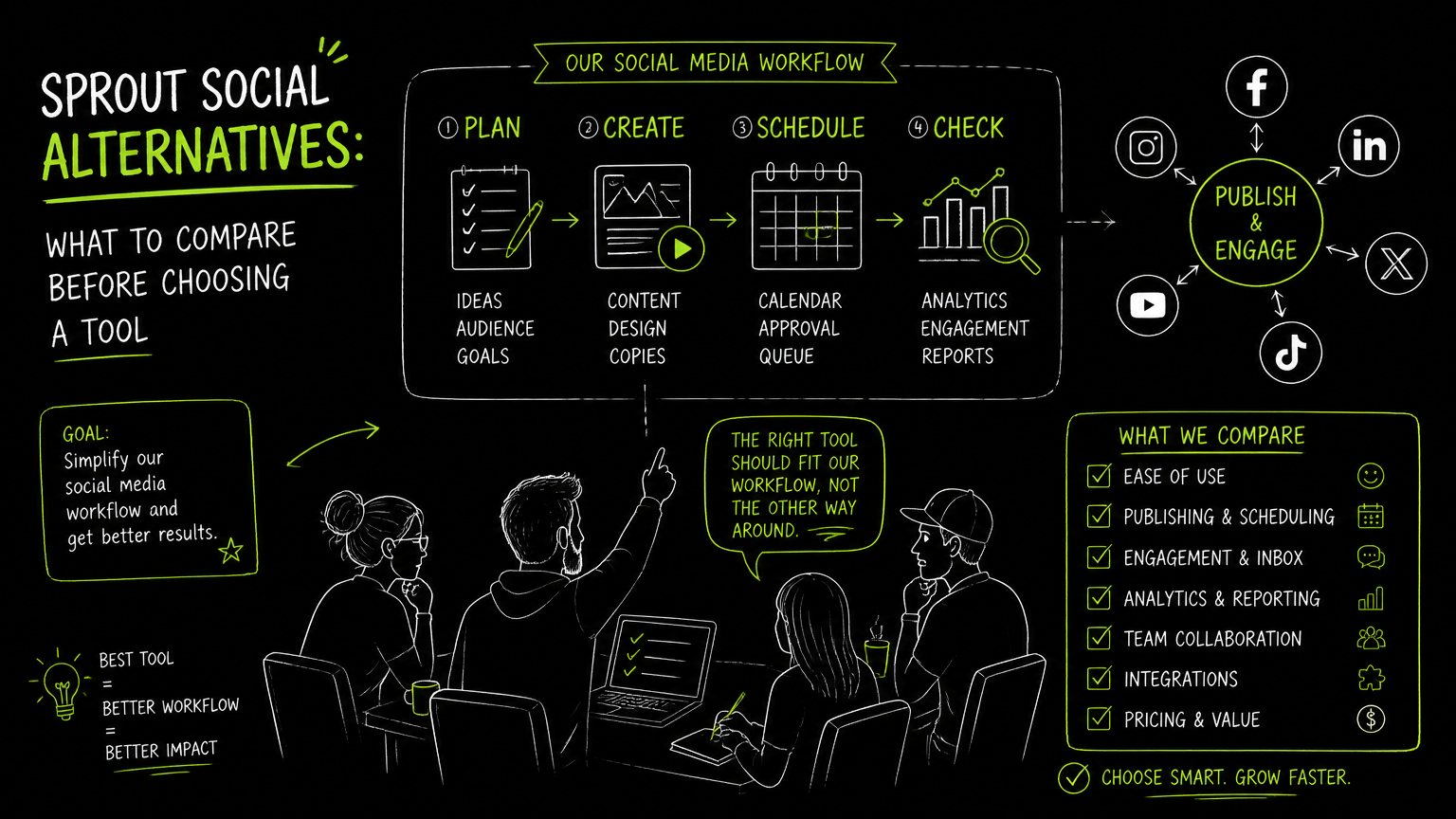
You open Monday’s content calendar and see the same problem in three places: approvals are happening in chat, video files are sitting in a drive folder, and the person posting to LinkedIn is not the same person checking TikTok. That is usually when teams start searching for sprout social alternatives—not because one tool is universally wrong, but because the workflow no longer matches the way the team ships content.
This guide gives you a practical comparison framework so you can shortlist tools by operating fit, not by feature-page noise.
Quick Answer
Quick answer: The best way to compare sprout social alternatives is to map your actual publishing workflow first: platforms, profile count, approval steps, content formats, scheduling volume, reporting needs, and budget. Then verify each tool’s limits, automation depth, API access, and collaboration model before committing to a trial or migration.
How Should You Compare Sprout Social Alternatives?
A useful comparison starts with the work your team repeats every week.
Before looking at product pages, write down the jobs that must happen without friction: planning posts, creating assets, scheduling content, publishing to each platform, getting approvals, and checking whether the team actually shipped what it planned.
| Need | What to check | Why it matters |
|---|---|---|
| Publishing coverage | Which platforms are supported: Instagram, TikTok, Facebook, YouTube, X/Twitter, Threads, LinkedIn, Pinterest, or others | A tool is only useful if it supports the channels your team actively maintains |
| Content formats | Photos, videos, reels, carousels, articles, short-form clips, or platform-specific post types | Format gaps create manual work at the worst point in the workflow |
| Scheduling workflow | Calendar view, queue, bulk scheduling, draft handling, and scheduled posting | The calendar becomes the team’s operating system, not just a visual nice-to-have |
| Profile limits | Number of social profiles included in each plan | Multi-brand, agency, and regional teams can outgrow low profile limits quickly |
| Upload limits | Monthly uploads, scheduled posts, file size limits, and media handling | Limits matter most during campaign weeks, launches, and seasonal content pushes |
| Collaboration | Who drafts, reviews, approves, and publishes | Approval friction often causes missed posts more than lack of features |
| Automation depth | Auto-publishing, bulk upload, reusable workflows, or API access where needed | Automation should remove repeat work without hiding accountability |
| API access | Whether the plan includes API access and which platforms have publish endpoints | Technical teams need to know if the tool can fit into internal systems |
| Pricing fit | Public plan limits, included profiles, and usage caps | A cheaper plan is not cheaper if the team must work around it every week |
| Migration effort | Existing content, connected profiles, user roles, and calendar rebuild | Switching tools has a cost even when the subscription is lower |
Decision rule: Do not compare tools by the longest feature list. Compare them by the fewest workflow exceptions your team will tolerate.
The most expensive social media tool is the one your team has to route around.
What Workflow Are You Actually Buying?
A social media management tool is not just a publishing dashboard; it is a shared workflow for turning ideas into live posts.
For a commercial team, the workflow usually looks like this:
- Plan campaign themes, launches, offers, and recurring content.
- Create captions, visuals, video clips, and platform-specific variants.
- Review brand, compliance, product, or client requirements.
- Schedule posts into a calendar or queue.
- Publish to active social platforms.
- Check execution so the team knows what went live and what still needs attention.
- Adjust the next batch based on internal priorities and practical performance review.
The key is to identify which step currently breaks.
If the calendar is clean but approvals are chaotic, a new scheduler alone will not solve the problem. If approvals are smooth but every TikTok, Instagram Reel, and LinkedIn post requires separate manual publishing, platform coverage and auto-publishing become more important.
Example: Before: a marketing manager writes one campaign caption in a doc, then three teammates rewrite it manually for Instagram, LinkedIn, and TikTok. After: the team plans the campaign in one calendar, prepares platform-specific versions, and schedules each post through the same workflow.
That before/after is more useful than asking whether a tool is “best.” The better question is: which recurring handoff should disappear?
Which Features Matter Most When Replacing a Social Media Tool?
The features that matter most are the ones that protect your publishing rhythm.
A small founder-led team may only need a reliable calendar, supported platforms, and scheduled posting. A multi-brand team may care more about profile limits, approvals, user permissions, and API access. An agency may need repeatable client workflows, more profiles, and predictable monthly capacity.
Platform support
Start with the platforms you actually publish to.
Common B2B and commercial workflows may include LinkedIn company pages, personal LinkedIn profiles, Instagram Business accounts, Facebook, YouTube, TikTok, X/Twitter, Threads, and Pinterest. The tool should match your active channel mix, not an aspirational channel list no one maintains.
Scheduling and calendar workflow
A calendar is useful when it answers three questions quickly:
- What is planned?
- What is approved?
- What is scheduled or published?
If the calendar cannot make those states obvious to your team, people will recreate the workflow in spreadsheets, chat threads, and project boards.
Content format handling
Format support matters because each platform has its own publishing reality.
For example, a team that posts LinkedIn articles, Instagram carousels, TikTok videos, and YouTube content needs more than plain text scheduling. Check whether the tool supports the content formats your team already uses, including video files and multi-image posts where relevant.
Automation depth
Automation should remove repeatable operational work.
Useful automation can include scheduled posting, bulk scheduling, auto-publishing, and API-based publishing workflows. But automation is not a substitute for clear ownership. Someone still needs to know what is going live and why.
API access
API access matters when social publishing needs to connect to another internal workflow.
For example, a technical team may want content to move from an internal content system into a publishing workflow. If that is part of your operating model, API availability should be checked early, not discovered after procurement.
Important: If API access is a requirement, verify whether it is included in the plan you are evaluating. Some tools separate API availability by plan, usage level, or product tier.
When Is a Cheaper Alternative Actually Cheaper?
A cheaper alternative is only cheaper when it preserves the workflow you need without adding manual labor.
Subscription price is easy to compare. Operational cost is harder. A lower monthly fee can still become expensive if the team loses hours every week resizing files, manually posting to one channel, checking approvals in chat, or rebuilding reports elsewhere.
Use this buying test:
| Cost area | Ask this before switching |
|---|---|
| Subscription | What is the monthly price at the profile count we need? |
| Profiles | How many profiles are included before we need a higher plan? |
| Scheduled posts | Will monthly scheduled post limits fit our normal publishing volume? |
| Uploads | Will monthly upload limits fit video-heavy or campaign-heavy months? |
| File size | Can the tool handle our largest normal media files? |
| API | Is API access available on the plan we would actually buy? |
| Team time | Which manual steps will remain after switching? |
| Risk | What breaks if one platform or approval step is not supported? |
The plan limit that matters most is the one your team hits during a busy week.
If you publish lightly, a leaner tool may be a practical fit. If your team manages many profiles, high content volume, or technical publishing workflows, the cheaper plan may not be the cheaper operating model.
A Practical Evaluation Process for Your Shortlist
A fair evaluation uses the same test campaign across every tool.
Pick one real campaign from the last month or the next month. Do not use a fake “hello world” post. Use a campaign with multiple platforms, at least one visual asset, and at least one approval or scheduling handoff.
Step 1: Map the current workflow
Document the current process in plain language:
- Who creates the caption?
- Where does the asset live?
- Who approves the post?
- Which platforms receive variants?
- Who schedules the post?
- Who checks that it went live?
This exposes the actual buying criteria.
Step 2: Build a channel matrix
Create a simple matrix with platforms across the top and content formats down the side.
For example:
| Format | TikTok | YouTube | X/Twitter | Threads | ||||
|---|---|---|---|---|---|---|---|---|
| Text post | Check | Check | Check | Check | Check | Check | Check | Check |
| Image | Check | Check | Check | Check | Check | Check | Check | Check |
| Video | Check | Check | Check | Check | Check | Check | Check | Check |
| Carousel/article/other | Verify | Verify | Verify | Verify | Verify | Verify | Verify | Verify |
Use “check” to mean “test in the product,” not “assume from the pricing page.”
Step 3: Run the same publishing test
For each shortlisted tool, try the same workflow:
- Connect the required profiles.
- Upload the same media.
- Create platform-specific versions.
- Schedule the posts.
- Review the calendar.
- Note every manual workaround.
The best tool is usually the one with the fewest awkward handoffs, not the one with the flashiest demo.
Step 4: Compare plan limits against real usage
Look at your last normal month and your busiest recent month.
If a plan includes a fixed number of uploads, scheduled posts, profiles, transcription minutes, or file-size limits, compare those limits against real work. This avoids buying for an average month and failing during a launch.
Tip: Test with your messiest normal post, not your cleanest one. A tool that handles the messy post will usually handle the easy ones.
Common Mistakes When Comparing Social Media Tools
Most bad software decisions come from testing features instead of testing handoffs.
Here are the mistakes worth avoiding.
Mistake 1: Comparing only monthly price
A lower subscription can hide manual posting, profile constraints, or file-size issues.
Fix: Compare price together with profile count, scheduled posts, upload limits, file size, and API access.
Mistake 2: Assuming every platform works the same way
Publishing to LinkedIn, TikTok, Instagram, YouTube, Facebook, X/Twitter, Threads, and Pinterest can involve different formats and account requirements.
Fix: Test the exact account types and formats you use, such as Instagram Business accounts, LinkedIn company pages, videos, reels, carousels, or articles where relevant.
Mistake 3: Letting the demo replace the trial
A demo often shows the cleanest version of the workflow.
Fix: Use a real campaign, real assets, and real reviewers. Track the number of times your team leaves the tool.
Mistake 4: Ignoring API access until late
API access is not a cosmetic feature if your content workflow depends on internal systems.
Fix: Ask early whether API access is available on the plan you are considering and whether publishing endpoints exist for your target platforms.
Mistake 5: Buying for the social manager only
The social manager may be the main user, but the workflow often includes designers, product marketers, founders, clients, compliance reviewers, or regional teams.
Fix: Include at least one reviewer and one content creator in the trial. Their friction becomes the social manager’s workload later.
Watch out: A tool can feel fast for one user and slow for a team. Collaboration friction usually appears after the first week of real use.
What Should You Verify Before Choosing?
You should verify limits, platform behavior, and ownership rules before signing off.
A shortlist can look strong on paper and still fail on one practical detail. Use this verification list before committing:
- Supported platforms: Confirm the social networks your team uses today.
- Account types: Check whether the tool supports the account types you need, such as business accounts, personal profiles, or company pages where applicable.
- Post formats: Test videos, images, carousels, articles, and other formats your team uses.
- Scheduling volume: Compare monthly scheduled post limits against your busiest realistic month.
- Upload volume: Compare monthly upload limits against campaign-heavy periods.
- File size: Test typical and large media files.
- Profile count: Count every brand, region, client, and platform profile.
- API access: Confirm whether it exists on your intended plan.
- Billing and trial terms: Read the trial and billing notes before adding the tool to an operational workflow.
- Migration work: Plan time to reconnect accounts, rebuild calendars, invite users, and recreate approval habits.
Verification is not distrust; it is workflow insurance.
When DOHOO May Fit
DOHOO may fit teams that want social media automation centered on creating, scheduling, and publishing content across multiple platforms from one dashboard.
DOHOO supports auto-posting across eight social networks: TikTok, Instagram, Facebook, YouTube, X/Twitter, Threads, LinkedIn, and Pinterest. Its product positioning is a social media automation platform for creating, scheduling, and publishing content across social platforms.
The platform includes calendar and posting workflows, with public product materials emphasizing scheduling.
DOHOO’s public plans list these limits:
| Plan | Monthly price | Included profiles | Uploads/month | Scheduled posts | AI transcription minutes | Max file size | API access |
|---|---|---|---|---|---|---|---|
| Blogger | $19.99/mo | 4 | 90 | 90 | 120 | 1 GB | No |
| Business | $39.99/mo | 15 | 250 | 250 | 300 | 2 GB | Yes |
| Agency | $79.99/mo | 30 | 550 | 550 | 600 | 4 GB | Yes |
DOHOO also has verified platform-specific support for TikTok bulk scheduling, auto-publishing, multiple TikTok accounts, and AI captions and hashtags. For Instagram, verified support includes photos, videos, reels, carousels, Instagram Business accounts, AI captions, hashtags, and bulk upload. For LinkedIn, verified support includes articles, images, videos, and posting to personal profiles and company pages.
API documentation includes publish endpoints for Facebook, Instagram, TikTok, YouTube, Twitter/X, LinkedIn, Pinterest, and Threads.
This makes DOHOO worth evaluating if your buying criteria prioritize multi-platform publishing, calendar-based scheduling, clear public plan limits, and API access on business or agency-level plans.
Key Takeaways
Choosing a social media management tool is a workflow decision, not just a software comparison.
- Start with your real publishing workflow before reading feature pages.
- Compare tools by platforms, formats, profiles, upload limits, scheduled posts, API access, and collaboration needs.
- A cheaper plan is only cheaper if it does not create manual work.
- Use one real campaign to test every shortlisted product.
- Verify platform support, account types, and plan limits before switching.
- Include the people who create, review, and schedule content in the trial.
- Keep the shortlist focused on tools that remove recurring handoffs, not tools that simply add more features.
FAQ
What are Sprout Social competitors?
Sprout Social competitors are social media management tools that help teams plan, schedule, publish, manage, or review social content. The right competitor depends on your platforms, publishing volume, approval process, reporting needs, and budget. Instead of starting with a brand list, start with the workflow your team needs to run every week.
How do I choose a cheaper alternative to Sprout Social?
Choose a cheaper alternative by comparing total operating fit, not only monthly price. Check included profiles, scheduled posts, upload limits, file-size limits, platform coverage, API access, and the manual steps your team would still need. If the cheaper tool creates more manual work, it may not be cheaper in practice.
What should agencies check before switching tools?
Agencies should check profile limits, client separation, approval workflows, scheduling capacity, supported platforms, media upload limits, and repeatable campaign processes. They should also test a real client campaign during the trial. The agency risk is not just missing a feature; it is creating exceptions across many clients.
Is API access important for social media management?
API access is important when publishing needs to connect with internal systems, content databases, or custom workflows. If your team only schedules posts manually, API access may be less critical. If technical publishing workflows are part of the plan, verify API access before choosing a tool.
What is the best way to trial a social media tool?
The best trial uses one real campaign with actual assets, platforms, reviewers, and scheduling requirements. Track every workaround, not just whether the post can be created. A practical trial should show whether the tool fits the way your team already works.
Final Takeaway
The best sprout social alternatives are the ones that match your actual publishing operation: the platforms you use, the formats you create, the people who approve work, and the limits you can live with.
If your shortlist includes a need for multi-platform scheduling, auto-publishing, clear public plan limits, and API access on higher plans, you can start a DOHOO trial and test it against one real campaign before deciding.