 DOHOO
DOHOO
Comparison
Instagram Post Scheduler: What to Compare Before Choosing a Tool
 Vitalii
12 min read
Vitalii
12 min read
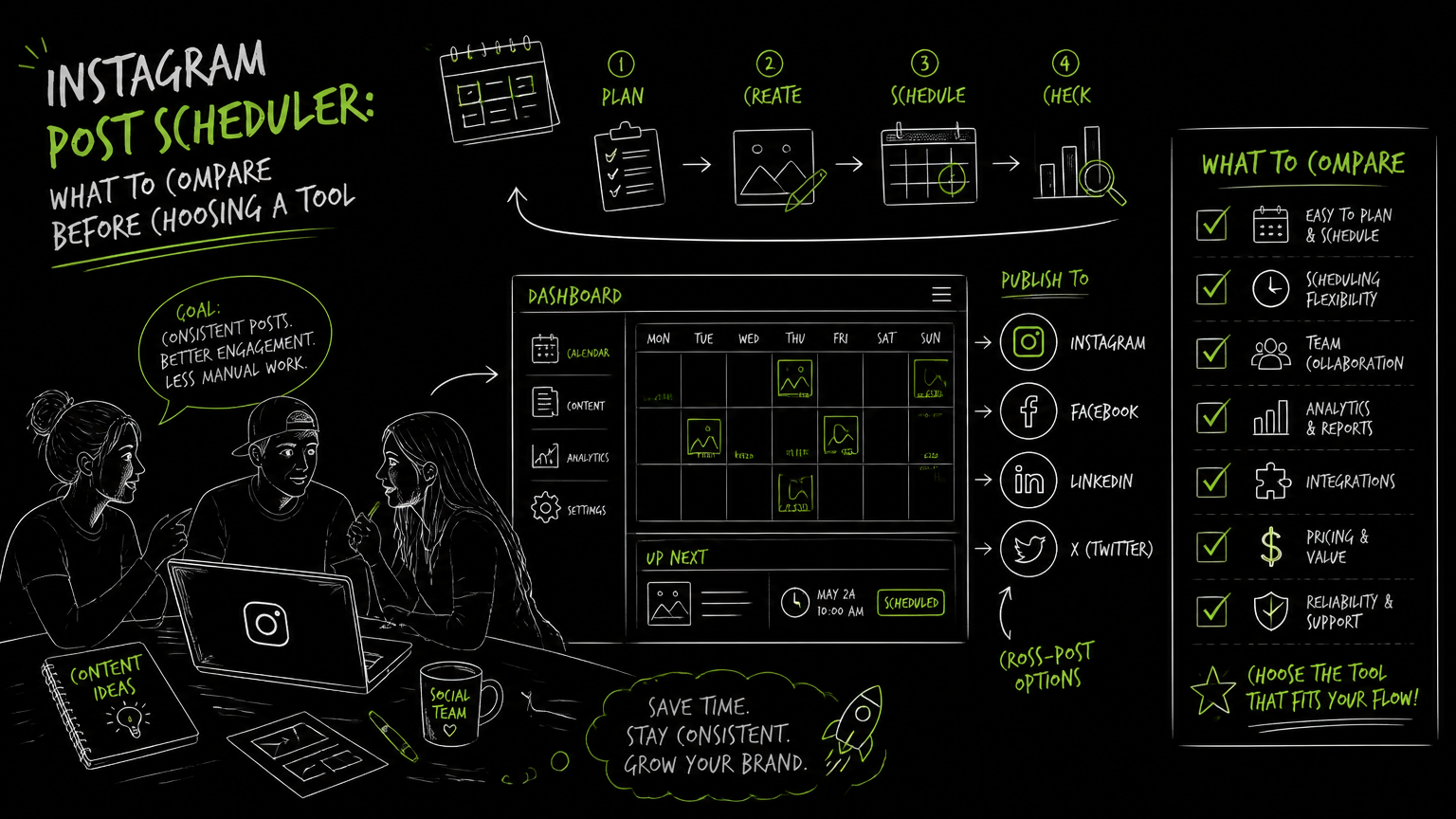
It is Thursday afternoon, the campaign goes live Monday, and the “final” Instagram assets are scattered across a shared drive, a spreadsheet, and three Slack threads. At that point, the question is not whether a tool can automate instagram posts. The real question is whether it can protect your workflow when posts, formats, approvals, and accounts start multiplying.
This guide gives you a practical comparison framework for choosing an Instagram post scheduler without overbuying or missing operational details.
Quick Answer
Quick answer: An Instagram post scheduler should help teams plan, review, schedule, and publish Instagram content with fewer manual handoffs. To automate instagram posts well, compare supported formats, account requirements, calendar workflow, approval needs, bulk upload options, platform coverage, limits, pricing, and whether the tool fits your team’s publishing process.
Start With the Comparison Checklist, Not the Feature Page
The best Instagram scheduler is the one that matches your publishing workflow, not the one with the longest feature list.
Use this table before booking demos or starting trials.
| Need | What to check | Why it matters |
|---|---|---|
| Instagram format coverage | Photos, videos, Reels, and carousels | A tool that handles only part of your content mix creates manual gaps. |
| Account compatibility | Whether your Instagram account type is supported | Some workflows depend on business account support, especially for team publishing. |
| Calendar planning | Visual calendar, scheduled posting flow, and draft organization | Teams need to see what is going out before it goes live. |
| Bulk preparation | Bulk upload or batch scheduling options | Useful when campaigns are built in batches rather than one post at a time. |
| Multi-platform publishing | Instagram plus channels such as Facebook, TikTok, YouTube, X/Twitter, Threads, LinkedIn, or Pinterest | If your team repurposes content, single-channel tools may add duplicate work. |
| Approval workflow | Who can review, edit, and approve before publishing | Prevents last-minute confusion between marketers, managers, and clients. |
| Limits | Scheduled posts, uploads, file size, profiles, users, or accounts | Limits decide whether a tool fits your actual volume. |
| API access | Whether developers can connect publishing into internal workflows | Important for larger teams, agencies, or content operations with existing systems. |
| Pricing fit | Plan limits compared with your monthly content calendar | A cheap plan can become expensive if it forces workarounds. |
Decision rule: If your team publishes more than one content format or manages more than one profile, compare workflow limits before comparing design polish.
A polished Instagram preview is useful, but it does not replace a reliable publishing process. For a B2B team, the operational questions usually matter more: who prepares the post, who checks the caption, who owns the calendar, and what happens when the same asset also needs to go to LinkedIn or YouTube.
What Features Matter When You Automate Instagram Posts?
The core feature set should match the way your team moves content from idea to published post.
For most commercial teams, an Instagram scheduling tool should cover five workflow stages:
- Content intake — assets, captions, hashtags, and campaign notes enter the system.
- Planning — the team places posts on a calendar.
- Review — stakeholders check creative, copy, timing, and format.
- Scheduling — approved posts are queued for publishing.
- Publishing follow-through — the team confirms what went live and handles any manual exceptions.
The mistake is treating “scheduler” as a single feature. In practice, it is a chain of handoffs.
A creator working alone may only need a simple Instagram planner app with a visual grid. A B2B marketing team usually needs a calendar, repeatable review steps, and a way to manage multiple profiles or platforms from the same place.
Important: A scheduler does not fix a messy content process. It exposes it. If captions, assets, and approvals are unclear before the tool, they will still be unclear inside the tool.
The most useful buying question is: where does the tool remove manual coordination, and where does it only move that coordination into a new interface?
Which Instagram Formats and Accounts Should You Verify?
Before choosing an Instagram scheduling app, verify support for the formats you actually publish.
For Instagram workflows, that usually means checking:
- Photos
- Videos
- Reels
- Carousels
- Instagram Business account support
- Caption and hashtag handling
- Bulk upload options, if your team prepares content in batches
This matters because teams often buy based on one ideal workflow, then discover that a key format still needs separate handling.
For example, a brand team might schedule static product posts smoothly but still manage Reels in a separate process. That creates two calendars: the official one and the real one. The real one usually wins, which means the tool becomes less trusted.
Format coverage is not a checkbox detail. It decides whether the scheduler becomes the team’s source of truth.
A practical evaluation step is to take last month’s Instagram calendar and mark each post by format. Then test whether the tool can support the actual mix, not the planned future mix.
How Should a Team Evaluate an Instagram Scheduler in Practice?
A scheduler evaluation should use real posts, real reviewers, and real constraints.
Do not evaluate with a fake “test post” unless your actual workflow is that simple. Use a small but representative batch.
Here is a practical five-step process:
1. Pick one real campaign week
Choose a week with a normal mix of Instagram content. Include at least one post that typically causes friction, such as a Reel, a carousel, or a post needing manager approval.
2. Map the current workflow
Write down where each item currently lives:
- Creative files
- Captions
- Hashtags
- Review comments
- Publishing dates
- Final approvals
- Cross-platform versions
This does not need to be pretty. A rough list is enough.
3. Rebuild the week inside the tool
Add the assets, captions, and scheduled dates. If the tool supports a calendar, use it as the central planning view.
Watch for small frictions: repeated uploads, unclear draft states, missing formats, confusing account selection, or no obvious way to see what is scheduled.
4. Run a review pass
Ask the people who normally approve posts to review inside the tool or alongside it.
If they still ask for a spreadsheet screenshot, the tool may not match your approval culture. That is not always a dealbreaker, but it is a cost.
5. Compare effort before and after
Use a simple before/after table.
| Workflow step | Before | After |
|---|---|---|
| Collecting assets | Files requested in chat | Assets added to scheduler |
| Confirming dates | Spreadsheet checked manually | Calendar used as reference |
| Reviewing captions | Comments split across channels | Review happens in one place or with fewer handoffs |
| Scheduling posts | Manual reminders | Posts queued in advance |
| Managing exceptions | Ad hoc follow-up | Exceptions visible earlier |
Example: Before: a campaign owner asks, “Is the carousel approved?” in Slack the night before launch. After: the carousel is visible on the calendar with the caption, asset, account, and scheduled date in one place.
The goal is not perfection. The goal is fewer brittle handoffs.
Is a Free Instagram Scheduler Enough?
A free Instagram scheduler can be enough for a solo operator or a very small team, but it is often a poor fit for multi-profile, multi-format, or approval-heavy workflows.
The trade-off is usually not “free versus paid.” It is simple workflow versus controlled workflow.
A free or lightweight tool may work well when:
- One person owns the account
- Posting volume is low
- Instagram is the only important channel
- Approval is informal
- Content formats are simple
- There is little need for API access or bulk handling
A more capable scheduler may be worth evaluating when:
- Multiple people touch each post
- The team manages several profiles
- Instagram content is reused across other platforms
- Reels, videos, and carousels are common
- Publishing volume is planned in batches
- Leadership or clients need visibility before content goes live
Small teams often overbuy because they want future-proofing. Larger teams often underbuy because a basic scheduler looks fine during a demo. The right answer is to compare tools against the next quarter’s real content calendar.
Tip: If the calendar view looks good but the limits are too low for your monthly posting volume, the tool will feel broken even when it works as designed.
What Limits Should You Check Before Choosing?
Tool limits shape the workflow more than most feature pages admit.
Before choosing an Instagram post planner, ask about:
- Number of scheduled posts
- Number of uploads
- Number of connected profiles
- Maximum file size
- Supported Instagram account types
- Supported content formats
- Bulk upload behavior
- API access
- Multi-platform publishing coverage
- Billing plan differences
Limits are not automatically bad. They help vendors package the product. The problem is discovering them after the team has already built a workflow around the tool.
Scheduled post limits matter for campaign-heavy teams. A team that schedules a full month in advance can hit plan limits faster than a team that posts more casually.
Profile limits matter when one marketing team manages regional brands, executives, business units, or client accounts.
File size limits matter when video is part of the workflow.
API access matters when scheduling needs to connect with internal systems, content operations, or custom workflows. If your team does not have a developer-owned use case, API access may be unnecessary. If you do, it can be a buying requirement rather than a bonus.
Common Mistakes When Comparing Instagram Scheduling Tools
Most bad scheduler decisions come from evaluating the interface instead of the operating model.
Here are the mistakes I would watch for.
Mistake 1: Testing only one perfect post
A single static image with a short caption will not reveal much.
Fix: Test a batch with multiple formats, including the content type your team finds most annoying to publish.
Mistake 2: Ignoring account and platform requirements
A tool can look right but still fail your actual account setup or publishing mix.
Fix: Verify Instagram account support, format support, and whether the same tool covers the other platforms your team uses.
Mistake 3: Treating AI copy features as the decision-maker
AI captions and hashtags can be useful when supported, but they should not outrank publishing reliability, format coverage, and workflow fit.
Fix: Put AI assistance below scheduling, approvals, account support, and limits in your scoring model.
Mistake 4: Forgetting the approval path
Many teams schedule posts only after approvals happen somewhere else.
Fix: Decide whether approvals must happen inside the tool or whether the tool only needs to reflect approved content clearly.
Mistake 5: Choosing based on today’s smallest use case
A tool may fit one Instagram profile but not a team managing several channels.
Fix: Evaluate against the next realistic workload, not the easiest current workload.
Watch out: If your team needs both Instagram scheduling and multi-platform publishing, a single-channel planner may create duplicate work even if it is pleasant to use.
How to Score Instagram Scheduling Tools Side by Side
A simple scoring model makes comparison less emotional and more operational.
Use a 1–3 score for each criterion:
- 1 = weak fit or unknown
- 2 = acceptable with some workarounds
- 3 = strong fit for the workflow
| Criterion | Score | Notes |
|---|---|---|
| Supports required Instagram formats | ||
| Supports required account type | ||
| Calendar is usable for the team | ||
| Handles batch preparation | ||
| Fits monthly scheduled post volume | ||
| Fits upload and file size needs | ||
| Supports required profiles | ||
| Covers other required platforms | ||
| Approval workflow is practical | ||
| API access is available if needed | ||
| Pricing matches expected usage |
The scoring conversation is often more valuable than the final number.
If a social media manager gives a tool a 3 for usability but operations gives it a 1 for limits, that is a real buying discussion. If an agency lead gives a tool a 3 for multi-profile handling but the content team gives it a 1 for review clarity, that exposes the actual trade-off.
The best scheduler is the one your team will trust during a busy launch week.
When DOHOO May Fit
DOHOO may fit teams that want Instagram scheduling as part of a broader social media automation platform rather than a standalone Instagram-only planner.
DOHOO is positioned as a Social Media Automation Platform for creating, scheduling, and publishing content across social platforms from one dashboard. Its verified platform coverage includes TikTok, Instagram, Facebook, YouTube, X/Twitter, Threads, LinkedIn, and Pinterest.
For Instagram specifically, DOHOO supports photos, videos, Reels, carousels, Instagram Business accounts, AI captions, hashtags, and bulk upload. Its product also includes calendar and posting functionality, with an emphasis on scheduling.
DOHOO’s public plans list these verified limits:
| Plan | Monthly price | Uploads / month | Included profiles | Scheduled posts | AI transcription minutes | Max file size | API access |
|---|---|---|---|---|---|---|---|
| Blogger | $19.99/mo | 90 | 4 | 90 | 120 | 1 GB | No |
| Business | $39.99/mo | 250 | 15 | 250 | 300 | 2 GB | Yes |
| Agency | $79.99/mo | 550 | 30 | 550 | 600 | 4 GB | Yes |
This makes DOHOO most relevant to buyers comparing Instagram scheduling against multi-platform publishing needs, profile limits, scheduled post volume, and API access.
It may be less relevant if you only need a lightweight visual Instagram preview app for one account and do not need broader platform coverage.
Key Takeaways
- An Instagram post scheduler should be evaluated against your real workflow, not a generic feature list.
- Verify Instagram format support for photos, videos, Reels, and carousels before choosing.
- Account type, profile limits, upload limits, scheduled post limits, and file size limits can change the buying decision.
- Free or lightweight schedulers can work for simple solo workflows, but team publishing usually needs stronger planning and review structure.
- Multi-platform publishing matters when Instagram content also needs to appear on Facebook, TikTok, YouTube, X/Twitter, Threads, LinkedIn, or Pinterest.
- API access is only important if your team has a real technical workflow that needs it.
- The most reliable evaluation is to rebuild one real campaign week inside each shortlisted tool.
FAQ
What is an Instagram post scheduler?
An Instagram post scheduler is a tool that helps plan and schedule Instagram content before it goes live. In a team workflow, it usually supports a calendar, draft preparation, content review, and scheduled publishing steps.
Can I automate Instagram posts for Reels and carousels?
Some tools support multiple Instagram formats, but you should verify the exact formats before buying. If your content mix includes Reels, videos, photos, and carousels, test each one during evaluation.
What is the difference between an Instagram planner and an Instagram scheduler?
An Instagram planner usually focuses on organizing the visual layout, content ideas, or upcoming posts. An Instagram scheduler goes further by helping queue posts for publishing at planned times. Some tools combine both functions.
Should agencies choose a multi-platform social media posting tool?
Agencies should consider a multi-platform tool when they manage several profiles, clients, or channels from one workflow. If Instagram is only one part of delivery, multi-platform publishing can reduce duplicate scheduling work.
Do I need API access for Instagram scheduling?
You need API access only if developers must connect publishing to internal systems or custom workflows. For many marketing teams, calendar scheduling, bulk upload, profile limits, and approval flow matter more than API access.
Final Takeaway
To automate instagram posts reliably, compare tools by workflow fit: formats, account support, calendar usability, limits, approvals, platform coverage, and pricing. If your shortlist includes multi-platform scheduling, test DOHOO with a real campaign week and compare its plan limits against your actual posting volume.