 DOHOO
DOHOO
Comparison
Alternatives To Specific Tools: What to Compare Before Choosing a Tool
 Vitalii
14 min read
Vitalii
14 min read
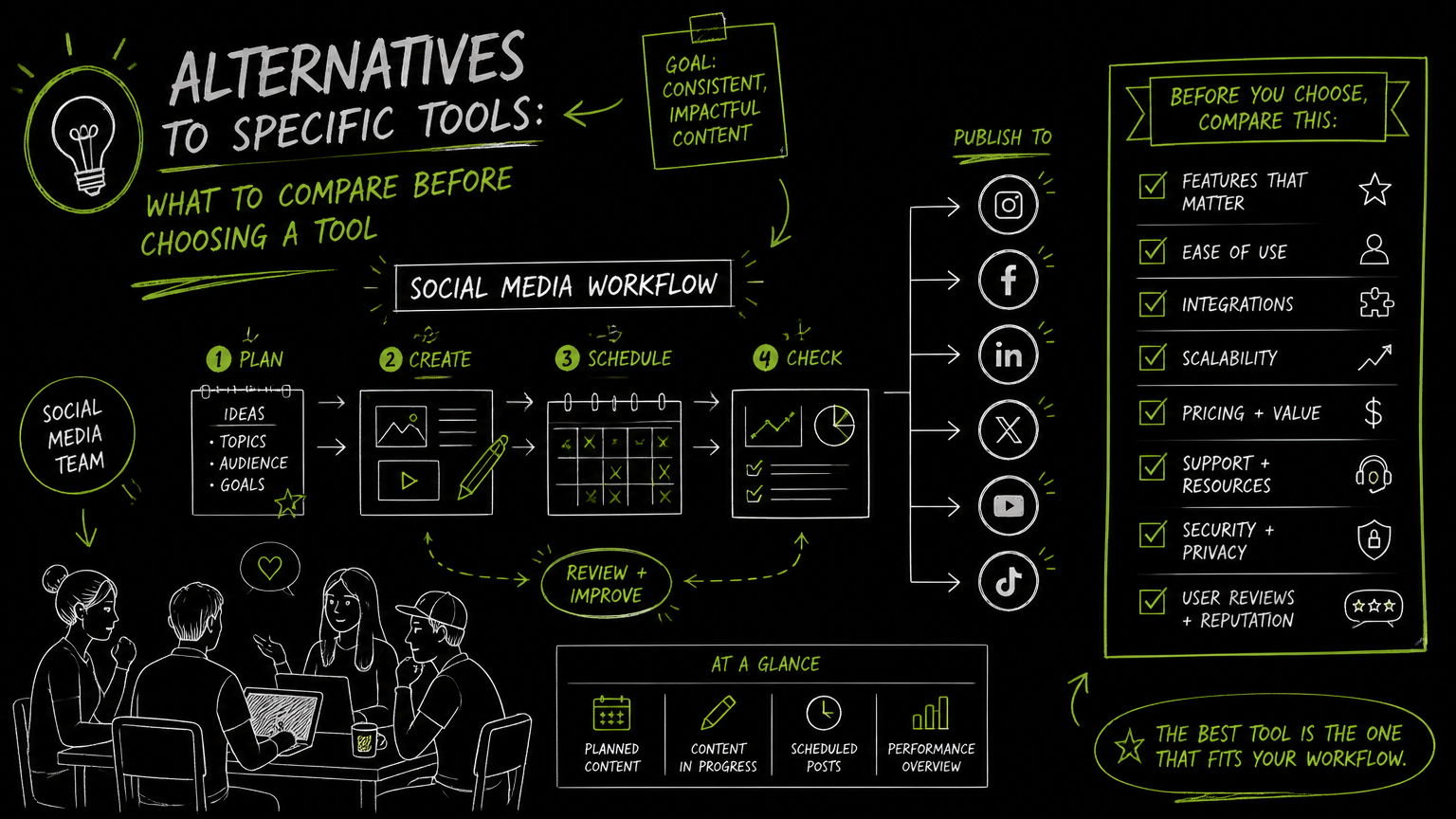
Your team has a product launch in two weeks, three creators waiting on briefs, and a manager asking whether you should use a marketplace, a creator platform, or your existing social media tool to handle the next ugc content creation request. The right answer is not “pick the most popular platform.” It is to match the tool to the workflow: sourcing, briefing, approvals, publishing, and reuse.
This guide gives you a practical comparison framework so you can choose a tool without overbuying or creating another disconnected content queue.
Quick Answer
Quick answer: A ugc content creation request should be evaluated by workflow fit: creator sourcing, brief management, asset review, usage rights, publishing needs, and team handoff. Compare UGC platforms, creator marketplaces, and social scheduling tools by where the work actually breaks down, not by feature lists alone.
Compare UGC Tool Alternatives With This Buying Checklist
The best UGC tool is the one that removes the most friction from your current content handoff.
Use this checklist before you compare tools such as Billo, Collabstr, Influee, Insense, JoinBrands, Trend.io, Cohley, creator websites, agencies, or social publishing platforms. The point is not to rank them universally. The point is to decide what job you need done.
| Need | What to check | Why it matters |
|---|---|---|
| Creator sourcing | Does the tool help you find creators, or only manage assets after you already have them? | A creator marketplace and a scheduling platform solve different problems. |
| Brief creation | Can your team standardize product details, talking points, format requirements, and deadlines? | Weak briefs create revision loops and inconsistent deliverables. |
| Request intake | Can marketers, ecommerce teams, or social managers submit requests in a repeatable way? | Ad hoc Slack messages make campaign tracking messy. |
| Content review | How are drafts, revisions, and approvals handled? | UGC work often stalls between “creator submitted” and “approved to publish.” |
| Usage rights | Where are content rights, permissions, and usage terms recorded? | Publishing or repurposing creator content without clear rights creates avoidable risk. |
| Platform fit | Which social platforms and formats are part of your actual workflow? | TikTok videos, Instagram Reels, YouTube Shorts-style assets, LinkedIn videos, and Pinterest posts may need different handling. |
| Publishing workflow | Does the tool publish content, export assets, or stop at delivery? | Delivery-only tools still require another system for scheduling and posting. |
| Multi-account needs | Can the tool support the number of brands, profiles, or client accounts you manage? | Agency and multi-brand teams outgrow single-profile workflows quickly. |
| API access | Is API access available if your team needs automation or internal systems? | API availability matters when UGC requests must connect to broader content operations. |
| Pricing fit | Are limits based on creators, assets, uploads, profiles, seats, or posts? | A cheap plan can become expensive if its limit is tied to your busiest workflow step. |
Decision rule: If your biggest pain is finding creators, compare UGC creator platforms first. If your biggest pain is publishing approved content across social channels, compare social scheduling and automation tools first.
What Is a UGC Content Creation Request?
A ugc content creation request is a structured ask for user-generated content, usually sent by a brand to a creator, customer, influencer, or internal team member.
In practice, the request should answer five questions:
What content is needed? Example: product demo video, unboxing clip, testimonial-style short video, product photo, or social post.
Who is creating it? Example: external UGC creator, customer, influencer, employee advocate, or agency partner.
Where will it be used? Example: TikTok, Instagram, Facebook, YouTube, X/Twitter, Threads, LinkedIn, Pinterest, paid ads, product pages, or email.
What are the requirements? Example: format, length, product claims to avoid, visual direction, deadline, captions, hashtags, and approval steps.
What permissions are attached? Example: organic social use, paid usage, whitelisting, editing rights, duration, or territory.
The most important part of a UGC request is not the form itself; it is the handoff from request to approved asset to scheduled post.
Important: A vague UGC request is not faster. It usually pushes the missing decisions into revisions, approvals, and last-minute publishing.
Which Type of Tool Should You Compare First?
Start with the workflow stage where your team loses the most time.
Most teams do not need “the best UGC platform” in the abstract. They need the right category of tool for their bottleneck.
1. UGC creator platforms
A UGC creator platform helps brands connect with creators or manage creator-generated content workflows.
This category is worth prioritizing when your team needs a repeatable way to source creators, send briefs, receive assets, and manage campaign-specific content. Examples named in the market include Billo, Collabstr, Influee, Insense, JoinBrands, Trend.io, and Cohley.
Use this route when:
- You do not already have a creator network.
- You need multiple creators for product videos or social assets.
- The creative brief and asset delivery process is the main pain.
- You want creator discovery and content production closer together.
2. UGC agency or managed service
A UGC agency or managed service may handle parts of creator sourcing, briefing, production coordination, and delivery for you.
This route can be useful when internal capacity is limited or when a team wants support instead of another software process to manage. The trade-off is usually less direct control over every workflow detail.
Use this route when:
- Your team does not have time to manage creators directly.
- You need help shaping the brief.
- You want a partner-led process rather than a self-serve tool.
- You are comfortable reviewing outputs instead of operating the whole workflow.
3. Content collection or UGC website tools
Some user-generated content platforms focus more on collecting, organizing, displaying, or repurposing content created by users or customers.
This can matter for ecommerce, community, and brand teams that already have customers posting content but need a better way to request, approve, and reuse it.
Use this route when:
- Your audience already creates usable content.
- You need permission workflows.
- You care about organizing submitted assets.
- Creator discovery is less important than content management.
4. Social media scheduling and publishing tools
A social media scheduling tool helps teams plan, schedule, and publish posts across social platforms.
This category is often overlooked in UGC buying decisions. But if creators already send content through email, Drive, Slack, or a creator platform, your bigger issue may be getting approved assets into a publishing calendar without losing context.
Use this route when:
- You already have creators or customer content.
- Your approval process happens outside the UGC platform.
- Your team manages several social profiles.
- Publishing across multiple networks is the bottleneck.
Quick takeaway: Do not buy a creator marketplace to fix a publishing bottleneck, and do not buy a scheduler to replace creator sourcing.
How Should a Brand Evaluate UGC Platforms Before Buying?
Evaluate UGC platforms by running one realistic campaign through the buying process on paper.
A demo can make any tool look clean. A real workflow exposes the awkward parts: missing permissions, unclear owners, asset exports, duplicate approvals, and publishing handoffs.
Use this evaluation process.
Step 1: Map the current request path
Write down how a request moves today.
Example:
- Product marketer asks for three short product videos.
- Social media manager writes the brief.
- Creator gets the brief by email.
- Draft video arrives in a shared folder.
- Brand manager comments in a document.
- Approved file is renamed manually.
- Social team uploads the asset to a scheduler.
- Caption is rewritten before publishing.
This map shows where software can help and where process is the real problem.
Step 2: Separate creation from distribution
Creation and distribution are different jobs.
Creation includes sourcing, briefing, producing, revising, and approving creator assets. Distribution includes planning, scheduling, publishing, and reusing those assets across social channels.
A tool that is excellent at creator sourcing may not be the best publishing calendar. A publishing tool may not manage creator relationships. That is not a flaw; it is a category difference.
Step 3: Test one complete content object
Pick one asset type and follow it from request to publication.
For example:
- Request: product demo video
- Creator: external UGC creator
- Destination: TikTok, Instagram Reels, YouTube, and Pinterest
- Required metadata: caption, hashtags, posting date, campaign name
- Approval: marketing lead and product owner
- Reuse: future organic social post
If the tool cannot support the full path, decide whether the gap is acceptable or whether another tool must cover it.
Step 4: Check the handoff points
Most UGC operations fail at handoffs, not at content creation.
Look closely at these moments:
- Brief approved → creator assigned
- Creator submitted → internal review started
- Draft revised → final asset approved
- Final asset approved → added to calendar
- Post published → content archived for reuse
Handoff clarity is often more valuable than a long list of isolated features.
Step 5: Compare limits against your actual volume
Pricing pages often use different limits: uploads, profiles, posts, users, campaigns, creators, or usage tiers.
Do not compare monthly prices until you know which limit you will hit first. A small team with many social profiles has different needs from a large brand running only one campaign at a time.
Example: If your team receives 40 creator videos in a month but only publishes 12, upload limits may matter more than scheduled post limits. If you publish the same approved assets across many profiles, profile and scheduling limits may matter more.
What Features Matter Most for a UGC Request Workflow?
The most useful features are the ones that preserve context from the original request to the final published post.
Here is what to inspect carefully.
Brief templates
A brief template should capture product details, content goal, format, platform, deadline, do-not-say language, and approval owner.
The goal is not to make every creator sound the same. The goal is to prevent missing requirements.
Asset organization
UGC assets become hard to manage when file names, versions, captions, rights, and approvals live in different places.
Check whether your team can quickly answer:
- Which version is approved?
- Which campaign does this asset belong to?
- Where can it be published?
- Who approved it?
- Has it already been used?
Approval workflow
A good approval workflow makes ownership visible.
At minimum, your team should know who needs to review an asset, what feedback has been given, and when the asset is approved for use. If the tool does not handle this directly, decide where approvals will live.
Platform and format support
UGC often starts as one asset but ends up in many destinations.
Before choosing a platform, list your required channels. Common social destinations include TikTok, Instagram, Facebook, YouTube, X/Twitter, Threads, LinkedIn, and Pinterest. Also list formats such as videos, photos, Reels, carousels, articles, and image posts where relevant.
Publishing and scheduling
Some UGC platforms stop at asset delivery. That can be fine if you already have a strong publishing workflow.
If your team needs to schedule posts, manage a calendar, or publish across profiles, treat publishing as a separate requirement rather than assuming every UGC platform covers it.
API access
An API, or application programming interface, lets software systems exchange data or trigger actions programmatically.
API access matters if UGC requests need to connect with internal tools, campaign systems, asset libraries, or custom workflows. If API access is required, confirm it before choosing a plan.
Common Mistakes When Comparing UGC Creator Platforms
The easiest way to choose the wrong tool is to compare feature pages before agreeing on the operating model.
Here are the mistakes I see most often, with practical fixes.
| Mistake | Why it causes problems | Better approach |
|---|---|---|
| Comparing tools before defining the workflow | Every tool looks useful when the process is vague. | Document one campaign from request to publication first. |
| Treating creator sourcing and publishing as one problem | They may require different systems. | Decide whether the bottleneck is finding creators or shipping approved content. |
| Ignoring usage rights | Content may be approved creatively but not cleared for every use. | Add rights and permissions to the request checklist. |
| Buying for future complexity too early | Small teams may pay for workflow depth they will not use yet. | Choose for the next two campaign cycles, not an imagined enterprise process. |
| Forgetting multi-profile publishing | A content asset may need to go to several brand or client profiles. | Check profile limits, supported platforms, and scheduled post limits. |
| Assuming AI means strategy | AI features vary widely and may only support narrow tasks. | Verify the exact AI function, such as captions, hashtags, or transcription, instead of assuming broader optimization. |
| Overlooking file size and upload limits | Video-heavy workflows can hit operational limits quickly. | Check asset size and monthly upload allowances before committing. |
Watch out: “Best UGC content creator platform” is not a single answer. The best option for a creator sourcing team may be the wrong option for a social publishing team.
What Should You Verify Before Choosing an Alternative?
Verify the boring operational details before you judge the interface.
A polished UI will not save a workflow if the limits, permissions, or supported platforms do not match your team’s real work.
Verify supported platforms
Confirm whether the tool supports the platforms you actually use, such as TikTok, Instagram, Facebook, YouTube, X/Twitter, Threads, LinkedIn, and Pinterest.
Do not assume support for one part of a platform means support for every format. For example, photos, videos, Reels, carousels, articles, personal profiles, and company pages may be treated differently depending on the tool.
Verify account and profile limits
Multi-brand teams, agencies, franchises, and regional marketing teams should check profile limits early.
A tool that works for one brand profile may not work for 15 client profiles or several regional accounts.
Verify asset limits
For UGC-heavy workflows, check:
- Monthly upload limits
- Maximum file size
- Video handling
- Storage or asset library behavior, if relevant
- Export or download process
Verify approval and rights tracking
If your team will use UGC for organic social, paid media, ecommerce pages, or creator reposts, rights tracking must be explicit.
If the platform does not manage permissions, decide where that record will live before content starts moving.
Verify billing and plan differences
Look beyond the starting price.
A plan can differ by uploads, scheduled posts, profiles, transcription minutes, API access, or file size. The right plan is the one whose limits match your busiest month, not your average week.
Verify what AI actually does
AI is not one feature.
If a vendor mentions AI, ask what it does in the workflow. Does it support captions, hashtags, transcription, content generation, review, tagging, or something else? Only count the capabilities the vendor clearly provides.
Verify the exact AI function before treating it as a buying criterion.
When DOHOO May Fit
DOHOO may fit when your UGC workflow already has content coming in and the main problem is planning, scheduling, and publishing across social platforms.
DOHOO is a social media automation platform for creating, scheduling, and publishing content across social platforms from one dashboard. It supports auto-posting across 8 social networks: TikTok, Instagram, Facebook, YouTube, X/Twitter, Threads, LinkedIn, and Pinterest.
This makes it more relevant as a publishing and scheduling layer than as a dedicated creator marketplace. If your team needs to discover UGC creators, compare creator platforms first. If your team already has approved assets and needs a calendar, scheduled posting, multi-platform publishing, or API access on eligible plans, DOHOO is worth comparing.
Verified public plan details include:
| Plan | Monthly price | Uploads / month | Included profiles | Scheduled posts | AI transcription minutes | Max file size | API access |
|---|---|---|---|---|---|---|---|
| Blogger | $19.99/mo | 90 | 4 | 90 | 120 | 1 GB | No |
| Business | $39.99/mo | 250 | 15 | 250 | 300 | 2 GB | Yes |
| Agency | $79.99/mo | 550 | 30 | 550 | 600 | 4 GB | Yes |
DOHOO also has verified platform-specific support including TikTok bulk scheduling and auto-publishing, Instagram photos, videos, Reels and carousels for Instagram Business accounts, LinkedIn articles, images and videos for personal profiles and company pages, and publish endpoints documented for Facebook, Instagram, TikTok, YouTube, Twitter/X, LinkedIn, Pinterest, and Threads.
Tip: If creator sourcing is your missing piece, start with UGC creator platforms. If approved assets are piling up before publication, evaluate scheduling and publishing tools alongside them.
Key Takeaways
A UGC tool comparison should start with the workflow bottleneck, not the software category.
- A UGC creator platform is usually best when you need to source creators and manage content production.
- A managed agency model can help when your team lacks time to coordinate creators directly.
- A social scheduling tool can be the better fit when assets are already approved but publishing is inconsistent.
- Usage rights, approval ownership, platform support, upload limits, profile limits, and API access should be checked before price.
- The most valuable comparison exercise is following one real asset from request to final publication.
- Creation and distribution are separate workflow stages, even when a campaign manager owns both.
- Do not assume AI, analytics, recommendations, or optimization features unless the vendor clearly documents those capabilities.
FAQ
What is the best alternative to a UGC creator platform?
The best alternative depends on the missing workflow. If you already have creators, a social media scheduling platform or asset management workflow may be more useful than another creator marketplace. If you do not have creators, compare UGC creator platforms or managed UGC services first.
How do I ask creators for UGC without creating confusion?
Use a structured request that includes the content format, product details, intended platforms, deadline, review process, and usage rights. The request should also say what not to include, especially around product claims or brand-sensitive language. A clear brief reduces revisions more than a longer brief.
Should UGC platforms and social media tools be separate?
They often can be separate because they solve different problems. UGC platforms usually focus on creator sourcing, briefing, content delivery, or rights workflows, while social media tools focus on calendars, scheduling, and publishing. The handoff between them is the part to design carefully.
What should agencies check before choosing a UGC tool?
Agencies should check multi-profile support, approval visibility, asset limits, publishing workflow, and whether the plan fits multiple client accounts. They should also confirm whether API access is available if internal systems or repeatable client workflows require automation.
Is AI important in UGC content workflows?
AI can be useful when the specific function matches the task, such as captions, hashtags, or transcription where supported. It should not replace workflow checks around creator briefs, approvals, rights, platform support, and publishing limits. Treat AI as a supporting feature, not the buying decision by itself.
Final Takeaway
Choosing an alternative for a ugc content creation request is really a workflow decision: decide whether you need creator sourcing, request management, approvals, rights tracking, scheduling, publishing, or API-enabled automation.
If your team already has UGC assets and needs to schedule and publish them across multiple social platforms, compare DOHOO’s plans against your required profiles, uploads, scheduled posts, file sizes, and API needs.