 DOHOO
DOHOO
Comparison
Social Media Web: What to Compare Before Choosing a Tool
 Vitalii
11 min read
Vitalii
11 min read
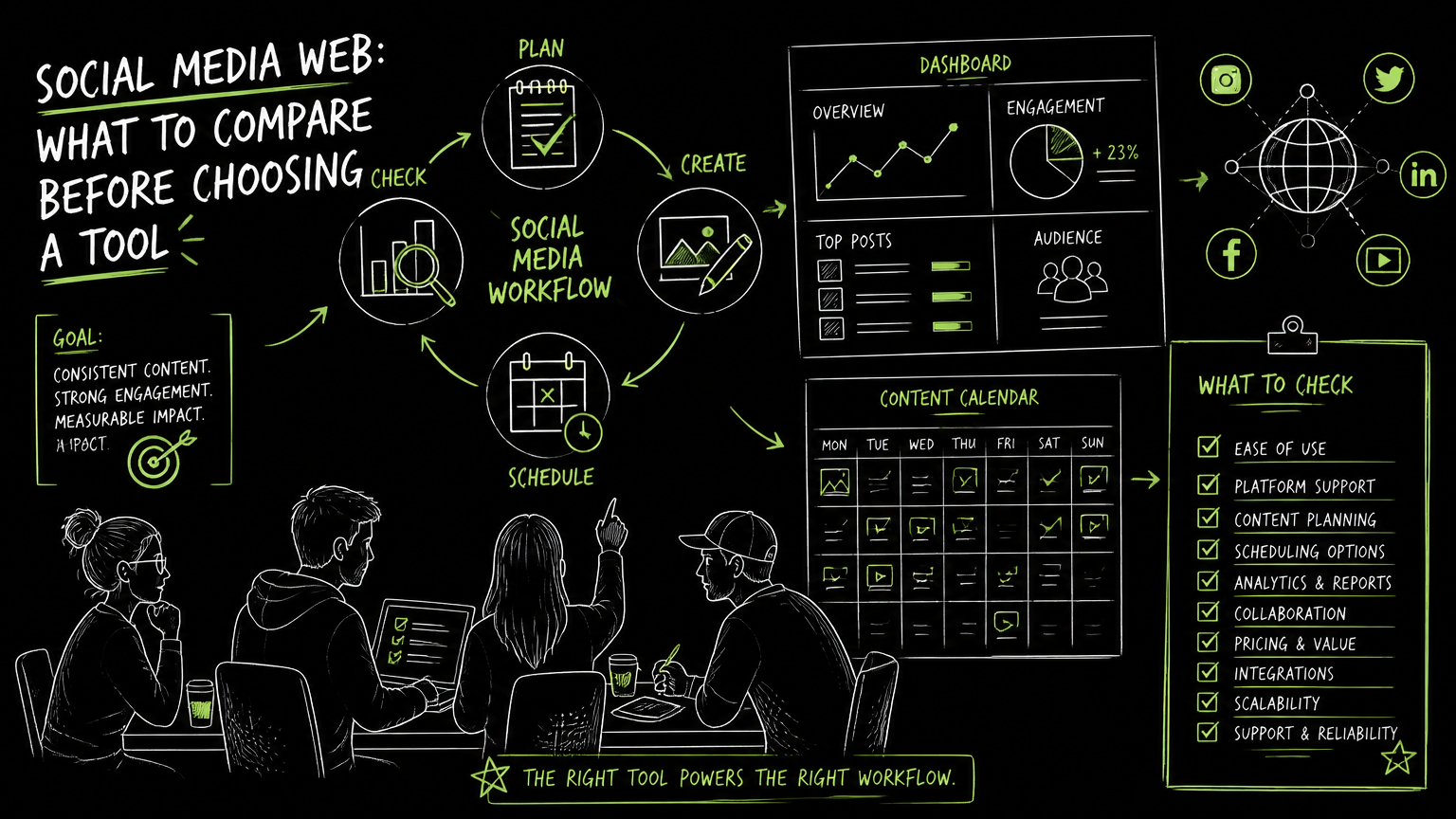
Your team has a product launch next month, three regional LinkedIn pages, a TikTok backlog, and someone asking whether the newest sites of social networking should be added to the calendar. The right answer is not “use every platform” or “buy the biggest dashboard.” It is to compare audience fit, publishing workflow, account limits, content formats, automation depth, API access, and pricing before committing.
This guide gives you a practical comparison framework you can use before choosing a social media web tool.
Quick Answer
Quick answer: To compare sites of social networking for business use, start with audience fit, supported publishing formats, scheduling workflow, account limits, collaboration needs, API access, and pricing thresholds. The best tool is not the newest network or largest dashboard; it is the one that removes recurring publishing friction without hiding operational constraints.
Start With the Buying Checklist, Not the Platform List
A useful comparison starts with the work your team repeats every week.
Before comparing social networking software, write down what actually happens in your workflow: who creates posts, who approves them, which channels matter, what formats are published, and how often you need scheduled posting.
| Need | What to check | Why it matters |
|---|---|---|
| Audience reach | Which social platforms matter for your business audience | A tool that supports unused platforms adds complexity without improving the workflow. |
| Multi-platform publishing | Whether the tool can publish to the networks your team uses | Manual reposting across TikTok, Instagram, Facebook, YouTube, X/Twitter, Threads, LinkedIn, and Pinterest can become a recurring bottleneck. |
| Format support | Whether posts, videos, images, reels, carousels, articles, and other formats are supported where needed | A tool may support a platform but not the specific format your campaign depends on. |
| Scheduling | Whether calendar planning and scheduled posting are built into the workflow | A calendar helps teams see gaps, launch dates, and duplicated messages before they go live. |
| Account coverage | How many profiles, pages, or accounts are included | Agencies and multi-brand teams often hit account limits before they hit feature limits. |
| Automation depth | What can be automated versus what still needs manual review | Automation is useful when it removes repetitive steps, but risky if it hides platform-specific checks. |
| API access | Whether developers can connect publishing workflows programmatically | API access matters when social publishing is tied to internal tools, content systems, or custom approval flows. |
| Pricing fit | Which limits change by plan, such as uploads, profiles, scheduled posts, file size, or API access | A low entry price can become a mismatch if the plan limit blocks normal campaign volume. |
| Governance | How approvals, roles, or review steps work | A solo creator can move fast; a B2B team usually needs a process that prevents accidental publishing. |
Decision rule: Choose the tool that fits your repeatable workflow, not the one with the longest platform logo strip.
The most expensive mistake is buying for a hypothetical future channel while ignoring the channel your team posts to every day.
What Kind of Social Media Web Problem Are You Solving?
A social media web tool should be evaluated by the operational problem it removes.
Most B2B teams are not simply “doing social.” They are managing one of a few recognizable problems:
- A content operations problem, where posts are ready but scattered across documents, folders, and chat threads.
- A multi-account problem, where one team handles multiple brands, regions, executives, or client profiles.
- A format problem, where short videos, images, carousels, and articles all require different preparation steps.
- A timing problem, where campaigns need scheduled posting around launches, events, webinars, or product updates.
- A governance problem, where publishing without review creates brand, legal, or customer communication risk.
- A developer workflow problem, where social posting needs to connect with internal systems through an API, meaning an application programming interface.
If your main issue is content planning, prioritize calendar clarity. If your main issue is volume, prioritize account and scheduled post limits. If your main issue is system integration, prioritize API availability before design polish.
Workflow fit beats feature breadth when the team is already stretched.
How Should You Compare Sites of Social Networking for B2B Use?
Compare social platforms by business purpose before comparing tools that publish to them.
A social network website may be broad, like Facebook, professional, like LinkedIn, video-led, like YouTube or TikTok, visual, like Instagram or Pinterest, conversation-led, like X/Twitter or Threads, or community-driven, depending on how people gather and interact there.
For a B2B team, the practical question is not “which social network is newest?” It is:
- Does the audience expect to hear from a business here?
- Can we create the right format consistently?
- Will this channel need unique content or a repurposed version?
- Who owns replies, edits, and approvals?
- Can our chosen tool support the platform and format without workarounds?
A “Twitter type site,” a Facebook alternative, or a new social network may be interesting for research. That does not make it an immediate publishing priority.
Watch out: New social sites can create planning pressure because they feel like early opportunities. Treat them as experiments until you know who will create, approve, publish, and monitor the content.
A good comparison separates network selection from tool selection. First decide where your audience and content fit. Then decide which software can support that operating model.
A Practical Evaluation Workflow for Choosing a Tool
The best evaluation process uses real campaign material instead of a feature demo script.
Use this five-step workflow before buying social networking software or a social media automation platform.
1. Map Your Current Publishing Week
List every post type your team publishes in a normal week.
Include:
- LinkedIn company updates
- LinkedIn personal profile posts
- Instagram photos, videos, reels, or carousels
- TikTok videos
- YouTube videos
- Facebook posts
- Pinterest posts
- X/Twitter or Threads updates
Do not start with an ideal future state. Start with the work already happening.
2. Mark the Friction Points
Identify where work slows down.
Common friction points include:
- Finding the latest approved asset
- Rewriting copy for each platform
- Waiting for approval
- Uploading the same media repeatedly
- Checking whether a post is scheduled
- Managing several accounts in separate browser tabs
- Reconfirming platform-specific formats
This gives you your real buying criteria.
3. Test With One Real Campaign
Use a recent or upcoming campaign as your comparison sample.
For example:
Before: A product marketer writes one launch post in a document. The social manager rewrites it for LinkedIn, Instagram, and X/Twitter, then manually uploads media and tracks scheduled dates in a spreadsheet.
After: The team checks the campaign calendar, adapts the copy by platform, schedules posts, and reviews what is queued before launch week.
The goal is not to make every step automated. The goal is to remove avoidable duplicate work while keeping the review points that protect quality.
Use one real campaign as the test case because generic demos hide daily annoyances.
4. Check Limits Against Normal Volume
Compare plan limits against your typical month, not your quietest week.
Look for limits around:
- Number of profiles or accounts
- Scheduled posts
- Uploads
- File size
- Video handling
- API access
- AI transcription minutes, if relevant to your workflow
A plan is only affordable if it supports your ordinary operating load.
5. Decide Who Owns the System
Assign ownership before rollout.
In many B2B teams, the tool touches multiple roles:
- Social media manager
- Content marketer
- Product marketer
- Founder or executive profile owner
- Agency account manager
- Designer or video editor
- Developer, if API access is required
Without ownership, even a strong tool becomes another place where drafts go stale.
Tip: Ask every evaluator to complete the same task: create, adapt, schedule, and review one campaign. Their notes will reveal workflow fit faster than a feature checklist.
Common Mistakes When Comparing Social Media Tools
Most failed tool choices come from comparing visible features while ignoring invisible work.
Here are the mistakes I would look for first.
Mistake 1: Treating “Supported Platform” as “Supported Workflow”
A tool may support a platform, but your team may need a specific format or publishing flow.
Fix: Check the exact post types you need. For example, if Instagram is important, verify whether your required formats are supported. If LinkedIn is important, check whether you need personal profiles, company pages, articles, images, or videos.
Mistake 2: Buying for Every Possible Channel
Adding every new social media site to your stack can fragment attention.
Fix: Rank channels by current business use, not novelty. Keep experimental platforms separate from core campaign operations until ownership and content format are clear.
Mistake 3: Ignoring Account and Profile Limits
Small teams often look at features first and limits later. Agencies and multi-brand teams usually feel those limits quickly.
Fix: Count every profile, page, region, client, and executive account before comparing plans.
Mistake 4: Assuming Automation Means Strategy
Social media marketing automation can reduce repetitive publishing work. It does not decide your positioning, offer, audience, or approval standards.
Fix: Keep strategy and review human-owned. Automate the repeatable steps around scheduling, posting, and asset handling where the tool supports them.
Mistake 5: Forgetting API Requirements Until Procurement
API access matters when your publishing workflow must connect with other internal systems.
Fix: Ask early whether API access is available on the plan you are considering. Do not assume it is included in every tier.
API access is a buying criterion, not a technical afterthought when developers are part of the workflow.
What Limits Should You Verify Before Choosing?
Every social media management tool has limits, and the important ones are the limits your team will hit during normal work.
Before choosing software for social media, verify these items directly in the product, plan page, or documentation.
| Limit to verify | What to ask | Practical risk if skipped |
|---|---|---|
| Supported platforms | Which platforms are supported for publishing? | You may still need manual posting for a priority channel. |
| Supported formats | Which formats work on each platform? | A campaign may depend on a format the tool does not handle. |
| Account/profile count | How many profiles are included? | Regional, executive, or client accounts can exceed the plan. |
| Scheduled post volume | How many posts can be scheduled? | Launch periods may outgrow a low-volume plan. |
| Upload volume | How many uploads are included? | Video-heavy workflows may hit limits faster than text-led workflows. |
| File size | What is the maximum file size? | Large video files may require resizing or another workflow. |
| API access | Is API access available, and on which plan? | Developer-led workflows may be blocked. |
| Billing and trial terms | What changes after the trial or billing period? | Teams may evaluate casually and miss operational fit. |
Important: If a vendor cannot clearly explain plan limits, treat that as part of the comparison. Hidden constraints usually appear during the busiest campaign week.
Also verify claims that are easy to misunderstand. “AI,” “automation,” and “multi-platform” can mean different things across tools. Ask what the product actually does, where it does it, and what still requires manual action.
When DOHOO May Fit
DOHOO may fit teams that need multi-platform scheduling and publishing from one dashboard.
DOHOO is positioned as a social media automation platform for creating, scheduling, and publishing content across social platforms. Its verified publishing coverage includes TikTok, Instagram, Facebook, YouTube, X/Twitter, Threads, LinkedIn, and Pinterest.
The product has a calendar and scheduled posting flow, with an emphasis on scheduling. Verified platform-specific capabilities include TikTok bulk scheduling, auto-publishing, multiple TikTok accounts, and AI captions and hashtags; Instagram photos, videos, reels, carousels, Instagram Business accounts, AI captions, hashtags, and bulk upload; and LinkedIn articles, images, videos, personal profiles, and company pages.
For comparison, the public plans list:
| Plan | Price | Included profiles | Uploads / month | Scheduled posts | AI transcription minutes | Max file size | API access |
|---|---|---|---|---|---|---|---|
| Blogger | $19.99/mo | 4 | 90 | 90 | 120 | 1 GB | No |
| Business | $39.99/mo | 15 | 250 | 250 | 300 | 2 GB | Yes |
| Agency | $79.99/mo | 30 | 550 | 550 | 600 | 4 GB | Yes |
DOHOO is worth shortlisting if those platform, scheduling, profile, upload, file size, and API limits match your actual monthly workflow. It is not the right comparison shortcut if you have not yet decided which channels and formats your team will consistently support.
Key Takeaways
The right tool is the one that matches your publishing operation under normal pressure.
- Start with workflow, not a list of new social sites.
- Separate platform strategy from software selection.
- Compare supported formats, not just supported networks.
- Count profiles, uploads, scheduled posts, and file size needs before evaluating price.
- Treat API access as a plan-level requirement if developers need to connect social publishing to internal systems.
- Keep automation focused on repeatable production work, not strategic judgment.
- Use one real campaign to test whether the tool fits your team.
The best comparison is boring in the right way: it exposes the daily work, the limits, and the handoffs before money changes hands.
FAQ
What is a social media web tool?
A social media web tool is browser-based software used to manage social publishing workflows. In B2B teams, that usually means planning content, preparing posts, scheduling publication, and managing multiple social profiles from one place.
Are new social networking sites worth testing for business?
New social networking sites can be worth testing when your audience, content format, and ownership model are clear. They should not automatically be added to the core calendar just because they are new. Treat them as experiments until they prove operationally sustainable.
What should B2B teams compare first: platforms or software?
Compare platforms first, then software. Decide where your audience and content belong, then choose a tool that supports those platforms, formats, account needs, scheduling workflow, and plan limits.
When does API access matter in social media software?
API access matters when publishing needs to connect with internal systems, custom approval workflows, or developer-built tools. If your team only needs manual planning and scheduling, API access may be less important than calendar usability and platform coverage.
Is free social media software enough for a business team?
Free or low-cost tools can work for simple workflows with few profiles and low posting volume. Business teams should still check limits around scheduled posts, uploads, file size, platform support, and account count before relying on them.
Final Takeaway
Choosing software for the social media web is less about chasing every new network and more about proving that your team can plan, adapt, schedule, and publish consistently across the sites of social networking that matter.
If your comparison includes TikTok, Instagram, Facebook, YouTube, X/Twitter, Threads, LinkedIn, or Pinterest, and you want to test scheduling, calendar planning, publishing limits, and API availability against a real workflow, start a DOHOO trial and evaluate it with one upcoming campaign.