 DOHOO
DOHOO
Comparison
Competitor Alternatives & Comparisons: What to Compare Before Choosing a Tool
 Vitalii
12 min read
Vitalii
12 min read
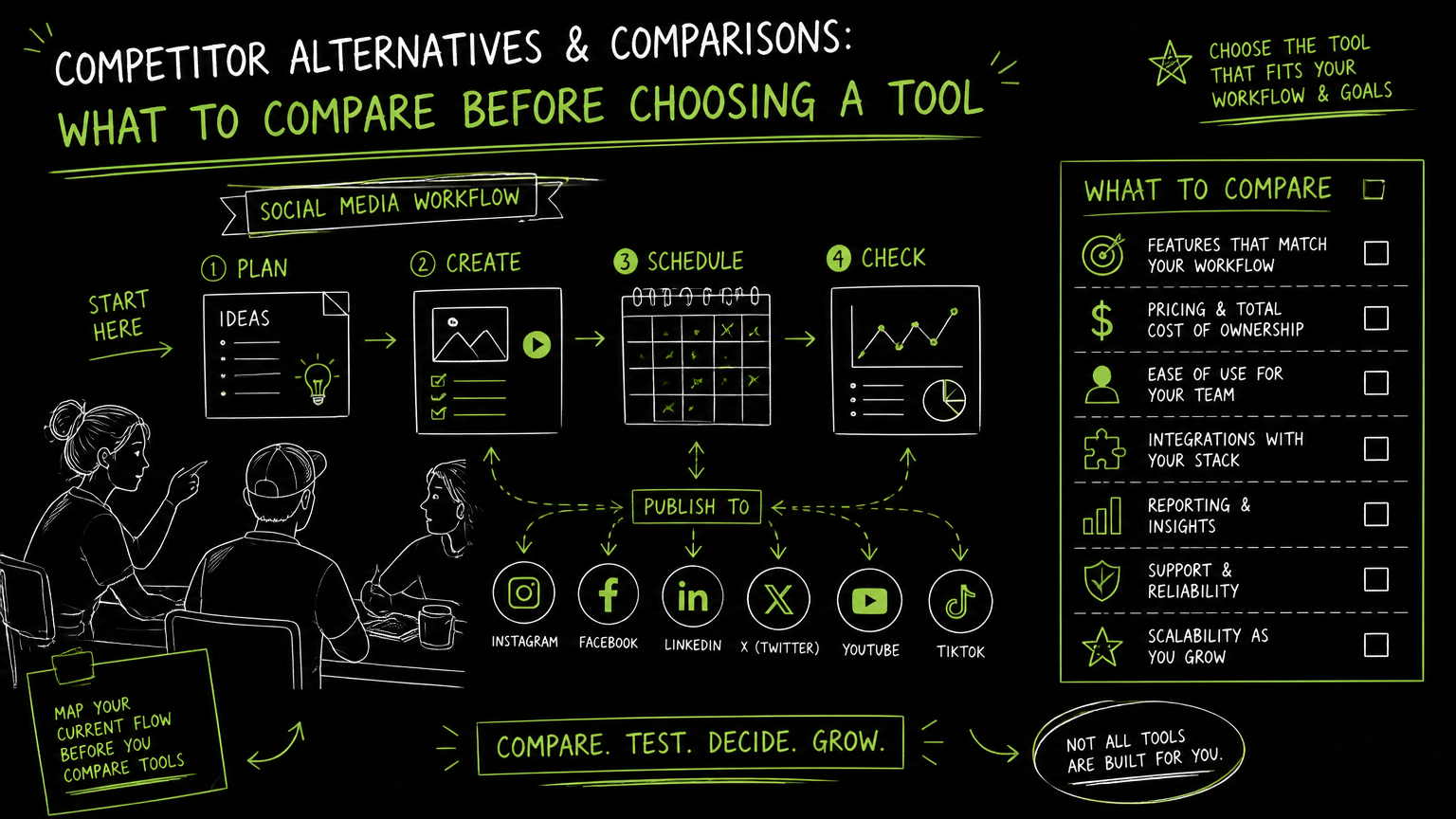
A campaign manager opens Monday’s backlog and finds product feedback in chat, launch assets in a shared drive, SMS questions on a phone, and social posts waiting for approval. Searching for the best messaging app is a reasonable starting point, but the real buying decision is broader: what kind of communication workflow are you trying to fix?
This guide gives you a practical comparison framework so you can separate chat, text messaging, social publishing, and all-in-one workspace needs before you choose a tool.
Quick Answer
Quick answer: The best messaging app depends on the job: private chat, SMS, desktop message aggregation, or campaign coordination. Compare tools by channel coverage, device support, security expectations, approval workflow, automation depth, pricing fit, and whether your team needs messaging only or social media scheduling and publishing too.
Start With the Job: Messaging, Social Publishing, or Both?
The fastest way to shortlist alternatives is to define whether you need conversation management, content distribution, or a mix of both.
Many searches for messaging apps mix different tool categories. A private messenger, an Android SMS app, a desktop message aggregator, and a social media automation platform can all appear in similar buying conversations, but they solve different operational problems.
Use this split before comparing vendors:
| Need | What to check | Why it matters |
|---|---|---|
| One-to-one private chat | Supported devices, account model, security expectations, group chat needs | A team chat or personal messenger is not the same as a publishing workflow |
| SMS or phone messages | Android or iPhone support, default SMS behavior, backup/export needs | SMS workflows are tied closely to mobile operating systems and carrier behavior |
| Desktop message consolidation | Which messaging accounts can be viewed from a computer | Useful for operators who monitor many inboxes, but not always built for campaign approval |
| Social media scheduling | Calendar, scheduled posts, supported social platforms | Publishing work needs planning, assets, captions, and timing controls |
| Multi-profile social operations | Number of social profiles, account types, approval steps | Agencies and multi-brand teams outgrow single-account tools quickly |
| API-enabled posting | API access, supported publishing endpoints, developer workflow | Useful when posting needs to connect to internal systems or custom workflows |
| Pricing fit | Monthly cost, usage limits, included profiles, upload limits | A low starting price can become awkward if the limits do not match the workload |
Decision rule: If the work ends when a person replies, you are comparing messaging apps. If the work ends when approved content is published across channels, you are comparing social media workflow tools.
What Should You Compare Before Choosing the Best Messaging App?
A serious comparison should start with workflow coverage, not feature volume.
For a commercial team, the wrong tool is usually not “bad.” It is mismatched. A good messenger app can still fail a marketing team if it cannot support scheduled publishing, and a capable social publishing tool can still be wrong if the actual need is encrypted personal communication.
Comparison criteria that matter in real work
| Criterion | Ask this | Good sign | Risk signal |
|---|---|---|---|
| Primary workflow | Are we chatting, texting, aggregating inboxes, or publishing? | The product’s core workflow matches your daily task | You need workarounds for the main job |
| Platform coverage | Which devices, social networks, or operating systems are supported? | Your required platforms are documented clearly | Support is implied but not stated |
| Account structure | Can the tool handle one user, multiple profiles, or multiple brands? | Limits match your team structure | You must share logins or rotate access manually |
| Scheduling | Do we need a content calendar or scheduled posting? | Scheduling is native to the workflow | Scheduling happens outside the tool |
| Media handling | What file types, size limits, and upload limits apply? | Limits are visible before purchase | Limits appear only after setup |
| API access | Do developers need to publish or automate from another system? | API access is included in the right plan | API availability is unclear |
| Review process | Who approves content or replies before they go live? | The workflow supports your review habits | Approval happens in comments, spreadsheets, or chat threads |
| Cost control | What usage limits trigger plan changes? | Pricing maps to expected volume | The plan looks cheap but caps the real workload |
Workflow coverage is the comparison point that prevents most expensive mistakes.
Important: Do not compare a secure private messenger against a social scheduling platform as if they were interchangeable. They may both handle communication, but they do not carry the same operational load.
Which Alternative Category Fits Your Team?
The right alternative category depends on where communication breaks down in your current process.
A founder answering customer texts from a phone has a different problem than a social media manager preparing posts for TikTok, Instagram, LinkedIn, and Pinterest. A support operator monitoring multiple chat apps from a desktop has a different problem again.
1. Private messenger apps
Private messenger apps are best when the core need is direct human conversation. Examples that often appear in comparison research include Signal Private Messenger and other popular chat applications.
Choose this category when:
- The work is mostly one-to-one or group chat.
- The sender and recipient are both active participants.
- Publishing calendars, social profiles, and media scheduling are not central.
Avoid this category when your real deliverable is campaign output.
2. SMS and phone message applications
SMS-focused tools are relevant when text messages are the channel of record. Google Messages and default phone messaging apps often appear in Android-related searches because buyers are comparing everyday texting workflows.
Choose this category when:
- The channel is SMS or phone-based text messaging.
- The workflow is tied to Android or iPhone behavior.
- Your main concern is reliable personal or business texting.
Avoid this category when the team needs social content planning, cross-network publishing, or a shared campaign calendar.
3. Desktop message aggregators
Desktop message aggregators are useful when a user wants to view multiple messaging services from a computer. Beeper and Rambox are examples that appear in the broader message-app comparison landscape.
Choose this category when:
- Operators need a desktop command center for conversations.
- The pain is switching between chat windows.
- The workflow is monitoring and replying, not planning posts.
Avoid this category when you need formal content calendars or social media publishing controls.
4. Social media automation platforms
Social media automation platforms are designed for creating, scheduling, and publishing content across social networks. This category matters when “messaging” is part of a larger go-to-market operation rather than the whole workflow.
Choose this category when:
- Your team manages posts across multiple social platforms.
- You need a calendar or scheduled posting flow.
- Profiles, uploads, and publishing limits affect daily work.
- Developers may need API access for publishing.
This is where comparison should shift from “best messenger app” to best-fit communication workflow.
A Practical Evaluation Workflow for Shortlisting Tools
A useful tool evaluation should recreate one real workweek before anyone signs a contract.
Do not start with a vendor demo script. Start with your own workflow: the channels you use, the people who touch content or messages, the assets involved, and the failure points that currently cost time.
Step 1: Write down the actual use case
Use plain language:
- “We need to reply to SMS from a shared computer.”
- “We need to manage Android text messages better.”
- “We need one desktop view for multiple chat apps.”
- “We need to schedule social posts across several networks.”
- “We need developers to publish social content from an internal system.”
The more specific the sentence, the easier the comparison.
Step 2: List required channels and platforms
Name the platforms explicitly. For social publishing, that may include TikTok, Instagram, Facebook, YouTube, X/Twitter, Threads, LinkedIn, or Pinterest. For messaging, that may mean Android, iPhone, desktop, or specific chat applications.
Do not accept “multi-platform” as enough. Ask which platforms are supported and what actions are supported on each.
Step 3: Run a before/after workflow test
Use one representative task.
Before: A marketing coordinator drafts a caption in a document, sends it to a manager in chat, uploads the asset later, and manually posts to each social network.
After: The same coordinator creates the post, attaches the asset, places it on a calendar, schedules it, and confirms which profiles it will publish to.
If the “after” still requires the same scattered steps, the tool may not solve the real problem.
Step 4: Check limits before feature polish
Limits are not fine print for operations teams. They shape the workflow.
Check:
- Number of included profiles or accounts
- Monthly uploads
- Scheduled post limits
- File size limits
- API availability
- Billing and trial terms
- Whether required platform support is documented
Usage limits before UI preference is a good rule for commercial evaluations.
Tip: Build your shortlist with one normal week of work, then one unusually busy week. A tool that only fits a quiet week may fail during a launch.
What Limits Should You Verify Before Buying?
The most important buying limits are the ones your team will hit during routine work.
For messaging tools, those limits may involve device support, account access, desktop availability, or whether a service supports the specific messaging channel you care about. For social media tools, limits are often more operational: profiles, uploads, scheduled posts, file size, and API access.
Verify these items before choosing:
| Limit or dependency | Why to verify it |
|---|---|
| Supported operating systems | Android, iPhone, and desktop workflows can differ significantly |
| Supported social platforms | “Social media support” does not automatically mean every network you use |
| Account and profile limits | Multi-brand teams can outgrow small plans quickly |
| Upload volume | Content-heavy workflows need predictable upload capacity |
| Scheduled post volume | Scheduling limits matter during launches and campaigns |
| File size | Video workflows can hit file caps faster than text/image workflows |
| API access | Developer-led workflows need confirmed API availability |
| Platform-specific publishing support | A tool may support one action on a platform but not another |
| Billing and trial rules | Commercial teams need to know when costs begin and what is included |
Watch out: The phrase “all-in-one” can hide a mismatch. It may mean one inbox, one desktop window, one publishing calendar, or one automation platform.
Common Mistakes When Comparing Messaging and Social Tools
Most bad software decisions come from comparing the wrong problem, not from missing a feature.
Here are the mistakes I would actively prevent in a buying process.
Mistake 1: Treating every communication tool as the same category
A chat app, a text messaging app, a desktop aggregator, and a social scheduler are different categories.
Fix: Define the job first: reply, text, consolidate, schedule, or publish.
Mistake 2: Choosing based on the app you personally like
Personal preference matters less when the workflow involves marketing, support, approvals, or multiple profiles.
Fix: Test the tool with the person who handles the most repetitive work, not only the buyer.
Mistake 3: Ignoring platform-specific support
A tool may support a platform name but not the exact action your team needs.
Fix: Ask whether the tool supports your required format and action, such as photos, videos, reels, carousels, articles, personal profiles, or company pages where relevant.
Mistake 4: Comparing entry prices without comparing limits
A lower price can still be a poor fit if upload, scheduling, profile, or file-size limits force an immediate upgrade.
Fix: Map pricing to a real monthly workload.
Mistake 5: Buying automation when the team needs governance
Automation does not fix unclear ownership. If nobody knows who approves a post or response, a faster tool just moves confusion faster.
Fix: Define roles and review steps before choosing software.
The best tool is the one that removes the handoff your team repeats every week.
When DOHOO May Fit
DOHOO may fit when the comparison has moved beyond private messaging and into social media scheduling, publishing, and API-enabled workflows.
DOHOO is a social media automation platform for creating, scheduling, and publishing content across social platforms from one dashboard. It supports publishing to TikTok, Instagram, Facebook, YouTube, X/Twitter, Threads, LinkedIn, and Pinterest.
That means it is not positioned as a replacement for a private messenger or an SMS app. It is more relevant when your team needs multi-platform social publishing, a calendar-based posting workflow, or API access for social publishing.
DOHOO has public plans with defined limits:
| Plan | Price | Included profiles | Uploads / month | Scheduled posts | AI transcription minutes | Max file size | API access |
|---|---|---|---|---|---|---|---|
| Blogger | $19.99/mo | 4 | 90 | 90 | 120 | 1 GB | No |
| Business | $39.99/mo | 15 | 250 | 250 | 300 | 2 GB | Yes |
| Agency | $79.99/mo | 30 | 550 | 550 | 600 | 4 GB | Yes |
DOHOO also has verified platform-specific support for TikTok bulk scheduling, auto-publishing, multiple TikTok accounts, and AI captions and hashtags. For Instagram, it supports photos, videos, reels, carousels, Instagram Business accounts, AI captions, hashtags, and bulk upload. For LinkedIn, it supports articles, images, videos, personal profiles, and company pages.
Quick takeaway: Consider DOHOO if your “messaging app” search is really about coordinating social content output across multiple platforms. Keep comparing dedicated messenger apps if your main problem is private chat or SMS.
Key Takeaways
Choosing a messaging or social workflow tool is easier when you compare the job, not the category label.
- The best messaging app for one team may be wrong for another because “messaging” can mean chat, SMS, desktop aggregation, or campaign coordination.
- Compare tools by workflow coverage, platform support, account structure, scheduling needs, media limits, API access, and pricing fit.
- Private messengers are best for direct conversation.
- SMS apps are best for phone-based text workflows.
- Desktop aggregators are useful when switching between chat apps is the main pain.
- Social media automation platforms are better when the workflow includes calendars, scheduled posts, multiple profiles, and publishing across networks.
- Verify limits before buying, especially profiles, uploads, scheduled posts, file size, and API access.
- A practical evaluation should test one normal workweek and one busy launch scenario.
FAQ
What is the best messaging app for a business team?
The best option depends on whether the team needs private chat, SMS, desktop message consolidation, or social publishing support. Start by naming the workflow: reply to messages, manage phone texts, monitor multiple inboxes, or schedule campaign content. Then compare tools only within that category.
Is a messaging app the same as a social media management tool?
No. A messaging app is usually built for conversations, while a social media management tool is built for planning, scheduling, and publishing content. Some teams need both, but they should not be evaluated as if they solve the same job.
What should Android users compare in a messenger app?
Android users should verify whether the app supports the exact phone messaging workflow they need, including SMS expectations and device behavior. If the requirement is broader than phone texts, such as desktop consolidation or social publishing, compare a different category of tool.
When should a team care about API access?
API access matters when developers need to connect publishing or workflow actions to an internal system. If the team only needs manual chat or basic texting, API access may be unnecessary. If social publishing is part of a larger operational workflow, confirm API availability before choosing a plan.
How should agencies compare messaging and social tools?
Agencies should compare account/profile limits, upload volume, scheduled post capacity, supported platforms, review workflow, and file-size limits. A tool that works for one brand may not fit a multi-client calendar. The best comparison uses real client volume rather than a generic feature checklist.
Final Takeaway
The best messaging app is the one that matches the communication job your team actually performs: replying, texting, consolidating, scheduling, or publishing.
If your comparison points toward social media scheduling and publishing rather than private messaging, review DOHOO’s supported platforms, plan limits, and API access to see whether it fits your workflow.