 DOHOO
DOHOO
Comparison
Instagram Planner App: What to Compare Before Choosing a Tool
 Vitalii
10 min read
Vitalii
10 min read
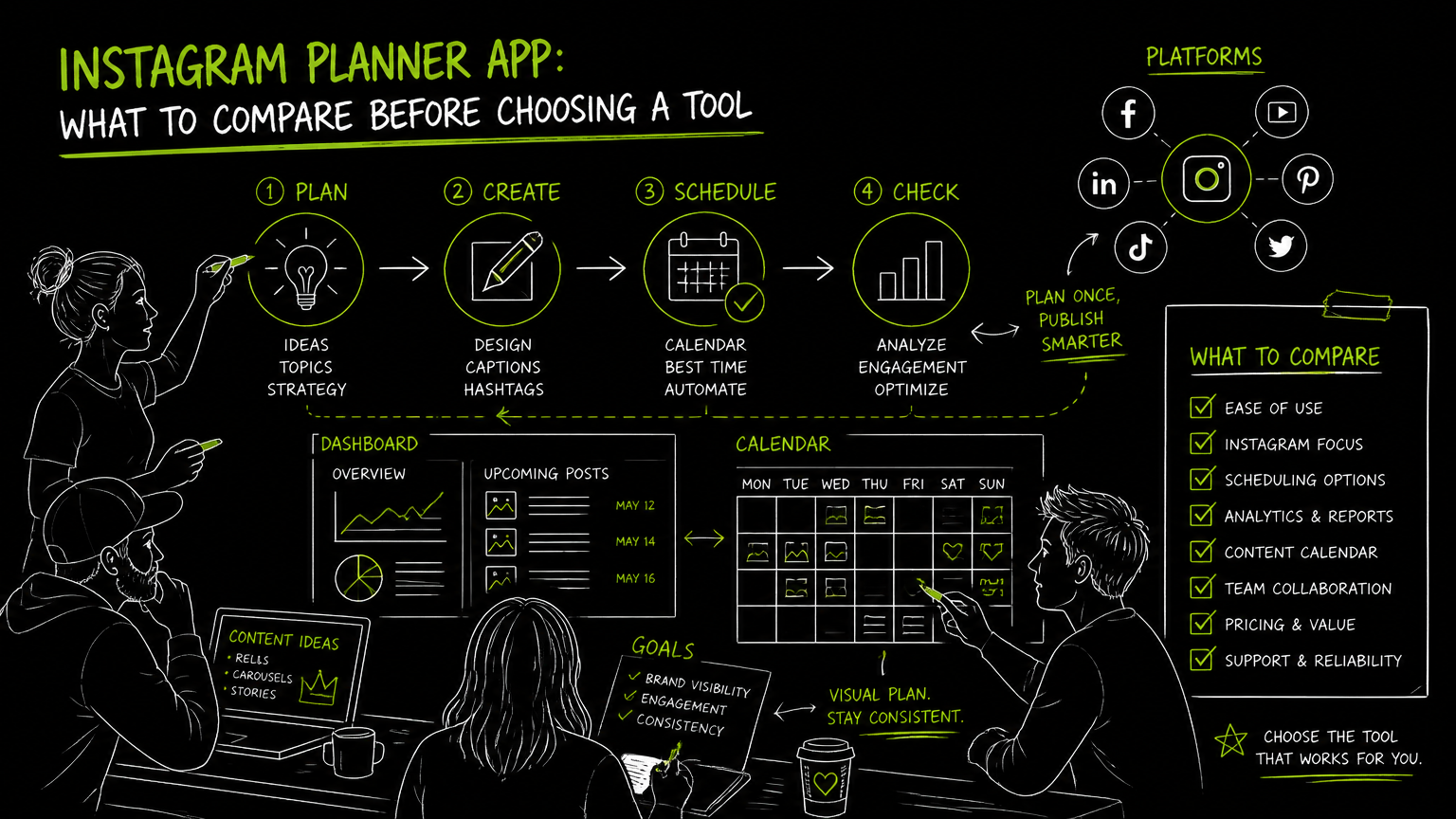
It is Thursday afternoon, the product team has just changed the launch carousel, and someone asks whether the Instagram grid will still look right after the reel goes live. That is usually when a preview app stops being a nice-to-have and becomes part of the approval workflow. The right choice depends less on the prettiest mockup and more on how your team plans, reviews, schedules, and publishes Instagram content.
This guide gives you a practical comparison framework you can use before committing to an Instagram planner app.
Quick Answer
Quick answer: A preview app helps teams see how Instagram posts will look before publishing, especially for feed layout, campaign sequencing, and approvals. Compare visual planning, supported Instagram formats, scheduling depth, account limits, collaboration needs, and whether the tool fits only Instagram or your wider social media workflow.
Start With the Buying Checklist, Not the Feature List
The best Instagram planner app is the one that matches your actual publishing workflow, not the one with the longest feature page.
Use this checklist before shortlisting tools:
| Need | What to check | Why it matters |
|---|---|---|
| Feed planning | Can you preview the Instagram feed or grid before publishing? | Visual layout matters when posts are part of a campaign, product launch, or branded sequence. |
| Instagram formats | Check support for photos, videos, reels, and carousels. | A tool that handles only simple image posts may create manual work for modern Instagram workflows. |
| Scheduling | Confirm whether the tool schedules posts, sends reminders, or supports auto-publishing. | “Planning” and “publishing” are different workflow commitments. |
| Account type | Verify whether it supports Instagram Business accounts if your company uses them. | B2B teams often publish from business-owned profiles, not personal creator accounts. |
| Approval flow | Look for comments, drafts, or review steps if multiple stakeholders are involved. | A visual grid is not enough when legal, brand, or product teams must approve content. |
| Multi-platform publishing | Decide whether Instagram-only planning is enough or if you also need Facebook, TikTok, LinkedIn, YouTube, X/Twitter, Threads, or Pinterest. | Teams that repurpose launches across channels can reduce duplicate scheduling work. |
| Bulk work | Check whether bulk upload or bulk scheduling is available. | Campaigns often arrive as batches, not one post at a time. |
| AI writing support | If AI captions or hashtags are offered, verify exactly where they work and who controls the final copy. | AI can speed drafting, but it should not replace human review for brand or compliance-sensitive content. |
| API access | Ask whether API access exists if your team wants to connect publishing to internal systems. | Some teams need automation beyond a standard dashboard. |
| Plan limits | Compare scheduled post limits, profile limits, upload limits, and file-size limits. | The cheapest plan can become expensive if it forces workarounds. |
Decision rule: If your team only needs to arrange nine Instagram posts visually, prioritize the grid. If your team runs launches across several social platforms, prioritize publishing ownership and account limits first.
The most expensive mistake is buying a beautiful planner that still leaves your team publishing manually from a spreadsheet.
What Should an Instagram Planner App Actually Do for a B2B Team?
An Instagram planner app should help a team move from content idea to approved, scheduled post with fewer handoffs.
For B2B teams, Instagram planning usually touches more people than it appears. A product marketer may write the launch message. A designer may create the carousel. A social media manager may sequence posts across Instagram, LinkedIn, and TikTok. A founder or brand lead may need final approval.
That means the tool needs to support the workflow around the post, not just the post itself.
A practical B2B Instagram planning workflow often includes:
- Draft the post concept.
- Add creative assets.
- Check the Instagram feed preview or grid sequence.
- Review captions, hashtags, and campaign references.
- Confirm the format: photo, video, reel, or carousel.
- Schedule or publish.
- Repeat the message across other social channels when needed.
For a very small team, a lightweight Instagram feed planner may be enough. For a team managing launches, webinars, employer branding, and founder-led posts, the planner needs to connect more directly to scheduling and publishing.
Tip: Do not evaluate the tool only with one polished post. Test it with a messy real campaign: one reel, one carousel, one image post, and one last-minute caption change.
How Much Should a Preview App Matter Compared With Scheduling?
A preview app matters most when Instagram feed layout is part of the brand experience, but scheduling matters more when the team’s pain is missed deadlines.
Visual preview is useful for spotting awkward grid patterns, repeated creative styles, or a campaign post that feels out of sequence. It helps when the feed itself is treated like a portfolio, product showcase, or brand proof point.
Scheduling solves a different problem. It reduces the need to remember what goes live, when, and from which account.
For many B2B teams, the right question is not “Do we need a grid planner?” It is:
- Are we mainly trying to improve visual approval?
- Are we mainly trying to reduce manual publishing?
- Are we trying to coordinate Instagram with other channels?
- Are we planning one account or several brand, regional, or executive profiles?
If the content team repeatedly argues over how the feed looks, choose stronger visual planning. If the team repeatedly misses publishing windows or duplicates work across channels, choose stronger scheduling.
How Should You Evaluate an Instagram Grid Preview?
An Instagram grid preview should be tested with real content, not sample tiles from a product demo.
The grid is where many teams discover hidden workflow problems. A carousel cover may look great alone but clash with the surrounding launch posts. A reel cover may break the pattern. A campaign announcement may need to appear before a customer-facing explainer.
Use this evaluation process:
1. Build a Real Test Set
Create a small batch from your actual calendar:
- One product or campaign announcement
- One carousel
- One reel or video
- One evergreen brand post
- One last-minute replacement post
This reveals whether the tool supports your real formats and your real pace of change.
2. Rearrange the Order
Drag posts around if the tool allows it, then check whether the new sequence is easy to understand.
You are looking for friction. If every change requires rebuilding the plan elsewhere, the preview is not really part of the workflow.
3. Check Caption and Asset Context Together
A grid-only view can look clean while hiding caption problems.
For example:
- Before: The feed looks balanced, but two consecutive posts use the same launch message.
- After: The planner shows enough post detail for the social manager to spot duplicate copy before approval.
That simple before/after is often where a basic visual tool and a true planning workflow separate.
4. Confirm What Happens After Approval
Ask what happens once the post is approved.
Can it be scheduled from the same place? Does someone still need to download the asset and post manually? Does the team need a reminder? Can the tool publish the supported format?
Watch out: A grid preview can make a broken workflow look organized. Always test the step after approval, not just the preview screen.
Where Do Instagram Scheduling Tools Usually Break Down?
Instagram scheduling tools usually break down at the boundaries: format support, approval ownership, profile limits, and multi-channel coordination.
Here are common mistakes and practical fixes.
| Mistake | What happens | Fix |
|---|---|---|
| Choosing based only on the grid | The feed looks good, but publishing still happens manually. | Ask whether the tool supports scheduling or auto-publishing for the formats you use. |
| Ignoring format coverage | Reels, videos, or carousels require separate handling. | Test every Instagram format your team publishes before choosing. |
| Forgetting account limits | Regional, executive, or brand profiles exceed the plan quickly. | Count profiles before comparing prices. |
| Treating AI captions as final copy | Captions may not match brand, product, or compliance language. | Use AI-assisted drafts only with human review. |
| Buying for Instagram alone when the workflow is multi-channel | Teams duplicate posts into LinkedIn, TikTok, Facebook, or other tools. | Decide whether Instagram-only planning is enough. |
| Not checking API access | Internal automation plans fail after purchase. | Verify API availability before committing. |
The best planner is the one that removes handoffs without hiding the publishing rules your team depends on.
What Limits Should You Verify Before Choosing a Tool?
Every Instagram planner has limits, and the important ones are usually operational rather than visual.
Before buying, verify these details in writing or during a trial:
- Which Instagram account types are supported.
- Whether photos, videos, reels, and carousels are supported.
- Whether the tool schedules, auto-publishes, or only reminds you to post.
- How many social profiles are included.
- How many scheduled posts are included.
- Whether upload limits apply.
- Whether file-size limits apply.
- Whether bulk upload is available.
- Whether API access is available.
- Which other platforms are supported if you manage more than Instagram.
This is especially important for agencies and multi-brand teams. A plan that works for one Instagram account may not work for 10 client profiles or a cross-platform launch calendar.
Important: Compare limits against next quarter’s workload, not this week’s workload. Campaign calendars tend to grow after a team finally gets a planning system in place.
When DOHOO May Fit
DOHOO may fit teams that want Instagram planning as part of a broader social media automation workflow.
DOHOO is positioned as a social media automation platform for creating, scheduling, and publishing content across social platforms from one dashboard. Its confirmed supported publishing platforms include TikTok, Instagram, Facebook, YouTube, X/Twitter, Threads, LinkedIn, and Pinterest.
For Instagram specifically, DOHOO supports photos, videos, reels, carousels, Instagram Business accounts, AI captions, hashtags, and bulk upload. The product also includes a calendar and scheduled posting flow.
DOHOO’s public plans list these limits:
| Plan | Monthly price | Included profiles | Scheduled posts | Uploads per month | AI transcription minutes | Max file size | API access |
|---|---|---|---|---|---|---|---|
| Blogger | $19.99/mo | 4 | 90 | 90 | 120 | 1 GB | No |
| Business | $39.99/mo | 15 | 250 | 250 | 300 | 2 GB | Yes |
| Agency | $79.99/mo | 30 | 550 | 550 | 600 | 4 GB | Yes |
This makes it worth evaluating if your team cares about format coverage, multi-platform publishing, and API access. If your only need is a simple Instagram grid mockup, a narrower Instagram feed preview tool may be enough.
Key Takeaways
An Instagram planner app should be chosen around workflow fit, not visual polish alone.
- Use a real campaign to test the tool, not sample posts.
- Separate feed preview needs from scheduling needs.
- Confirm support for Instagram photos, videos, reels, and carousels.
- Check whether the tool supports Instagram Business accounts if your team uses them.
- Count profiles, scheduled posts, uploads, and file-size limits before comparing plans.
- Decide whether your team needs Instagram-only planning or multi-platform publishing.
- Verify API access before assuming the tool can support custom automation.
- Treat AI captions and hashtags as drafting support that still needs review.
FAQ
What is the difference between an Instagram feed planner and an Instagram scheduler?
An Instagram feed planner helps you preview the visual order of posts in the feed or grid. An Instagram scheduler helps you plan when posts should go live and may support scheduled posting or auto-publishing, depending on the tool. Some products combine both, but you should verify the exact workflow.
Do I need an Instagram grid planner if I already have a content calendar?
You may still need one if feed appearance affects approvals, brand consistency, or campaign sequencing. A calendar shows timing; a grid preview shows how posts look together. If your team does not care about visual sequence, the calendar may be enough.
What should agencies check before choosing an Instagram planning tool?
Agencies should check profile limits, scheduled post limits, upload limits, file-size limits, approval workflows, and whether multiple platforms are supported. They should also verify whether API access is available if client reporting or internal systems depend on automation.
Is AI important in an Instagram planner app?
AI can be useful for drafting captions or hashtags when the tool supports those features. It should not be treated as a replacement for brand, product, legal, or campaign review. The key buying question is where AI fits into the workflow and who approves the final post.
Should I choose an Instagram-only tool or a multi-platform scheduler?
Choose an Instagram-only tool if your main problem is feed layout and visual approval. Choose a multi-platform scheduler if your team publishes related content across Instagram, TikTok, Facebook, LinkedIn, YouTube, X/Twitter, Threads, or Pinterest and wants fewer duplicate scheduling steps.
Final Takeaway
Choose a preview app only after you know whether your real problem is grid layout, scheduling discipline, approval flow, or multi-platform publishing.
If your team needs Instagram planning alongside broader social scheduling, test DOHOO against your real campaign workflow and compare the plan limits before committing.