 DOHOO
DOHOO
Comparison
Free Social Media Tools: What to Compare Before Choosing a Tool
 Vitalii
14 min read
Vitalii
14 min read
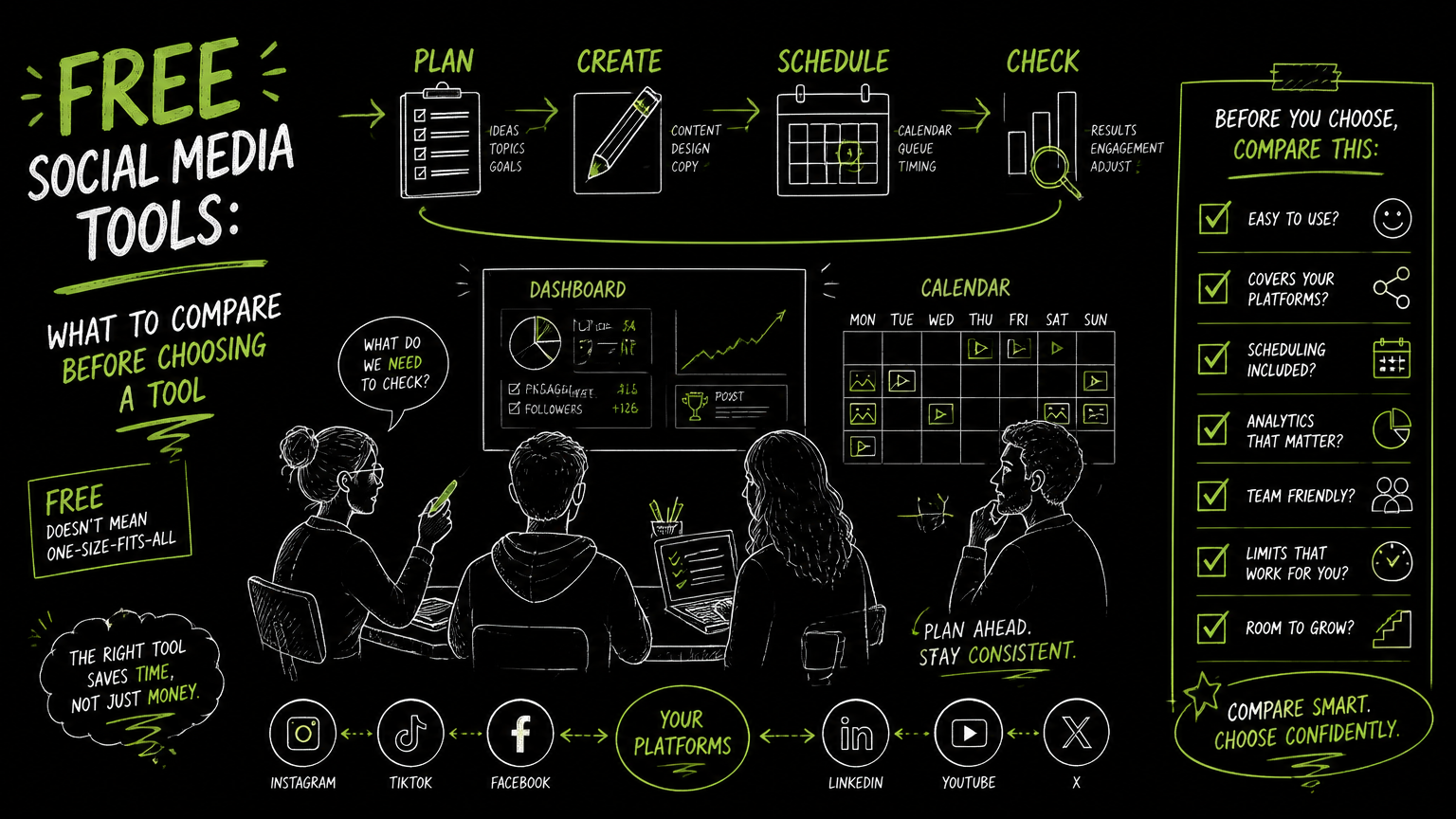
It usually starts with a messy Friday handoff: three Instagram posts waiting on captions, a LinkedIn update stuck in review, a TikTok video in the wrong folder, and someone asking whether the “free tool” can publish everything next week. The best tools for social media managers are not simply the ones with the longest feature list; they are the ones that remove the most friction from your actual publishing workflow.
This guide gives you a practical way to compare free social media tools before you commit your calendar, content, and team process to one platform.
Quick Answer
Quick answer: Free social media tools are worth comparing by supported platforms, scheduling limits, approval workflow, media formats, account limits, collaboration needs, and upgrade path. The best tools for social media managers match the daily workflow first: planning, creating, reviewing, scheduling, publishing, and fixing failed posts without adding manual work elsewhere.
Compare Free Social Media Tools With This Checklist
A free social media tool should be judged by workflow fit before feature volume.
Use this checklist before you shortlist any social media management system, social media suite, or post scheduling app.
| Need | What to check | Why it matters |
|---|---|---|
| Multi-platform publishing | Can it publish to the platforms you actually use, such as Instagram, TikTok, Facebook, YouTube, X/Twitter, Threads, LinkedIn, or Pinterest? | A “free” tool is less useful if your team still has to publish manually on key channels. |
| Scheduling | Does it support scheduled posts and a calendar view? | Scheduling is the backbone of campaign planning, especially when multiple stakeholders review content. |
| Format support | Check photos, videos, reels, carousels, articles, images, and platform-specific requirements. | Platform support does not always mean every content format is supported. |
| Account/profile limits | How many brand, client, or regional profiles can you connect? | Free plans often break down when an agency or multi-brand team adds more profiles. |
| Monthly posting volume | Look for scheduled post, upload, or publishing limits. | A tool may fit a solo creator but fail for a weekly campaign cadence across several channels. |
| Review process | Can teammates review drafts before publishing? | Without a review step, teams move approvals back into email, spreadsheets, or chat. |
| Bulk workflow | Can you upload or schedule multiple posts efficiently? | Bulk scheduling matters when planning launches, campaigns, or client content batches. |
| API access | Does the vendor offer API access if you need automation beyond the UI? | API access matters for teams connecting social publishing to internal tools or custom workflows. |
| Upgrade path | What changes when you move from free to paid? | The real cost is not only price; it is whether you must rebuild your workflow later. |
| Failure handling | How visible are publishing errors, missing assets, or disconnected accounts? | Social workflows need fast recovery when a post does not go live as expected. |
Decision rule: If a free plan saves money but forces the team to track approvals, formats, and platform exceptions in separate documents, it is not really simplifying social media management.
The most important comparison is not “free vs. paid.” It is calendar control vs. manual coordination.
What Should Tools for Social Media Managers Actually Do?
Tools for social media managers should support the full publishing cycle, not just queue posts.
A practical social media workflow usually includes six steps:
- Plan campaigns, themes, channels, and dates.
- Create captions, media, hashtags, and platform-specific variations.
- Review drafts with stakeholders or clients.
- Schedule posts in a calendar.
- Publish to selected social platforms.
- Check whether scheduled work is still on track.
A free social media tool may cover only part of that cycle. That can be fine if your team is small and the missing step is easy to manage manually. It becomes a problem when the missing step is central to your work.
For example, if you manage one LinkedIn company page, a simple scheduler may be enough. If you manage Instagram reels, TikTok videos, LinkedIn articles, Pinterest posts, and YouTube content across several profiles, the tool needs stronger platform and format coverage.
Tip: Before comparing vendors, write down last month’s actual publishing workflow. Include every spreadsheet, chat thread, asset folder, approval step, and manual login. That map will expose which “free” features matter.
A good comparison starts with the work your team already does, not the feature grid on a pricing page.
Which Free Features Matter Most?
The most valuable free features are the ones that remove repeated manual steps from your publishing process.
For B2B teams, these are usually the highest-impact areas to evaluate.
Calendar and scheduling
A content calendar is a shared view of upcoming posts, campaigns, and publishing dates. It helps teams see whether LinkedIn, Instagram, TikTok, YouTube, and other channels are coordinated instead of planned in isolation.
Scheduling matters because it separates content preparation from publish time. That is especially useful when stakeholders approve posts during business hours but the content needs to go live later.
Look for:
- Calendar visibility by day, week, or campaign.
- Clear scheduled post status.
- Ability to edit scheduled content.
- Support for the formats your team uses.
- A practical way to avoid duplicate or missed posts.
Multi-platform posting
A multi-platform social media posting tool helps publish content to several social networks from one dashboard.
This is useful only if it supports the specific channels and formats in your plan. “Publish everywhere” sounds attractive, but a B2B team may care more about LinkedIn company pages and YouTube videos than every possible network.
Verify support for the platforms you use today and the platforms your team may add soon.
Account and profile management
Profile limits matter for agencies, franchises, multi-brand teams, and companies with regional social accounts.
A free tool may be suitable for one brand and a small set of channels. It may become restrictive when you add client accounts, business units, or campaign-specific profiles.
Bulk scheduling and uploads
Bulk scheduling means preparing multiple posts at once rather than creating every post manually in sequence.
This is useful when you plan a month of content, launch a campaign, or manage several client calendars. It can be less important for a small team publishing only a few posts per week.
AI-assisted creation
Some tools include AI features for captions, hashtags, or transcription. These features can help speed up content preparation, but they should not be treated as a replacement for editorial judgment, brand review, or platform-specific context.
Check exactly what the tool claims to do. Do not assume AI features include analytics, performance prediction, reach optimization, or recommended posting times unless the vendor explicitly supports those capabilities.
Watch out: AI copy help and AI analytics are different capabilities. If a product says it helps with captions, do not assume it also predicts performance or optimizes publishing strategy.
How Do You Evaluate a Free Social Media Tool in One Week?
A one-week evaluation should test your real workflow with real content, not a demo calendar.
Use this simple process before rolling a tool out to the team.
Day 1: Define the publishing scenario
Pick one realistic campaign or content batch.
Include:
- One short-form video.
- One image post.
- One text-heavy professional post.
- One platform-specific variation, such as an Instagram carousel or LinkedIn article if relevant.
- At least one approval or review step.
The goal is to test the workflow, not to create perfect content.
Day 2: Connect only the necessary profiles
Connect the profiles you actually need for the test. Avoid connecting every account before you know how the tool behaves.
For example, a B2B SaaS team might test LinkedIn, X/Twitter, YouTube, and Instagram first. An agency might test one client profile set rather than the full client roster.
Day 3: Build the calendar
Create scheduled posts in the tool’s calendar or scheduling interface.
Pay attention to small workflow details:
- Can you see all scheduled posts clearly?
- Can you identify which platform each post belongs to?
- Can you edit a post without losing work?
- Can you spot missing media or incomplete captions?
Day 4: Run review
Ask the person who usually approves content to review the test posts.
This is where many tools reveal their limits. If the approver still needs screenshots, exported documents, or a separate spreadsheet, the tool may not be solving your review problem.
Day 5: Publish or simulate publishing
If you are comfortable publishing live test content, do it. If not, schedule internal-safe posts or use draft workflows where available.
Track every manual workaround. The workaround list is often more useful than the vendor’s feature list.
Day 6: Check recovery points
Look for what happens when something changes.
Try a practical edit:
- Replace a video file.
- Update a caption.
- Change a publish date.
- Remove one platform from a multi-platform post.
- Adjust a campaign sequence.
A good tool should make changes visible and manageable.
Day 7: Score the tool
Use a simple scoring model:
| Area | Score 1-5 | Notes |
|---|---|---|
| Platform coverage | ||
| Format support | ||
| Scheduling workflow | ||
| Review workflow | ||
| Ease of edits | ||
| Profile/account fit | ||
| Upgrade path | ||
| Manual work reduced |
Manual work reduced is the most honest score in the table.
Example: Before testing, a team might think its main need is “publishing to all social media at once.” After testing, it may discover the bigger issue is that approvals happen outside the tool, causing late edits and duplicate work.
What Are the Biggest Trade-Offs With Free Social Media Tools?
Free tools usually trade lower cost for limits in scale, automation, collaboration, or control.
That does not make them bad. It means you need to choose based on your operating model.
Free can be enough for a single operator
If one person manages a small number of profiles, a free social media manager app may be enough. The workflow is simple: create, schedule, check, repeat.
In this case, advanced collaboration may be unnecessary. A lightweight scheduler can be the better choice.
Free can be risky for agencies
Social media tools for agencies need to handle multiple clients, profiles, calendars, approvals, and posting cadences.
The risk is not only hitting a limit. The bigger risk is building client delivery around a tool that does not support enough profiles, scheduled posts, or reliable review flows as the account list grows.
Free can hide future migration work
A tool can look easy during week one and become expensive later if you must rebuild calendars, reconnect profiles, retrain the team, or move approval workflows elsewhere.
This is why the upgrade path matters. Compare paid tiers before you commit, even if you plan to start free.
API access is a separate decision
API access means a product allows software systems to interact programmatically with its publishing capabilities. This can matter if your team wants custom automation, internal dashboards, or workflow connections beyond the standard interface.
Not every team needs API access. If your workflow lives inside a calendar UI, it may be irrelevant. If social publishing is part of a larger content operations system, it may be a deciding factor.
The right tool is the one whose limits match your next stage, not just your current budget.
Common Mistakes When Choosing Social Media Management Tools
Most bad tool choices come from comparing screenshots instead of workflows.
Here are the mistakes I would actively avoid.
Mistake 1: Choosing by the longest platform list
A long platform list looks good, but your team needs verified support for the platforms and formats it actually uses.
Fix: Build a platform-format matrix. For example: Instagram reels, Instagram carousels, LinkedIn company page posts, LinkedIn articles, TikTok videos, YouTube videos, Pinterest posts, and Threads posts.
Mistake 2: Ignoring profile limits
A tool may support your target platforms but not enough connected profiles for your team.
Fix: Count profiles, not just social networks. One company with Instagram, LinkedIn, Facebook, YouTube, X/Twitter, TikTok, Pinterest, and Threads already has multiple publishing destinations.
Mistake 3: Treating scheduling as the whole workflow
Scheduling is important, but it is not the same as planning, approval, publishing, and recovery.
Fix: Test a complete campaign workflow before committing. Include edits, approvals, and at least one format-specific post.
Mistake 4: Assuming “AI” means strategy
AI captions, hashtags, or transcription can be useful production aids. They do not automatically mean the tool provides advanced analytics, performance prediction, engagement improvement, or posting-time recommendations.
Fix: Ask vendors to identify exactly which AI functions are included and where they appear in the workflow.
Mistake 5: Skipping the paid-plan comparison
Even if you want free software for social media management, you should understand the paid tiers.
Fix: Compare what changes when you add more profiles, scheduled posts, uploads, users, file size, or API needs.
Important: A free tool is a starting point, not a procurement strategy. If your team’s social output is growing, compare the next paid tier before the free plan becomes a bottleneck.
What Should You Verify Before Choosing a Tool?
You should verify the operational limits that affect your calendar before choosing a social media tool.
Create a short vendor question list and use the same questions for every platform you compare.
Platform and format questions
Ask:
- Which platforms are supported?
- Does support include Instagram photos, videos, reels, and carousels?
- Does support include LinkedIn personal profiles and company pages?
- Does support include TikTok bulk scheduling or multiple TikTok accounts?
- Does support include YouTube, X/Twitter, Threads, Facebook, and Pinterest if you need them?
- Are there format-specific limits for videos, images, carousels, or articles?
Scheduling and publishing questions
Ask:
- How many posts can be scheduled?
- Are scheduled posts counted separately from uploads?
- Can posts be edited after scheduling?
- Can one post be adapted for multiple platforms?
- What happens if an account disconnects or a post fails?
Team and agency questions
Ask:
- How many profiles are included?
- Is the tool designed for one brand, multiple brands, or agency use?
- Can different team members review content?
- Can clients or stakeholders see drafts without disrupting the calendar?
- What happens when you add another client or business unit?
Automation and API questions
Ask:
- Is API access included?
- Is API access limited to specific plans?
- Which platforms have documented publishing support?
- Can the API support the workflow you want, or only a narrow publishing action?
Commercial questions
Ask:
- What limits exist on uploads, scheduled posts, profiles, and file size?
- What happens when the team exceeds those limits?
- Is there a clear upgrade path?
- Will moving up a plan preserve the workflow you tested?
Verify limits before workflows depend on them.
When DOHOO May Fit
DOHOO may fit teams that want multi-platform scheduling, auto-publishing, and API access options in one social media automation platform.
DOHOO is positioned as a Social Media Automation Platform for creating, scheduling, and publishing content across social platforms from one dashboard. Its verified platform coverage includes TikTok, Instagram, Facebook, YouTube, X/Twitter, Threads, LinkedIn, and Pinterest.
A few verified details are useful for comparison:
| Plan | Monthly price | Included profiles | Scheduled posts | Uploads/month | AI transcription minutes | Max file size | API access |
|---|---|---|---|---|---|---|---|
| Blogger | $19.99/mo | 4 | 90 | 90 | 120 | 1 GB | No |
| Business | $39.99/mo | 15 | 250 | 250 | 300 | 2 GB | Yes |
| Agency | $79.99/mo | 30 | 550 | 550 | 600 | 4 GB | Yes |
DOHOO also has verified support for a calendar and scheduled posting flow. Platform-specific verified claims include TikTok bulk scheduling, auto-publishing, multiple TikTok accounts, AI captions and hashtags; Instagram photos, videos, reels, carousels, Instagram Business accounts, AI captions, hashtags, and bulk upload; and LinkedIn articles, images, videos, personal profiles, and company pages.
This makes it worth comparing if your shortlist includes multi-platform social media management SaaS, agency-oriented scheduling, or API-enabled publishing workflows. It may not be the first tool to test if you only need a no-cost option for one profile and very light scheduling.
Key Takeaways
Free social media tools are best compared by workflow fit, not by feature count.
- Start with your real calendar, channels, formats, and approval process.
- Compare platform support at the format level, not just the network level.
- Count profiles carefully if you manage multiple brands, regions, or clients.
- Test scheduling, edits, approvals, and recovery before committing.
- Treat AI features as production aids unless the vendor explicitly supports broader capabilities.
- Check paid limits early, even if you plan to start with a free tool.
- API access matters only when your social publishing workflow needs custom automation.
- The best tools for social media managers reduce handoffs, duplicate entry, and last-minute publishing confusion.
FAQ
What is the best free social media management tool?
The best free social media management tool is the one that supports your actual platforms, formats, posting cadence, and review process. A solo manager may only need basic scheduling, while an agency may need more profiles, approval workflows, and bulk planning. Test with a real campaign before deciding.
Are free social media tools enough for agencies?
Free tools can work for early agency workflows, but they often become restrictive when profile counts, client calendars, and scheduled posts increase. Agencies should compare limits on connected profiles, uploads, scheduled posts, review steps, and upgrade paths before standardizing on any tool.
What should I compare besides price?
Compare platform support, format support, profile limits, scheduling capacity, review workflow, bulk scheduling, API access, file limits, and failure handling. Price matters, but the hidden cost is manual work that returns when a tool does not cover the full workflow.
Do I need one tool to publish to all social media at once?
You need one publishing workflow more than one universal button. Publishing to multiple platforms from one dashboard can save time, but only if each post can be adapted to the right format, caption, profile, and channel requirement.
When should a team care about API access?
A team should care about API access when social publishing needs to connect with internal systems, custom dashboards, or automated content operations. If your team works entirely inside a calendar UI, API access may not be necessary.
Final Takeaway
Choose free social media tools by testing how they handle your real calendar, not by scanning a feature list. The right tools for social media managers make planning, scheduling, publishing, and review easier without pushing hidden work into spreadsheets or chat.
If your comparison includes multi-platform publishing, scheduled posting, API access, and clear plan limits, add DOHOO to your evaluation and test it against the checklist above.