 DOHOO
DOHOO
Comparison
Competitor Alternatives & Comparisons: What to Compare Before Choosing a Tool
 Vitalii
11 min read
Vitalii
11 min read
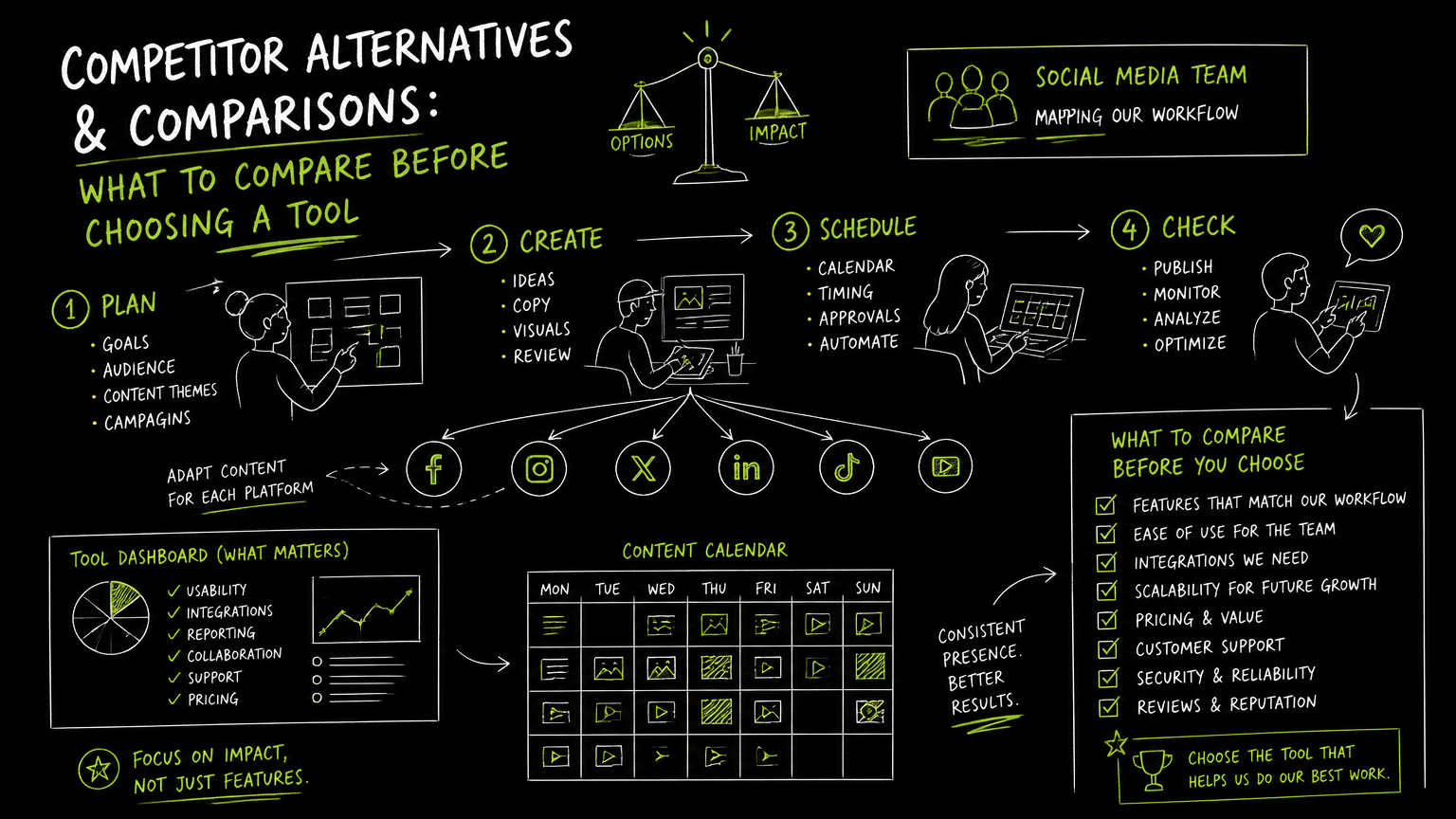
You have ten product photos ready, a draft description open, and three tabs waiting: one marketplace, one social channel, and one spreadsheet that has become the team’s source of truth. At that moment, choosing a cross listing app is not about “features” in the abstract; it is about reducing duplicate work without creating cleanup work later. This guide gives you a practical way to compare alternatives before you commit.
Quick Answer
Quick answer: A cross listing app should be judged by the workflow it replaces: listing creation, media handling, platform coverage, scheduling, edits, delisting, and team controls. The best choice depends on whether you sell across marketplaces, publish to social channels, or need both workflows coordinated without confusing product listings with social posts.
Start With the Comparison Checklist
The right comparison starts with the job you need done, not the tool category name.
| Need | What to check | Why it matters |
|---|---|---|
| Sell on multiple marketplaces | Which marketplaces are supported and whether listing fields map cleanly | Marketplace listings often need product-specific fields, condition details, categories, and pricing rules. |
| Post promotional content to social platforms | Which social networks and formats are supported | Social publishing is a different workflow from marketplace listing, especially for videos, carousels, and scheduled posts. |
| Reduce copy-paste work | Whether the tool reuses titles, descriptions, images, and metadata | The time savings disappear if every destination still needs manual reformatting. |
| Keep listings accurate | How edits, sold items, and removals are handled | Stale listings can create customer service problems and manual reconciliation. |
| Manage media | File size limits, supported formats, bulk upload, and image/video handling | Media is usually where workflows slow down, especially with larger product catalogs or video-heavy campaigns. |
| Coordinate a team | User roles, approval steps, calendar visibility, and accountability | A solo reseller and a B2B marketing team do not need the same operating model. |
| Use automation safely | What actions are automated, what requires review, and where failures appear | Automation should remove repetitive steps, not hide errors. |
| Compare cost realistically | Monthly price, listing or upload limits, profile limits, and API availability | A cheap plan can become expensive if it blocks the workflow you actually need. |
| Connect to internal systems | Whether API access exists and what platforms it covers | API access matters when posting is part of a larger workflow rather than a one-person task. |
Decision rule: If the tool cannot clearly explain how it handles edits, removals, and platform-specific fields, do not treat it as workflow automation. Treat it as a copy-paste helper until proven otherwise.
What Should a Cross Listing App Actually Replace?
A good tool should replace a specific sequence of repetitive work, not just open more publishing destinations.
For marketplace sellers, that sequence may be: create a listing, upload photos, write a title and description, choose categories, set price, publish across destinations, then update or remove the item when it sells. For social media teams, the sequence is different: create content, adapt captions and assets, schedule posts, publish across networks, and track what is planned.
Those workflows overlap, but they are not the same.
The most useful comparison question is: what is the source of truth? If the product listing is the source of truth, you need marketplace-first features. If the campaign calendar is the source of truth, you need social publishing features. If a spreadsheet is the source of truth, you need to decide whether the new tool replaces it or simply feeds it.
A tool is only “multi-platform” if it handles the differences between platforms, not just the act of sending content to more than one place.
Which Alternatives Should You Compare?
You should compare alternatives by category before comparing brand names.
Search results and reseller discussions often surface names such as Crosslist, List Perfectly, Vendoo, Flyp, Nifty, and 3Dsellers in the cross-listing and reseller workflow space. Without assuming identical capabilities, it is useful to group tools by the workflow they appear designed to solve.
| Tool category | Best-fit workflow | Typical buyer question |
|---|---|---|
| Marketplace cross-listing tools | Resellers listing inventory across multiple selling platforms | “Can I create once, adapt fields, and keep listings synchronized?” |
| Social cross-posting tools | Marketing teams publishing content across social networks | “Can I schedule and publish posts across the channels we manage?” |
| Marketplace operations tools | Sellers managing inventory, fulfillment-adjacent workflows, or platform-specific selling tasks | “Does this reduce operational cleanup after the sale?” |
| Lightweight or free crosslisters | Solo sellers testing whether cross-listing is worth formalizing | “Can I validate the workflow before paying for a larger system?” |
| API-enabled publishing platforms | Teams connecting publishing to internal tools or approval workflows | “Can this become part of our existing process?” |
Important: “Cross listing” and “cross posting” are often used loosely in search results. Before comparing tools, define whether you mean marketplace product listings, social media posts, or both.
How Do You Evaluate a Tool Without Getting Distracted by Feature Lists?
Evaluate the tool by running a small, realistic workflow from start to finish.
Use one item, one campaign, or one content batch that represents your normal work. Do not use a perfect sample. Use the messy one: multiple images, a long title, a platform-specific description, a price change, or a video asset.
A practical evaluation process:
- Map the current workflow. Write down each manual step from asset creation to final publication.
- Pick three destinations. Choose the platforms that create the most repetitive work today.
- Create once. Enter the listing or post in the tool and note what can be reused.
- Adapt per destination. Check what must be manually changed for each platform.
- Publish or schedule. Confirm whether the tool supports the timing and format you need.
- Make an edit. Change a title, caption, price, or asset and see how the update flows.
- Simulate an exception. Remove an item, change availability, or replace media.
- Review reporting and auditability. Check whether your team can see what happened and what still needs action.
- Compare limits. Review upload caps, profile limits, file size limits, and API access before buying.
Run the test with your least tidy workflow because that is where software fit becomes obvious.
Example: Before: a reseller copies one product description into several destinations, then keeps a spreadsheet column for each platform. After: the tool creates the first draft across destinations, but the team still reviews platform-specific fields before publishing. That is still a win if review time is shorter than rewrite time.
What Workflow Trade-Offs Matter Most?
The biggest trade-off is usually between speed, control, and platform depth.
A simple tool can be faster to adopt, especially for solo sellers or small teams. The downside is that lightweight workflows may still require manual checks for platform-specific fields, edits, or removals. A deeper platform may reduce more downstream work, but it can take longer to configure and may be unnecessary if you only list a few items or post occasionally.
Here are the trade-offs I would review before buying:
| Trade-off | Choose the simpler option when... | Choose the deeper option when... |
|---|---|---|
| Platform breadth vs. depth | You only need a few destinations and can review manually | Platform-specific formatting, categories, or media rules create frequent errors |
| Manual review vs. automation | Mistakes are costly or inventory is small | Repetitive publishing volume is high and review rules are clear |
| Free or cheap plan vs. paid plan | You are validating the workflow | Limits block the number of listings, posts, profiles, or uploads you need |
| Browser-based workflow vs. dashboard workflow | One person owns the process | A team needs shared visibility, scheduling, or approvals |
| Marketplace-first vs. social-first | Revenue depends on listing inventory | Growth work depends on planned social content across channels |
| No API vs. API access | The tool is used manually | Publishing needs to connect with internal systems or repeatable operations |
Watch out: The cheapest option is not always the lowest-cost option if your team still spends time reconciling edits, sold items, and duplicate content across platforms.
Common Mistakes When Comparing Cross-Listing and Cross-Posting Tools
Most bad software choices come from testing the happy path only.
Mistake 1: Comparing supported platforms without comparing supported actions
A platform logo does not tell you whether the tool supports the action you need. For example, publishing, scheduling, editing, removing, and handling media are different capabilities.
Fix: Build a checklist around verbs: create, schedule, publish, edit, remove, bulk upload, review, and connect.
Mistake 2: Treating marketplace listings and social posts as interchangeable
A marketplace listing is a sales object. A social post is a content object. They may use the same photos and copy, but they usually need different fields, timing, and success criteria.
Fix: Separate the buying decision into two workflows: inventory distribution and content distribution.
Mistake 3: Ignoring limits until after setup
Upload limits, scheduled post limits, profile limits, file size limits, and API access can change whether a plan is workable.
Fix: Estimate a normal month before choosing a plan. Count actual uploads, scheduled posts, profiles, and media sizes.
Mistake 4: Choosing based on “free” instead of “safe to scale”
Free cross-listing software can be useful for testing. It is less useful if the evaluation does not include the moments that break workflows: edits, sold items, duplicate drafts, and platform-specific exceptions.
Fix: Use a free option to validate the workflow, then compare paid plans against real operating volume.
Mistake 5: Forgetting who owns cleanup
If a tool publishes or lists content but does not make exceptions visible, someone still owns cleanup. It may be the reseller, social media manager, operations lead, or agency account manager.
Fix: Assign ownership before implementation: who checks failures, who approves changes, and who resolves platform-specific issues?
Limits and Questions to Verify Before You Choose
The safest buying process is to verify the limits that would interrupt your normal week.
Ask these questions before committing:
- Which exact platforms are supported?
- Are you creating marketplace listings, social posts, or both?
- Which media formats are supported?
- Are photos, videos, reels, carousels, articles, and product images handled differently?
- Can the tool schedule content, publish immediately, or both?
- What happens when an item sells or needs to be removed?
- Can edits be pushed across destinations?
- Are there monthly upload, listing, post, or profile limits?
- Is there a maximum file size?
- Does the plan include API access?
- Can multiple accounts or profiles be managed?
- Is there a calendar or planning view?
- How visible are failed posts, rejected listings, or incomplete drafts?
- Does the vendor clearly document what is and is not automated?
Verify the failure path before you trust the success path.
Tip: During a trial, keep a simple log with three columns: task, manual work remaining, and risk. That log will tell you more than a generic feature comparison page.
When DOHOO May Fit
DOHOO may fit when your “cross listing” search is really about social media cross-posting, scheduling, and publishing across multiple social platforms.
DOHOO is a social media automation platform for creating, scheduling, and publishing content across social platforms from one dashboard. It supports publishing to TikTok, Instagram, Facebook, YouTube, X/Twitter, Threads, LinkedIn, and Pinterest.
Its public product information confirms a calendar/posting workflow and an emphasis on scheduling. Platform-specific supported claims include TikTok bulk scheduling and auto-publishing, Instagram photos, videos, reels, carousels, and Instagram Business accounts, and LinkedIn articles, images, videos, personal profiles, and company pages.
Public plan details are:
| Plan | Price | Uploads / month | Included profiles | Scheduled posts | Max file size | API access |
|---|---|---|---|---|---|---|
| Blogger | $19.99/mo | 90 | 4 | 90 | 1 GB | No |
| Business | $39.99/mo | 250 | 15 | 250 | 2 GB | Yes |
| Agency | $79.99/mo | 550 | 30 | 550 | 4 GB | Yes |
DOHOO is not positioned here as a marketplace inventory cross-listing tool. If you need product listing synchronization across resale marketplaces, verify that requirement separately with marketplace-first vendors.
Key Takeaways
- Choose based on workflow replacement, not the longest feature list.
- Define whether you need marketplace listings, social posts, or both.
- Compare platform support by action: create, schedule, publish, edit, remove, and review.
- Test with a messy real example, not a polished demo item.
- Check limits before buying: uploads, scheduled posts, profiles, file size, and API access.
- Free tools are useful for validation, but they may not prove team readiness.
- API access matters when publishing needs to connect to a repeatable business process.
- The best tool is the one that reduces duplicate work without increasing cleanup work.
FAQ
What is the difference between cross listing and cross posting?
Cross listing usually refers to creating product listings across multiple selling platforms. Cross posting usually refers to publishing content across multiple social media platforms. The workflows can share assets, but they have different fields, timing, and operational risks.
What is the best tool for selling on multiple platforms?
The best tool depends on the selling platforms you use, how many listings you manage, and how edits or sold items are handled. Compare tools by running a real listing through creation, publishing, editing, and removal before deciding.
Is a free crosslister enough for a reseller?
A free crosslister can be enough to test whether the workflow saves time. It may not be enough if you need higher volume, team coordination, advanced controls, or reliable handling of edits and removals. Use free software to validate fit, not to skip due diligence.
Should a social media team use a marketplace cross-listing tool?
Usually not if the main job is content planning, scheduling, and publishing to networks like Instagram, TikTok, LinkedIn, YouTube, Facebook, X/Twitter, Threads, or Pinterest. Social media teams should compare social publishing tools separately from marketplace listing tools.
When does API access matter?
API access matters when publishing is part of a larger workflow, such as an internal content system, approval process, or repeatable operations pipeline. If one person manually schedules a few posts, API access may be less important than a clear calendar and simple publishing flow.
Final Takeaway
A cross listing app comparison should start with the workflow you want to remove: marketplace listing duplication, social publishing duplication, or both. If your priority is social scheduling and multi-platform publishing, start a DOHOO trial and test it against one real weekly content workflow before deciding.