 DOHOO
DOHOO
Developer Api
Marketing Agency Reporting: What Developers Need Before Publishing at Scale
 Vitalii
10 min read
Vitalii
10 min read
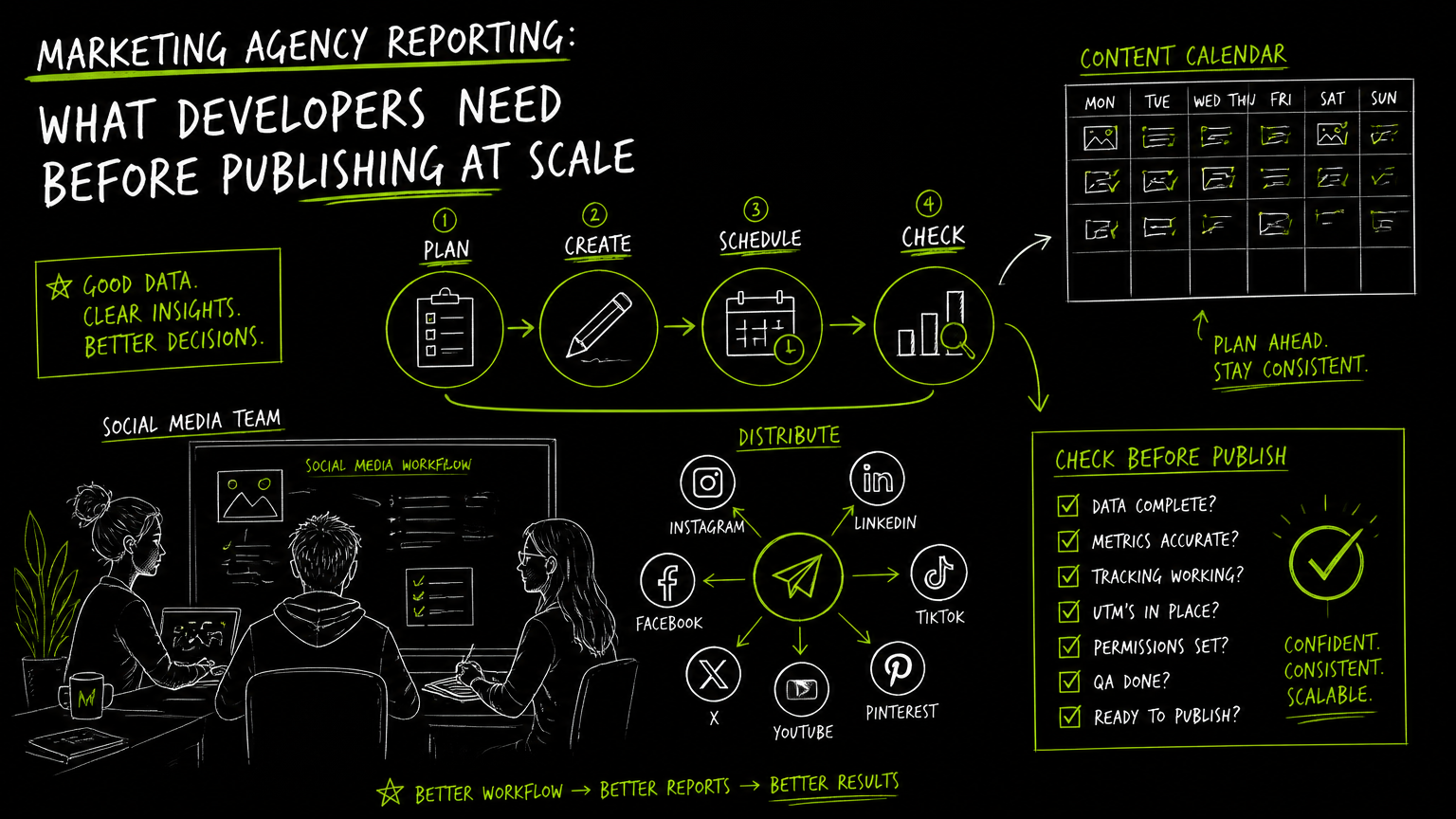
It is 4:58 p.m. on reporting day, and the account manager is asking why the LinkedIn post in the client deck does not match the post your scheduler says went live. That is the moment when marketing reporting tools stop being “dashboard software” and become a workflow design problem.
For agencies publishing across multiple social platforms, the report is only as reliable as the path from brief, media file, account, post, schedule, publish event, and final client-facing summary.
This guide gives developers and agency operators a practical way to evaluate reporting workflows before scaling publishing volume.
Quick Answer
Quick answer: For agencies, the best marketing reporting tools are the ones that match how campaigns are actually shipped: connected accounts, media uploads, scheduled posts, approvals, and platform-specific failures. Developers should evaluate reporting software against the publishing workflow first, then check dashboards, exports, authentication, access control, and limits.
What should developers solve before a report is generated?
Agency reporting starts before the dashboard, because every report depends on clean campaign, account, media, and publishing records.
A marketing agency report is a client-facing summary of marketing activity and results. In a social media workflow, that usually means the agency needs to explain what was planned, what was published, where it was published, and what the client should review next.
A developer-owned reporting workflow is the system behind that report: IDs, account mappings, media references, timestamps, publishing status, permissions, and the data structure that lets non-technical teams trust what they see.
The mistake is treating reporting as the last step.
In practice, the report is the final view of several earlier decisions:
- Which client owns each social profile?
- Which campaign owns each post?
- Which media file was uploaded, approved, and published?
- Which platform accepted, rejected, or changed the post?
- Which user or system action triggered the publish event?
- Which limits apply to uploads, scheduled posts, file size, profiles, and API access?
Decision rule: If you cannot trace a client-facing report line back to the account, media file, post record, and publish status, the reporting workflow is not ready to scale.
This matters most when the agency moves from a few manually checked posts to bulk scheduling, multiple profiles, and recurring client reports.
Marketing Reporting Tools: Developer Evaluation Checklist
The most useful evaluation is not “Which dashboard looks best?” but “Which tool can represent the workflow we actually run?”
Use this checklist before committing to agency reporting software, marketing dashboard software, or a custom reporting layer.
| Need | What to check | Why it matters |
|---|---|---|
| Client and account mapping | Can each social profile be mapped to the correct client, brand, market, or campaign? | Reporting breaks quickly when one connected account serves multiple clients or business units. |
| Platform coverage | Which platforms are supported, and are they supported for the workflows you use? | TikTok, Instagram, Facebook, YouTube, X/Twitter, Threads, LinkedIn, and Pinterest all have different publishing and reporting realities. |
| Media handling | How are images, videos, thumbnails, folders, and file references stored? | The report often needs to explain what asset was used, not just that a post exists. |
| Scheduled versus published state | Can the system distinguish drafted, scheduled, published, failed, and edited posts? | A scheduled post is not proof that the content went live. |
| Authentication | How does API authentication work, and can credentials be rotated? | Agencies need a practical way to manage access without hard-coding secrets into scripts. |
| API access | Is API access available on the plan you intend to use? | Some tools reserve API features for higher plans or specific product tiers. |
| Upload limits | What are the monthly upload limits and maximum file sizes? | Bulk publishing workflows can fail for operational reasons before reporting even starts. |
| Profile limits | How many social profiles are included? | Agency plans often need enough profiles for multiple clients, channels, and test accounts. |
| Failure handling | Are platform errors, rejected posts, and retry attempts captured? | Client reports should not silently omit failed posts. |
| Export and sharing | Can account managers turn the data into a client-ready report without developer help? | A technically correct report still fails if the client team cannot use it. |
| Permission model | Can internal users, clients, and automation jobs be separated? | Reporting access and publishing access should not always be the same thing. |
| Audit trail | Can you see who created, changed, scheduled, or published content? | Agencies need a defensible workflow when a client questions a post. |
The key criterion is account-to-client mapping. If that is weak, every chart, table, and export downstream becomes harder to trust.
Important: A dashboard does not repair broken source data. If campaign IDs, profile ownership, and publish states are inconsistent, the report will only make the inconsistency easier to see.
How should publishing workflows feed reporting?
A scalable agency reporting workflow should treat publishing events as structured records, not as screenshots or manual notes.
A practical workflow looks like this:
Create the campaign record. Store the client, campaign name, objective, internal owner, and reporting period.
Connect or select the social profiles. Map each TikTok, Instagram, Facebook, YouTube, X/Twitter, Threads, LinkedIn, or Pinterest account to the right client or campaign.
Upload and classify media. Store the media file, folder, title, caption draft, thumbnail reference, and any approval status.
Create the post object. Attach platform, profile, caption, media reference, scheduled time, and campaign ID.
Publish or schedule the post. Record the requested action and the platform-specific response.
Capture status changes. Track whether the post is drafted, scheduled, published, failed, retried, or manually changed.
Generate the report. Build the client view from the same structured records, not from a separate spreadsheet maintained after the fact.
The important object is the single post identifier that ties campaign planning, media upload, publishing status, and reporting together.
Mini-example: before and after
Before:
- A strategist creates a content plan in a spreadsheet.
- A designer uploads video files into a shared folder.
- A developer publishes through a script.
- An account manager builds a client report manually.
- Nobody can quickly prove which file matched which final post.
After:
- The campaign ID is created first.
- Media files are uploaded and referenced from the post record.
- Each post is tied to a social profile and platform.
- Publishing status is stored as part of the workflow.
- The report pulls from the same records used to schedule and publish.
The second workflow is not fancier. It is just easier to debug.
Tip: Preserve campaign IDs and post IDs across planning, upload, publishing, and reporting. Renaming a campaign for presentation is fine; losing the underlying identifier is not.
What can break when reports depend on social publishing APIs?
Reporting becomes fragile when API-driven publishing does not capture enough context about media, authentication, platform state, and failure modes.
Developers usually notice this after the first few edge cases:
- A video was uploaded successfully but failed during platform publishing.
- A post was scheduled but never moved to a confirmed published state.
- The wrong connected account was selected for a client.
- An API key was rotated, but a background job still used the old credential.
- A file exceeded a tool’s maximum upload size.
- A platform-specific field was required for one network but irrelevant to another.
- A retry created duplicate internal records.
- A client report counted scheduled posts as live posts.
These are not abstract technical risks. They create real account-management problems.
A useful reporting workflow needs a failure taxonomy. At minimum, separate:
- Upload failure: The media never entered the system correctly.
- Authentication failure: The credential or connected account could not be used.
- Validation failure: The post payload was incomplete or unsupported.
- Publishing failure: The platform did not accept the post.
- Status uncertainty: The system cannot confidently say whether the post went live.
- Reporting mismatch: The report view does not match the publishing record.
Watch out: “Connected” can mean different things in different products. Verify whether a connection supports publishing, reporting, account selection, media upload, or only dashboard viewing.
For developers, the reporting question is not only “Can I call the API?” It is “Can I explain what happened when the API call did not produce the expected client-facing result?”
Common mistakes, fixes, and limits to verify
Most agency reporting problems come from treating operational limits as afterthoughts.
Here are the mistakes I would check before adopting any agency reporting tool or building around one.
| Mistake | What happens | Practical fix |
|---|---|---|
| Counting scheduled posts as published posts | Client reports overstate completed work. | Store scheduled and published as separate states. |
| Using platform names without profile IDs | Reports mix accounts with similar names. | Report by platform plus connected profile identifier. |
| Keeping media files outside the workflow | Nobody can verify which asset was published. | Track the media object lifecycle from upload to publish. |
| Ignoring plan limits | Bulk upload or scheduling stops unexpectedly. | Verify upload quotas, scheduled post limits, profile limits, file size, and API access before rollout. |
| Hard-coding API credentials | Rotating keys breaks hidden jobs. | Use a credential management process and test key rotation. |
| Building reports from manual spreadsheets | Reports drift from the publishing system. | Use structured campaign, post, and status records as the source of truth. |
| Treating all platforms the same | Platform-specific publishing issues disappear from reports. | Store platform-specific responses and error states. |
| Giving clients the wrong access | Clients may see internal drafts or operational details. | Separate internal workflow permissions from client reporting views. |
There are also limits to verify before choosing online marketing reporting software:
- Supported platforms for your actual channels.
- Whether the tool supports publishing, reporting, or both.
- Whether media uploads are included in your workflow.
- Whether API access is available on the plan you need.
- Whether account/profile counts match your client structure.
- Whether scheduled post limits match your content volume.
- Whether maximum file size supports your video workflow.
- Whether authentication can be rotated without breaking production jobs.
- Whether reports can distinguish scheduled, published, failed, and retried posts.
- Whether your team can export or share reports in the format clients expect.
A practical rule: if a limit can stop publishing, it can also distort reporting.
When DOHOO may fit
DOHOO may fit when an agency or developer team needs API-supported social publishing, media upload workflows, connected accounts, and scheduling before reporting.
DOHOO is a social media automation platform for creating, scheduling, and publishing content across multiple social platforms from one dashboard. Verified platform coverage includes TikTok, Instagram, Facebook, YouTube, X/Twitter, Threads, LinkedIn, and Pinterest.
For developer workflows, DOHOO supports API keys, authentication through the X-API-Key header, and the ability to retrieve and rotate an API key. It also has an upload flow with presigned upload URLs, file lists, direct file access, and folder management.
Public plan data lists API access as unavailable on Blogger, available on Business at $39.99/mo, and available on Agency at $79.99/mo. Public plan data also lists Business with 250 uploads / month, 15 included profiles, 250 scheduled posts, and 2 GB maximum file size; Agency lists 550 uploads / month, 30 included profiles, 550 scheduled posts, and 4 GB maximum file size.
That makes API access is plan-dependent an important buying check.
DOHOO should be evaluated as part of the publishing and workflow layer, not as a generic replacement for every client reporting dashboard. If your main problem is custom executive reporting, compare reporting-specific tools carefully. If your main problem is API-driven multi-platform publishing with media management, it may be relevant to test.
Key takeaways
Agency reporting is a workflow problem before it is a dashboard problem.
- Start with campaign, client, account, media, post, and status records.
- Evaluate reporting software against your real publishing workflow.
- Keep scheduled and published states separate.
- Verify platform coverage for TikTok, Instagram, Facebook, YouTube, X/Twitter, Threads, LinkedIn, and Pinterest if those channels matter to your agency.
- Check upload limits, profile limits, scheduled post limits, file size, and API access before rollout.
- Treat authentication, key rotation, and failure states as reporting requirements.
- Do not let manual spreadsheets become the source of truth for client reports.
- Choose marketing reporting tools that make your workflow easier to explain, not just easier to visualize.
Final takeaway: if your agency needs API-driven publishing, media uploads, scheduling, and multi-platform social workflows as part of the reporting pipeline, review DOHOO’s developer workflow and plan limits before building custom automation around it.
FAQ
What is marketing agency reporting?
Marketing agency reporting is the process of turning campaign activity and performance information into client-facing updates. For social media agencies, that often includes planned posts, published posts, platform coverage, content status, and commentary from the account team.
What should developers look for in agency reporting tools?
Developers should look for clean account mapping, reliable identifiers, API access, authentication controls, media handling, status tracking, and clear limits. A polished dashboard is useful, but it should not be the first buying criterion if the underlying workflow is messy.
Why does publishing workflow matter for reporting?
Publishing workflow matters because reports often depend on the same objects used to schedule and publish content. If media files, connected accounts, post IDs, and publish states are not tracked, the final client report can become a manual reconstruction rather than a reliable system output.
Should an agency buy reporting software or build a custom dashboard?
Buy when the reporting workflow is standard enough for your account team to use without developer support. Build or extend when you need custom campaign IDs, platform-specific publishing states, internal approval logic, or deeper control over how publishing data becomes a client report.
What limits should agencies verify before scaling social reporting?
Verify supported platforms, included profiles, upload volume, scheduled post volume, maximum file size, API availability, authentication model, and how failed posts are handled. These limits affect both publishing operations and the accuracy of reports built from those operations.