 DOHOO
DOHOO
Developer Api
Social Media Analytics Tools: What Developers Need Before Publishing at Scale
 Vitalii
12 min read
Vitalii
12 min read
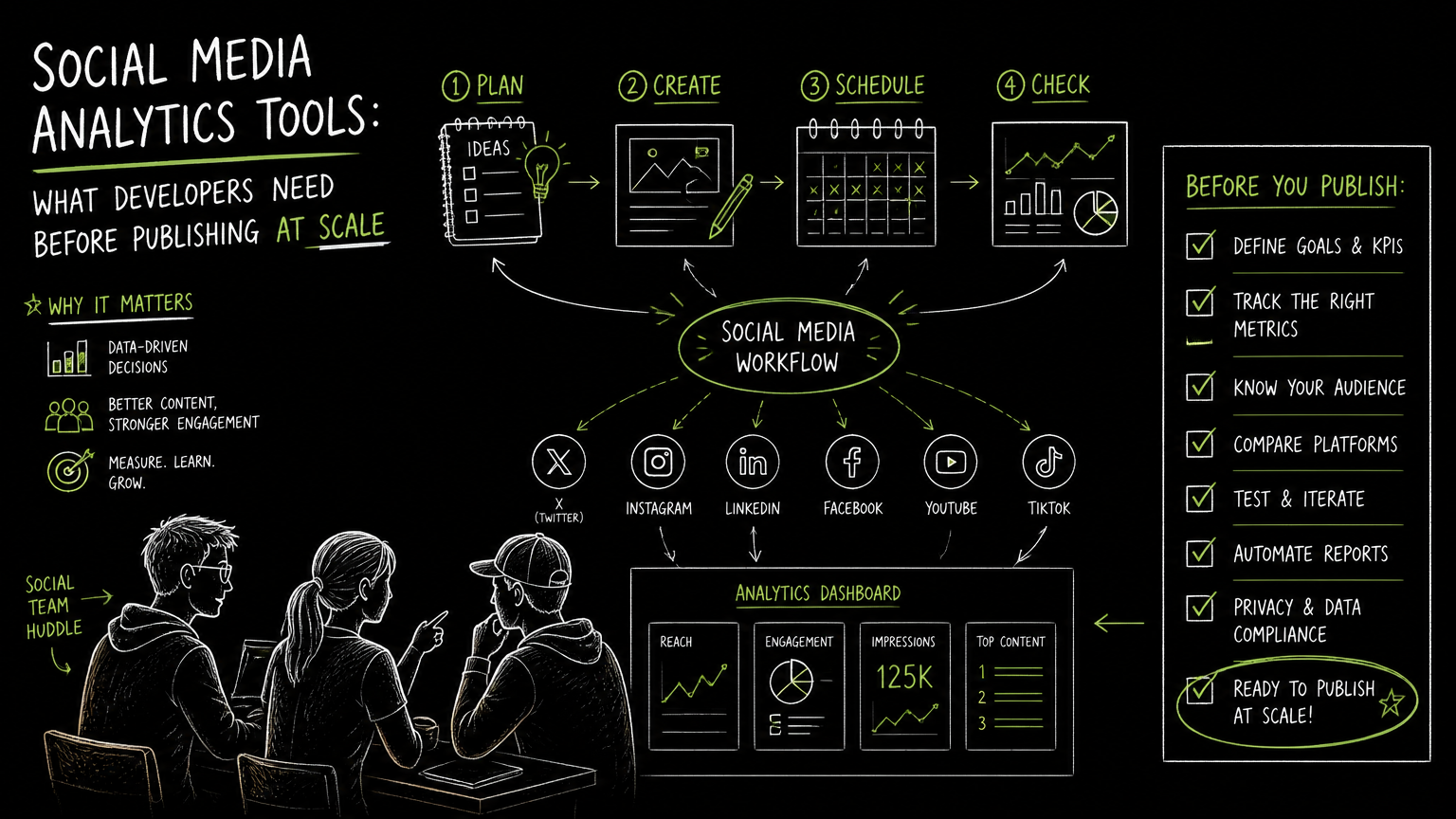
You are about to let a campaign system publish hundreds of social posts, and the reporting team is already asking how those posts will show up in the marketing dashboard. That is the moment to evaluate social media analytics tools as workflow infrastructure, not just reporting screens. The right question is not “Which chart looks best?” It is “Can our publishing, media, account, and reporting flows stay reliable when volume rises?”
This guide gives developers, marketing operations teams, and agencies a practical framework for choosing tools before publishing at scale.
Quick Answer
Quick answer: Social media analytics tools should be evaluated by platform coverage, account mapping, media handling, authentication, reporting workflow, and failure visibility. A marketing dashboard is useful only when the upstream publishing and data processes are consistent enough for teams to trust what they see and act on.
What Should Developers Check Before Choosing Social Media Analytics Tools?
Developers should check the workflow behind the dashboard before judging the dashboard itself.
A polished report can hide fragile operations. If posts are created in one system, uploaded through another, approved in a spreadsheet, and reported in a separate dashboard, small mismatches become expensive at scale.
Use this checklist before shortlisting tools:
| Need | What to check | Why it matters |
|---|---|---|
| Platform coverage | Which social platforms are supported, such as TikTok, Instagram, Facebook, YouTube, X/Twitter, Threads, LinkedIn, and Pinterest | Missing one core channel usually creates manual workarounds |
| Account mapping | How the tool handles multiple social profiles, brands, regions, or clients | Reporting breaks when teams cannot trace posts back to the right account |
| Media workflow | Whether the tool supports upload flows, file lists, direct file access, and folder management | Social publishing depends on reliable media handling, not just captions |
| Authentication | How API keys, connected accounts, and key rotation work | Security and operational continuity depend on predictable access control |
| Publishing workflow | Whether posts can be scheduled, reviewed, and published across platforms | Analytics are easier to trust when publishing records are consistent |
| Failure visibility | How failed uploads, rejected posts, or missing media are surfaced | Silent failures create reporting gaps that look like performance issues |
| Dashboard design | Whether reports separate channel, campaign, post, and account views | A single blended chart can confuse teams with different decisions to make |
| Limits | Upload counts, scheduled post counts, profile limits, file-size limits, and API access | Limits affect architecture, rollout plans, and commercial fit |
Decision rule: If the tool cannot explain how a post moves from media upload to publishing to reporting, treat the dashboard as incomplete infrastructure.
The most useful dashboard is often the one that makes operational gaps visible before a campaign goes live.
How Does a Marketing Dashboard Fit Into a Publishing Workflow?
A marketing dashboard is a reporting interface that helps teams monitor campaign, channel, or content activity across marketing workflows.
For social media teams, the dashboard is only the final surface. The workflow usually starts much earlier:
- A campaign manager defines the content plan.
- A designer or video editor prepares media files.
- A social media manager writes captions and platform-specific copy.
- A developer or marketing operations owner connects accounts and automation.
- Posts are scheduled or published.
- The team reviews analytics and reporting views.
The common mistake is buying for step six while ignoring steps two through five.
Important: Reporting quality depends on workflow consistency. If teams rename campaigns manually, upload assets in different places, or publish outside the system, the dashboard will inherit that disorder.
A practical dashboard design should answer different questions for different roles:
- Marketing leadership: What is happening across brands, channels, or campaigns?
- Social media managers: Which posts were published, scheduled, or missed?
- Developers: Which API calls, uploads, authentication paths, or account mappings are involved?
- Agencies: Which client, profile, or campaign does each post belong to?
- Content teams: Which media assets are ready, reused, or pending?
The dashboard is not the workflow. It is the visible layer of the workflow.
What API Concepts Matter for Social Media Publishing at Scale?
API-driven publishing needs stable authentication, predictable payloads, media handling, and clear failure states.
When a team moves from manual posting to automated publishing, developers need to think beyond “Can we send a post?” The real question is whether the system can handle repeatable publishing without making support work harder.
Key API concepts to evaluate:
Authentication
Authentication is the process of proving that a system or user is allowed to access a service.
For developer workflows, check:
- Whether API access exists on the plan you need
- How keys are created
- Whether keys can be rotated
- Whether authentication is sent through headers or another mechanism
- How access is separated across teams, clients, or environments
Key rotation matters because long-lived credentials eventually become an operational risk. Even if your first rollout is small, plan for a future where access needs to be changed without breaking every workflow.
Payload design
A payload is the structured data sent in an API request, such as post text, media references, account identifiers, or platform-specific options.
Before selecting a tool, ask:
- Are platform-specific fields clearly separated?
- Can your system store the final payload that was sent?
- Can you trace a published post back to the campaign, account, and media asset?
- Are errors returned in a way your team can log and investigate?
A simple before/after helps.
Before: A marketer pastes a caption into each platform and uploads the same video manually. Reporting later shows posts, but nobody knows which source asset or campaign brief produced them.
After: The campaign system stores the caption, account, media reference, and publishing status before the post is sent. The reporting team can trace the published item back to the original workflow.
That traceability is what makes reporting useful during scale.
Media upload
Media upload is the process of transferring files such as videos, images, or thumbnails into a system before publishing.
For social media workflows, media is often the fragile part. Captions are small. Video files are not. A reliable tool should make the upload path explicit, especially when developers are building automation.
Check whether the product supports:
- Upload flows
- Presigned upload URLs
- File lists
- Direct file access
- Folder management
Watch out: If media files are uploaded outside the publishing system, your dashboard may show a post record without giving teams a reliable way to inspect the asset that was actually used.
Failure modes
Failure modes are the predictable ways a workflow can break.
For social publishing, common failure points include:
- Missing or expired authentication
- Wrong account selected
- Media upload incomplete
- File too large for the selected plan or workflow
- Scheduled post not created
- Platform-specific publishing request rejected
- Duplicate posting caused by retry logic
Do not wait for a campaign launch to discover these. Build a small test workflow that includes upload, scheduling, publishing, and reporting review.
Which Dashboard Views Actually Help Marketing Teams?
Useful dashboard views match real decisions, not internal data structures.
A social media report dashboard can become cluttered quickly. The fix is not always more charts. It is separating views by decision type.
Consider these practical dashboard views:
| View | Primary user | Useful question |
|---|---|---|
| Channel view | Social media manager | What is happening on each platform? |
| Campaign view | Marketing manager | Which planned content went live? |
| Account view | Agency or regional team | Which brand, client, or profile does this activity belong to? |
| Publishing status view | Operations team | What is scheduled, published, failed, or missing? |
| Media view | Content team | Which files are uploaded, organized, and ready to use? |
| Executive summary | Leadership | What should we pay attention to this week? |
Publishing status is underrated. Many teams want performance reports first, but at scale the first operational question is often simpler: “Did the content go out correctly?”
Tip: Build one dashboard view for action and another for reporting. A manager deciding what to fix today needs a different screen than an executive reviewing a campaign summary.
Avoid designing one dashboard for everyone. That usually creates a screen that satisfies nobody.
How Should You Evaluate Tools in a Real Workflow?
Evaluate tools with a controlled publishing scenario, not a feature checklist alone.
A good evaluation process should test how the system behaves under the kind of work your team actually does.
Use this sequence:
Choose a representative campaign
- Include at least one image or video asset.
- Include more than one social profile if your team manages multiple accounts.
- Include at least two platforms that matter to your business.
Map the workflow
- Where does the brief start?
- Who uploads media?
- Who approves captions?
- Who schedules posts?
- Who checks reporting?
Test account connection and authentication
- Confirm who owns credentials.
- Confirm how access is granted.
- Confirm how keys or connected accounts can be rotated or changed.
Run the media path
- Upload files.
- Organize them.
- Confirm direct access if your workflow requires it.
- Check file-size constraints against your real assets.
Publish or schedule a small batch
- Use the normal approval path.
- Capture post identifiers, account mapping, and status.
- Watch for platform-specific differences.
Review the dashboard
- Can the team see what was scheduled?
- Can they see what published?
- Can they identify failures?
- Can they connect activity back to the campaign?
Document operational gaps
- Manual steps
- Missing fields
- Unclear ownership
- Plan limits
- API access constraints
Test with real assets. Demo content rarely exposes file handling, account mapping, or approval problems.
Common Mistakes When Buying Social Media Analytics Tools
Most bad tool decisions come from testing reports without testing operations.
Here are the mistakes I would actively avoid.
Mistake 1: Treating analytics as separate from publishing
If reporting and publishing are disconnected, teams spend time reconciling what happened. The fix is to document how a post is created, uploaded, scheduled, published, and then reported.
Mistake 2: Ignoring plan limits during architecture
Upload counts, scheduled post limits, included profiles, file-size limits, and API access can shape the workflow. The fix is to compare limits against your expected operating model before implementation.
Mistake 3: Designing only for one brand or account
A workflow that works for one LinkedIn page or one Instagram profile may not work for an agency or multi-brand team. The fix is to test multiple profiles during evaluation.
Mistake 4: Hiding failures from marketing users
Developers may log API errors, but marketers need visible status. The fix is to expose simple states such as scheduled, published, failed, missing media, or needs review.
Mistake 5: Overbuilding dashboards too early
A small team may not need a complex digital marketing reporting dashboard on day one. The fix is to start with the few views that drive action, then expand once the workflow is stable.
Quick takeaway: A dashboard that shows fewer metrics but clearly identifies publishing status, account ownership, and missing assets is often more useful than a crowded report.
What Limits Should You Verify Before Signing?
Limits are not fine print when your workflow depends on uploads, profiles, scheduled posts, and API access.
Before choosing a platform, verify these items in writing or in the product plan details:
- Supported platforms: Confirm every channel you need, such as TikTok, Instagram, Facebook, YouTube, X/Twitter, Threads, LinkedIn, and Pinterest.
- Included profiles: Check how many social accounts or profiles are included.
- Upload volume: Compare monthly upload limits with your publishing calendar.
- Scheduled posts: Confirm whether scheduled post counts match campaign volume.
- File size: Test with your actual media assets, especially video.
- API access: Confirm whether the plan includes API access.
- Authentication model: Check whether keys can be obtained and rotated.
- Media management: Confirm upload flows, file lists, direct access, and folders if your team relies on them.
- Billing and trial terms: Verify trial and billing notes directly before rollout.
API access by plan is especially important for developers. A tool can be a good manual dashboard and still be the wrong fit for an automated publishing system.
When DOHOO May Fit
DOHOO may fit teams that need API-supported social publishing, media upload workflows, and multi-platform scheduling from one dashboard.
DOHOO supports publishing to TikTok, Instagram, Facebook, YouTube, X/Twitter, Threads, LinkedIn, and Pinterest. Its developer workflow includes API keys, authentication through the X-API-Key header, and the ability to obtain and rotate an API key.
For media-heavy workflows, DOHOO includes an upload flow, an API for presigned upload URLs, file lists, direct file access, and folder management. It also supports planning and scheduled posting.
Public plan details list API access on the Business plan at $39.99/mo and the Agency plan at $79.99/mo; API access is not included on the Blogger plan. Published limits include uploads per month, included profiles, scheduled posts, AI transcription minutes, and maximum file size by plan.
This makes the product most relevant when your team is building publishing automation around connected accounts, file handling, and scheduled social posts rather than only looking for a standalone reporting screen.
Key Takeaways
A social media analytics tool should be evaluated as part of the full publishing system.
- Start with workflow requirements, not dashboard screenshots.
- Confirm platform coverage before designing reports.
- Treat media upload as a first-class part of the architecture.
- Verify authentication, API access, and key rotation early.
- Test multiple accounts if your team manages brands, regions, or clients.
- Make failure states visible to both developers and marketers.
- Check plan limits against real campaign volume.
- Build dashboard views around decisions, not vanity reporting.
The best tool is the one your team can operate reliably when publishing volume increases.
FAQ
What is the difference between a marketing analytics dashboard and a social media report dashboard?
A marketing analytics dashboard can cover multiple marketing channels and workflows. A social media report dashboard focuses specifically on social platforms, posts, accounts, media, and publishing outcomes. For scaled publishing, the social dashboard should also help teams understand status and workflow issues.
What should developers ask before integrating a social publishing tool?
Developers should ask how authentication works, whether API access is available on the required plan, how media uploads are handled, and how failures are returned. They should also confirm whether account mapping and scheduled publishing fit the team’s workflow.
Do small teams need API-driven social media analytics tools?
Not always. A small team with low posting volume may be fine with a manual dashboard and scheduling workflow. API-driven workflows become more useful when teams manage multiple profiles, repeated campaigns, bulk uploads, or internal systems that need to trigger publishing.
Why does media management matter for analytics?
Media management matters because social posts often depend on specific files, versions, folders, and upload states. If the media workflow is disconnected from publishing, teams may struggle to trace what was actually posted when reviewing analytics.
Which platforms should a social media workflow support?
That depends on your audience and operating model. Common platforms to verify include TikTok, Instagram, Facebook, YouTube, X/Twitter, Threads, LinkedIn, and Pinterest. The important step is to confirm coverage before committing to a dashboard or integration.
Final Takeaway
A marketing dashboard is only trustworthy when the publishing workflow behind it is consistent, traceable, and visible to the people who operate it.
If your team is building API-driven social publishing with media uploads, connected accounts, and scheduled posts, review DOHOO’s developer workflow and plan limits to see whether it fits your architecture.