 DOHOO
DOHOO
Ai Social Content
Caption Pop Ai: How to Build a Faster Content Workflow
 Vitalii
11 min read
Vitalii
11 min read
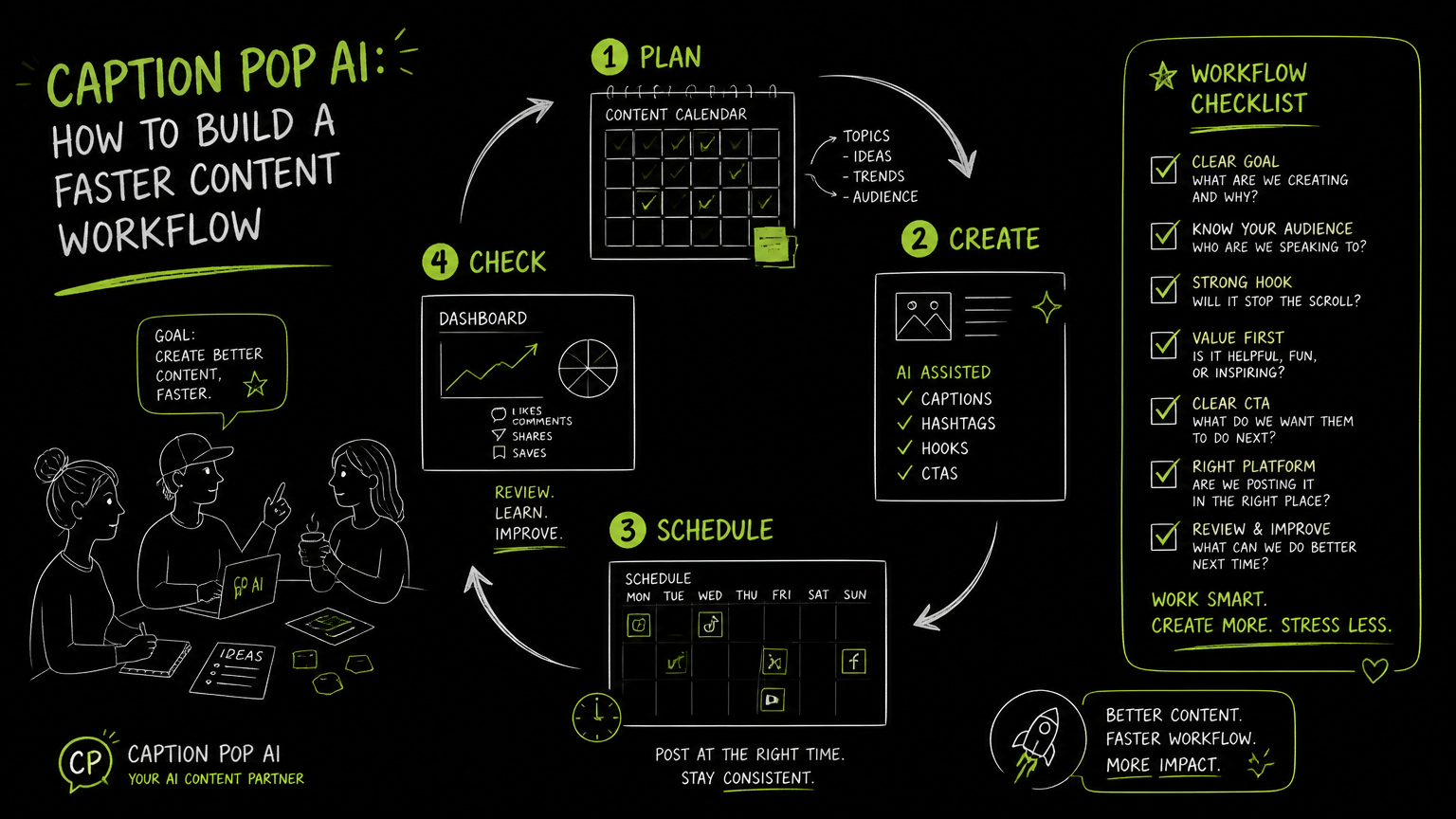
You have ten posts waiting, three channels to update, a product manager asking for “just a sharper hook,” and a designer sending the final image five minutes before the calendar review. That is where an ai caption generator can help—but only if it fits the workflow around captions, approvals, scheduling, and publishing. The goal is not to generate clever lines in isolation; it is to reduce handoffs without losing control.
This guide gives you a practical way to evaluate caption tools and build a faster, safer content workflow.
Quick Answer
Quick answer: Caption Pop Ai searches are usually about finding a faster way to write social captions. The right ai caption generator should create editable caption options, support platform-specific context, fit your approval process, and help prepare posts for scheduling without replacing human review, brand judgment, or final publishing checks.
What Does “Caption Pop Ai” Usually Mean in a B2B Workflow?
“Caption Pop Ai” is best treated as a search for AI-assisted caption creation, not as a complete content operations system by itself.
For B2B teams, the real job is rarely “write one caption.” The job is usually:
- Turn a campaign idea into channel-ready post copy.
- Adapt the same message for Instagram, TikTok, LinkedIn, Facebook, X/Twitter, Threads, Pinterest, or YouTube.
- Add hashtags where they make sense.
- Route the draft through review.
- Schedule or publish without mixing up assets, captions, and accounts.
That means your evaluation should cover both caption quality and workflow fit.
A caption generator that produces five decent options but forces your team to copy, paste, rename files, and manually check every platform can still slow you down. A simpler tool that fits the review and publishing flow may be more useful.
Quick takeaway: Treat AI captions as one step in the content supply chain: brief, draft, edit, approve, schedule, publish, and learn.
How Should You Evaluate an AI Caption Generator?
An AI caption generator should be judged by how reliably it helps your team move from raw idea to publishable post.
Use this checklist before choosing a tool:
| Need | What to check | Why it matters |
|---|---|---|
| Caption drafting | Can it generate multiple caption options from a prompt, image context, or campaign notes? | Your team needs options, not a single sentence to accept blindly. |
| Platform fit | Can you adapt copy for Instagram, TikTok, LinkedIn, Facebook, X/Twitter, Threads, Pinterest, or YouTube workflows? | A LinkedIn post and an Instagram caption usually need different structure and tone. |
| Hashtag support | Does it help prepare hashtags where relevant? | Hashtags are part of social prep, but they should not crowd every post. |
| Brand voice control | Can editors revise quickly and keep recurring language consistent? | AI output needs a human pass for tone, claims, and clarity. |
| Media context | Can the workflow handle photos, videos, reels, carousels, or other assets you publish? | Captions often depend on the visual, format, and call to action. |
| Approval flow | Can drafts move through review without losing the latest version? | Version confusion is one of the fastest ways to publish the wrong caption. |
| Scheduling readiness | Does the tool help you prepare posts for a calendar or publishing queue? | Caption generation is only useful if it connects cleanly to execution. |
| Bulk work | Can your team prepare many posts at once? | B2B teams often plan campaigns in batches, not one post at a time. |
| Developer needs | Are publishing endpoints or API options available if your workflow requires automation? | Some teams need programmatic publishing rather than manual scheduling. |
Decision rule: If a tool improves writing but adds manual cleanup before publishing, it is a writing aid—not a workflow accelerator.
A Practical Caption Workflow That Does Not Break at Publishing
A strong caption workflow separates creative drafting from publishing control.
Here is a simple process that works for campaign teams, agencies, and lean marketing departments.
1. Start with the post brief, not the caption
Define the post before asking AI to write.
Include:
- Campaign or product theme
- Target audience
- Platform
- Asset type, such as image, video, reel, carousel, article, or short post
- Main message
- Required call to action
- Claims or phrases to avoid
- Hashtag guidance, if relevant
This keeps the generated caption from drifting into generic copy.
2. Generate caption variations by role
Ask for variations with different purposes, not just different wording.
For example:
- A direct announcement caption
- A problem-solution caption
- A short teaser caption
- A founder or executive voice caption
- A customer education caption
- A CTA-led caption
This gives editors useful options instead of five near-duplicates.
3. Edit for platform behavior and brand risk
Do not approve AI captions just because they sound polished.
Check for:
- Unsupported product claims
- Overpromising language
- Wrong audience assumptions
- Hashtags that feel unrelated
- Calls to action that do not match the landing page
- Captions that describe an image or video inaccurately
Human review is still the control point for accuracy, brand voice, and legal-safe language.
4. Prepare the post package
A publishable post package should include:
- Final caption
- Approved media asset
- Platform destination
- Account or page
- Hashtags, if used
- Publish date or schedule slot
- Owner or approver
- Notes for variants across platforms
This is where many teams lose time. The caption may be ready, but the post is not.
5. Schedule and publish from a controlled queue
Once captions and assets are approved, move them into a calendar or scheduling queue.
This prevents last-minute copy-paste mistakes, especially when one campaign has several platform versions.
Example: Before: “Launch post caption” lives in a doc, the image lives in a Slack thread, and the LinkedIn version is edited in the scheduler. After: each platform version has one final caption, one attached asset, one owner, and one scheduled slot.
Where Do AI Caption Tools Help Most?
AI caption tools help most when the bottleneck is first-draft production, caption variation, or adapting one campaign idea into multiple social formats.
They are especially useful for:
- Turning rough campaign notes into a first draft
- Creating alternate hooks for the same post
- Rewriting a caption for a different platform
- Preparing captions and hashtags for Instagram or TikTok posts
- Drafting social copy from video or transcription-based content
- Reducing blank-page time for recurring posts
The practical value is speed to a reviewable draft.
The risk is treating that draft as finished.
A good workflow makes AI responsible for draft acceleration and keeps humans responsible for message, compliance, and final judgment.
What Mistakes Slow Down Caption Workflows?
Most caption workflow problems come from weak handoffs, not weak writing.
Here are the common mistakes and how to fix them.
| Mistake | What happens | Specific fix |
|---|---|---|
| Writing captions before the asset is final | The copy describes the wrong visual or misses the key frame. | Draft early, but require an asset-context review before approval. |
| Using one caption everywhere | LinkedIn, Instagram, TikTok, and X/Twitter posts feel mismatched. | Create a platform variant for each important channel. |
| Letting AI invent details | Captions include claims, features, or promises that were not in the brief. | Add a fact-check step and restrict prompts to approved inputs. |
| Overusing hashtags | The caption looks automated or cluttered. | Use hashtags only where they support the platform and campaign. |
| Copying from doc to scheduler manually | Teams paste the wrong version into the wrong account. | Store the final caption with the target platform and asset. |
| Skipping approval status | Nobody knows whether the caption is draft, reviewed, or final. | Use clear labels: draft, needs edits, approved, scheduled, published. |
| Confusing social captions with video captions | Teams evaluate the wrong feature set. | Decide whether you need post copy, video subtitles, or both. |
Watch out: “Caption” can mean social post copy or on-video subtitles. If your team needs both, verify both capabilities before choosing a tool.
What Should You Verify Before Choosing a Caption App?
Before choosing a caption app, verify the workflow details that will affect daily use.
Do not stop at the output sample. A good demo caption does not prove the tool fits your team.
Check these areas:
Supported content formats
Confirm whether the workflow supports the formats you actually publish, such as:
- Photos
- Videos
- Reels
- Carousels
- Articles
- Images
- Short text posts
If your team publishes Instagram carousels, LinkedIn articles, TikTok videos, and YouTube content, your tool evaluation should reflect that mix.
Platform destinations
Confirm the platforms your team needs.
In B2B social operations, common destinations may include Instagram, TikTok, LinkedIn, Facebook, YouTube, X/Twitter, Threads, and Pinterest.
The more platforms you manage, the more important it becomes to track which caption belongs where.
Account management
If you manage multiple brands, regions, executives, or client accounts, verify how the tool handles multiple accounts.
This matters for agencies and distributed marketing teams because a wrong-account post is not a small formatting issue.
Scheduling and calendar flow
Ask where approved captions go next.
A caption generator that does not connect to your planning process may still be useful, but it will require an extra operational step.
Bulk preparation
If your team works in batches, verify bulk upload or bulk preparation options.
Batch workflows are common when teams plan monthly campaigns, product launches, event promotion, or recurring thought leadership posts.
AI transcription needs
If video or audio content feeds your social workflow, check whether transcription is part of the toolset.
Transcription can help teams turn spoken content into post drafts, clips, or social copy, but only if it fits the content preparation process.
API and developer requirements
If your team has a custom content system, internal approval tool, or automation layer, verify whether publishing APIs exist.
Developer-friendly publishing workflows can matter when marketing operations need to connect content preparation to automated publishing.
Is an AI Caption Generator Enough by Itself?
An AI caption generator is enough only when your main problem is writing captions, not managing social publishing.
For a solo creator or very small team, a standalone caption maker may be fine. If the workflow is “generate caption, edit, paste into one app,” a lightweight tool can do the job.
For a B2B team, the bigger issue is usually coordination:
- Who owns the final copy?
- Which asset is approved?
- Which account gets the post?
- Has the caption been adapted for each platform?
- Is the post scheduled?
- Has anything changed after review?
The caption is only one object in a larger publishing system.
A faster caption draft does not help much if the team still loses time during approval and scheduling.
The best caption workflow is not the one that writes the most options; it is the one that gets the right caption attached to the right asset and published to the right account.
When DOHOO May Fit
DOHOO may fit teams that want AI-assisted caption preparation inside a broader social media automation workflow.
DOHOO is positioned as a social media automation platform for creating, scheduling, and publishing content across social platforms from one dashboard. Its product knowledge includes AI-related workflows for captions, hashtags, and transcription, plus planning, calendar, bulk upload, media management, and multi-account work.
It supports publishing workflows across TikTok, Instagram, Facebook, YouTube, X/Twitter, Threads, LinkedIn, and Pinterest. Its confirmed platform-specific claims include AI captions and hashtags for TikTok and Instagram, Instagram photos, videos, reels, carousels, and Instagram Business accounts, plus LinkedIn articles, images, videos, personal profiles, and company pages.
For developer-led teams, DOHOO also has publishing endpoints documented for Facebook, Instagram, TikTok flow, YouTube, X/Twitter, LinkedIn, Pinterest, and Threads.
This makes it worth evaluating when your requirement is not just “generate captions,” but prepare, schedule, and publish social content from a more centralized workflow.
Key Takeaways
- A caption tool should be evaluated as part of the full content workflow, not as a standalone writing toy.
- The strongest use case is moving from campaign notes to editable, platform-aware caption drafts.
- Human review remains necessary for brand voice, accuracy, claims, and final approval.
- Verify whether “caption” means social post copy, video subtitles, or both.
- Teams managing multiple platforms should prioritize scheduling readiness, account control, asset matching, and approval status.
- Bulk preparation, transcription, and publishing APIs matter only if they match how your team already works.
- The right workflow reduces copy-paste errors as much as it reduces writing time.
FAQ
What is an ai caption generator?
An ai caption generator is a tool that helps create caption drafts from prompts, images, campaign notes, or content context. In social media workflows, it is usually used to produce post copy, alternate hooks, hashtags, or platform-specific variations that a human editor reviews before publishing.
What is the difference between a caption generator and an image caption generator?
A caption generator may create social post copy from a prompt or campaign idea. An image caption generator usually uses image context to suggest text related to a picture. For business workflows, the key question is whether the output can be edited, approved, and attached to the correct publishing destination.
Are AI captions safe to publish without editing?
AI captions should be reviewed before publishing. The main risks are unsupported claims, mismatched tone, inaccurate descriptions of assets, or calls to action that do not match the campaign. A short editorial review is the safest way to keep speed without losing control.
Do I need a social media scheduler if I already use a caption app?
You may not need a scheduler if you publish occasionally to one account. You likely need scheduling or calendar support if you manage multiple platforms, accounts, campaigns, approvals, or bulk content. The decision depends on whether your bottleneck is writing or operations.
What should B2B teams test before adopting a caption tool?
Test a real campaign batch, not a generic prompt. Include the actual platforms, assets, review steps, hashtags, approval owners, and scheduled posts. This reveals whether the tool improves the workflow or simply creates another place to copy text from.
Final Takeaway
The best ai caption generator for a B2B team is the one that turns rough campaign input into approved, platform-ready captions without creating extra publishing risk.
If you need AI captions, hashtags, transcription-supported content preparation, scheduling, bulk upload, and multi-platform publishing in one workflow, consider testing DOHOO with your next campaign batch before rolling it out more broadly.