 DOHOO
DOHOO
Comparison
Marketing Automation Vendors: What to Compare Before Choosing a Tool
 Vitalii
12 min read
Vitalii
12 min read
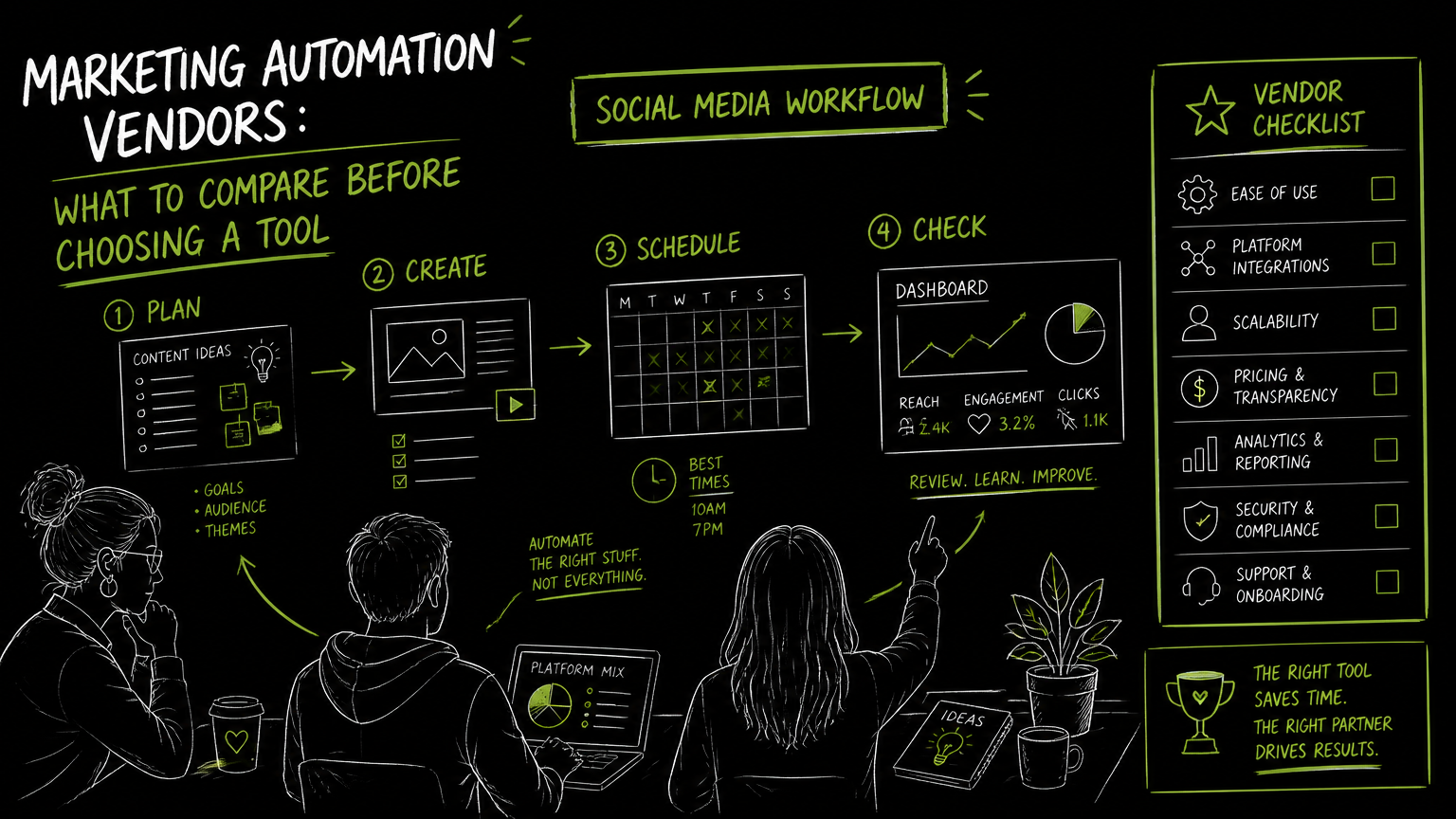
The moment usually comes when a campaign calendar has become a spreadsheet, three people are waiting on caption approvals, and someone is manually rebuilding the same post for LinkedIn, Instagram, and TikTok. That is when teams start comparing marketing automation software, but the right choice depends less on the biggest feature list and more on the workflow you need to remove from your week. This guide gives you a practical comparison framework before you shortlist vendors.
Quick Answer
Quick answer: The best marketing automation software is the one that matches your actual workflow: planning, approval, publishing, automation depth, supported channels, API needs, and budget limits. Compare vendors by the work they replace, the platforms they support, the limits they impose, and how easily your team can adopt them.
Compare Vendors With This Buying Checklist First
A good vendor comparison starts with the recurring work your team wants to automate, not with a generic feature grid.
Use this table to separate “nice to have” features from capabilities that will affect daily execution.
| Need | What to check | Why it matters |
|---|---|---|
| Campaign planning | Does the tool include a calendar, campaign view, or scheduling workspace? | A calendar reduces handoffs between planning and publishing. |
| Social publishing | Which social platforms are supported? | A tool is only useful if it covers the channels your team actually maintains. |
| Format support | Check whether posts, videos, carousels, reels, articles, or other formats are supported where relevant. | Channel support alone is not enough if the format you use is missing. |
| Automation depth | Can the vendor schedule, queue, bulk upload, or auto-publish content? | “Automation” can mean anything from reminders to direct publishing. |
| Approval workflow | Can your team review, edit, and approve content before it goes live? | This matters for agencies, regulated teams, and brands with multiple stakeholders. |
| Profile limits | How many social profiles or brand accounts are included? | Profile limits can affect cost and operational fit. |
| Upload and media limits | Check upload volume, file size, and media handling. | Video-heavy teams can hit limits faster than text-first teams. |
| API access | Is API access available, and on which plan? | API access matters when automation must connect with internal systems or custom workflows. |
| Billing fit | Compare monthly price against the limits you will actually use. | A cheaper plan is not cheaper if your normal workload exceeds its caps. |
| Team adoption | Can non-technical marketers use the tool without constant admin help? | A powerful platform that only one person understands becomes a bottleneck. |
Decision rule: If two vendors look similar, choose the one that removes the most frequent manual handoff in your current workflow.
The most useful automation tool is not the one with the longest menu; it is the one that makes your team’s repeated work disappear.
Which Marketing Automation Software Criteria Matter Most for Social Teams?
For social media teams, the most important criteria are channel coverage, scheduling workflow, content format support, and operational limits.
A broad B2B marketing automation platform may be built around email journeys, CRM handoffs, lead scoring, or nurture campaigns. A social media automation tool is usually judged on a different set of jobs: creating posts, planning a calendar, adapting media, scheduling content, and publishing across platforms.
That distinction matters because “marketing automation” is a wide category. A team looking for a digital marketing automation platform may need lifecycle email workflows. A social team may simply need a reliable way to plan, schedule, and publish content across multiple networks.
For social-heavy teams, prioritize these criteria:
Supported platforms Confirm the exact networks you need, such as TikTok, Instagram, Facebook, YouTube, X/Twitter, Threads, LinkedIn, or Pinterest.
Supported content formats A vendor may support a platform but not every format your team uses. Check formats such as photos, videos, reels, carousels, articles, and company page posts where relevant.
Scheduling and calendar workflow Look for a practical planning view where content can move from idea to scheduled post without bouncing through separate files.
Bulk work If your team plans in batches, check for bulk scheduling or bulk upload options.
Account and profile scale Agencies and multi-brand teams should compare included profiles, not just base price.
API access API access is useful when a team wants to connect publishing workflows to custom systems, internal dashboards, or other operational processes.
Watch out: A vendor can be strong for email automation and still be a poor fit for social publishing. Compare against your actual channel workflow, not the category label.
What Type of Marketing Automation Vendor Are You Actually Buying?
Most poor vendor shortlists mix different product categories that solve different problems.
Before comparing top marketing automation tools for agencies, B2B teams, or content teams, decide which kind of vendor you need.
Broad B2B marketing automation platforms
These platforms are usually considered when marketing and sales workflows need to be connected. They can be relevant for teams comparing B2B marketing automation platforms or solution marketing automation for lead management and campaign orchestration.
Choose this direction if your main problem is not social posting, but managing contacts, nurture paths, or sales-ready handoffs.
Email and lifecycle automation tools
These tools focus on email automation, customer journeys, and audience messaging. They may be useful when the core workflow is triggered communication rather than publishing content to public social channels.
Choose this direction if the main pain is sending the right message to contacts based on behavior or lifecycle stage.
Social media automation tools
These tools focus on planning, scheduling, and publishing content across social platforms. They are usually the better fit when the bottleneck is content production, campaign calendars, posting consistency, or multi-platform publishing.
Choose this direction if your team spends more time coordinating posts than building lifecycle email sequences.
Agency-oriented tools
Agency teams often need more profiles, multiple client calendars, repeatable publishing workflows, and predictable limits. The important comparison point is not only features, but how the tool behaves when one team manages many brands.
Choose this direction if account volume and repeatable client execution are the main constraints.
Tip: Write your shortlist around the workflow category first: lifecycle automation, campaign orchestration, or social publishing. Then compare vendors inside that category.
How Should You Evaluate Vendors Without Getting Lost in Feature Lists?
A useful evaluation process should recreate one real week of work, not a perfect demo scenario.
Here is a practical workflow I would use before committing to any vendor.
1. Pick one representative campaign
Choose a campaign that includes the normal mess: multiple platforms, different media formats, edits, approvals, and deadline pressure.
Do not use a simple announcement post as your test. Use a campaign that looks like your actual calendar.
2. Map the current workflow
List each step from idea to published post.
For example:
- Draft campaign message
- Create platform-specific captions
- Prepare video or image assets
- Review captions internally
- Schedule posts
- Check that the correct accounts are selected
- Publish or auto-publish
- Track what went live
This makes it clear which tasks the vendor must support.
3. Run the same campaign through each shortlisted tool
During the trial or demo, ask the vendor to show the exact workflow rather than a general tour.
Look for friction points:
- Do you need to re-upload the same media repeatedly?
- Can you see the posting calendar clearly?
- Are platform-specific posts easy to review?
- Are profile limits obvious?
- Can the team member who owns the workflow use it without help?
4. Compare limits against normal usage
Limits are not edge cases. They decide whether the tool fits after the first month.
Check:
- Number of profiles included
- Scheduled post limits
- Upload limits
- File size limits
- API access availability
- Billing terms and trial details where available
5. Score the workflow, not the demo
A vendor that feels impressive in a demo may still create extra work in production.
Use a simple scoring model:
| Evaluation area | Low score looks like | High score looks like |
|---|---|---|
| Setup | Requires constant admin help | Team can start with minimal friction |
| Scheduling | Posts are hard to visualize | Calendar makes deadlines clear |
| Platform fit | Missing key channels or formats | Covers the team’s active channels and formats |
| Limits | Normal work exceeds plan caps | Plan fits current workload with room to operate |
| Automation | Only reminds users what to do | Removes repeated manual publishing steps |
| Governance | Hard to review before posting | Review steps are visible and manageable |
Run the test with real content, not sample posts. Real assets reveal workflow problems faster than any feature checklist.
Where Do Automation Projects Break Down?
Automation projects usually fail when the buyer automates a vague goal instead of a specific workflow.
The phrase “we need automation” is not enough. You need to know whether you are automating creation, planning, review, scheduling, publishing, reporting, or handoff.
Mistake 1: Buying for every possible future use case
A team may overbuy because they imagine every department using the platform later. That can lead to a larger tool than the current team can adopt.
Fix: Buy for the workflow you can implement now, then verify expansion paths separately.
Mistake 2: Treating all platform support as equal
A vendor may support a social network, but the details still matter. For example, a team posting LinkedIn articles has different needs from a team posting short videos.
Fix: Confirm platform-specific formats during evaluation, not after purchase.
Mistake 3: Ignoring profile and upload limits
Profile limits can be easy to miss during a demo. Agencies, franchise teams, and multi-brand teams often feel this first.
Fix: Count every profile, brand account, and client account before comparing plans.
Mistake 4: Assuming API access is included
API access can be plan-dependent. If your workflow depends on custom automation, this is a buying criterion, not a technical footnote.
Fix: Ask which plans include API access and what your team is allowed to automate.
Mistake 5: Replacing a messy process with a messy tool
If captions, approvals, and assets are disorganized before implementation, software can expose the mess rather than fix it.
Fix: Define ownership before rollout: who drafts, who approves, who schedules, and who checks live posts.
Example: Before: a campaign owner sends captions in chat, a designer uploads files to a drive, and a coordinator copies everything into each platform. After: the team plans posts in one calendar, attaches the right media, reviews captions, and schedules the approved content from the same workflow.
Which Limits Should You Verify Before Choosing a Tool?
The limits that matter most are the ones tied to your normal production volume.
A plan that looks affordable can become a poor fit if it caps the exact activity your team does every week. For social media workflows, limits often show up around profiles, scheduled posts, uploads, file size, and API access.
Use this verification list before buying:
- Profiles: How many social profiles are included?
- Scheduled posts: How many posts can be scheduled in the plan period?
- Uploads: Is there a monthly upload cap?
- Media size: What is the maximum file size?
- API access: Is it included or reserved for higher plans?
- Platform details: Are the exact platforms and formats you use supported?
- Trial and billing: What happens when the trial ends, and how is billing handled?
- Team roles: Can the people doing the work operate the tool without creating a new bottleneck?
Plan limits are workflow limits when your team publishes at scale.
For agencies, this check is especially important. A plan that fits one brand may not fit ten client calendars. For in-house teams, the same issue appears when one marketing team manages multiple regions, product lines, or executive profiles.
When DOHOO May Fit
DOHOO may fit teams that specifically need social media automation for creating, scheduling, and publishing content across multiple social platforms from one dashboard.
Based on available product information, DOHOO supports auto-posting across 8 social networks: TikTok, Instagram, Facebook, YouTube, X/Twitter, Threads, LinkedIn, and Pinterest.
It includes a calendar and scheduled posting workflow. Platform-specific information confirms support for TikTok bulk scheduling and auto-publishing, Instagram photos, videos, reels, carousels, and Instagram Business accounts, plus LinkedIn articles, images, videos, personal profiles, and company pages.
DOHOO’s public plans are:
| Plan | Price | Included profiles | Scheduled posts | Uploads per month | AI transcription minutes | Max file size | API access |
|---|---|---|---|---|---|---|---|
| Blogger | $19.99/mo | 4 | 90 | 90 | 120 | 1 GB | No |
| Business | $39.99/mo | 15 | 250 | 250 | 300 | 2 GB | Yes |
| Agency | $79.99/mo | 30 | 550 | 550 | 600 | 4 GB | Yes |
The practical fit is clearest for teams comparing social media automation vendors by supported platforms, scheduled post volume, profile count, media limits, and API access.
DOHOO would be less relevant if your primary need is broad lifecycle email automation, CRM-led nurture management, or a general B2B marketing automation suite rather than social publishing.
Key Takeaways
The right marketing automation vendor is the one that matches your publishing workflow, channel mix, and operating limits.
- Start with the job to be automated, not the vendor category.
- Separate broad B2B automation platforms from social media automation tools.
- Test vendors with a real campaign that includes your normal formats, platforms, and approvals.
- Compare limits such as profiles, scheduled posts, uploads, file size, and API access.
- Treat platform support as specific, not generic: network, format, account type, and publishing method all matter.
- Avoid buying for hypothetical future workflows before fixing the current one.
- For social teams, calendar-to-publishing flow is often more important than a long list of unrelated features.
FAQ
What are marketing automation vendors?
Marketing automation vendors are software providers that help teams automate marketing workflows such as campaign planning, audience messaging, scheduling, publishing, or operational handoffs. The category is broad, so buyers should first clarify whether they need email automation, B2B campaign orchestration, or social media publishing automation.
What should I compare in marketing automation tools for agencies?
Agencies should compare profile limits, scheduled post capacity, upload volume, supported platforms, approval workflow, and API access. The main question is whether the tool can handle multiple clients or brands without forcing the team back into spreadsheets and manual posting.
Is social media automation the same as B2B marketing automation?
No. Social media automation usually focuses on planning, scheduling, and publishing content across social platforms. B2B marketing automation platforms are often evaluated for broader campaign and lead-management workflows, so they may not be the best fit if the core need is social publishing.
How do I know if a vendor’s pricing is a good fit?
Compare pricing against the limits your team will actually use: profiles, scheduled posts, uploads, file size, and API access. A lower monthly price can be a poor fit if your normal campaign volume exceeds the plan’s included limits.
Should API access matter when choosing a marketing automation tool?
API access matters if your team wants custom automation, internal workflow connections, or programmatic publishing processes. If your team only needs a calendar and scheduled posting, API access may be less important than ease of use and platform coverage.
Final Takeaway
Choose marketing automation software by recreating your real workflow: the platforms you publish to, the formats you use, the approvals you need, and the limits your team will hit in normal production.
If your comparison is focused on social media scheduling and multi-platform publishing, review DOHOO’s plans and supported platforms to see whether its profile counts, scheduled post limits, upload limits, and API access match your workload.