 DOHOO
DOHOO
Agency
Ai Automated Social Media Posting: What Agencies Should Check Before Scaling
 Vitalii
12 min read
Vitalii
12 min read
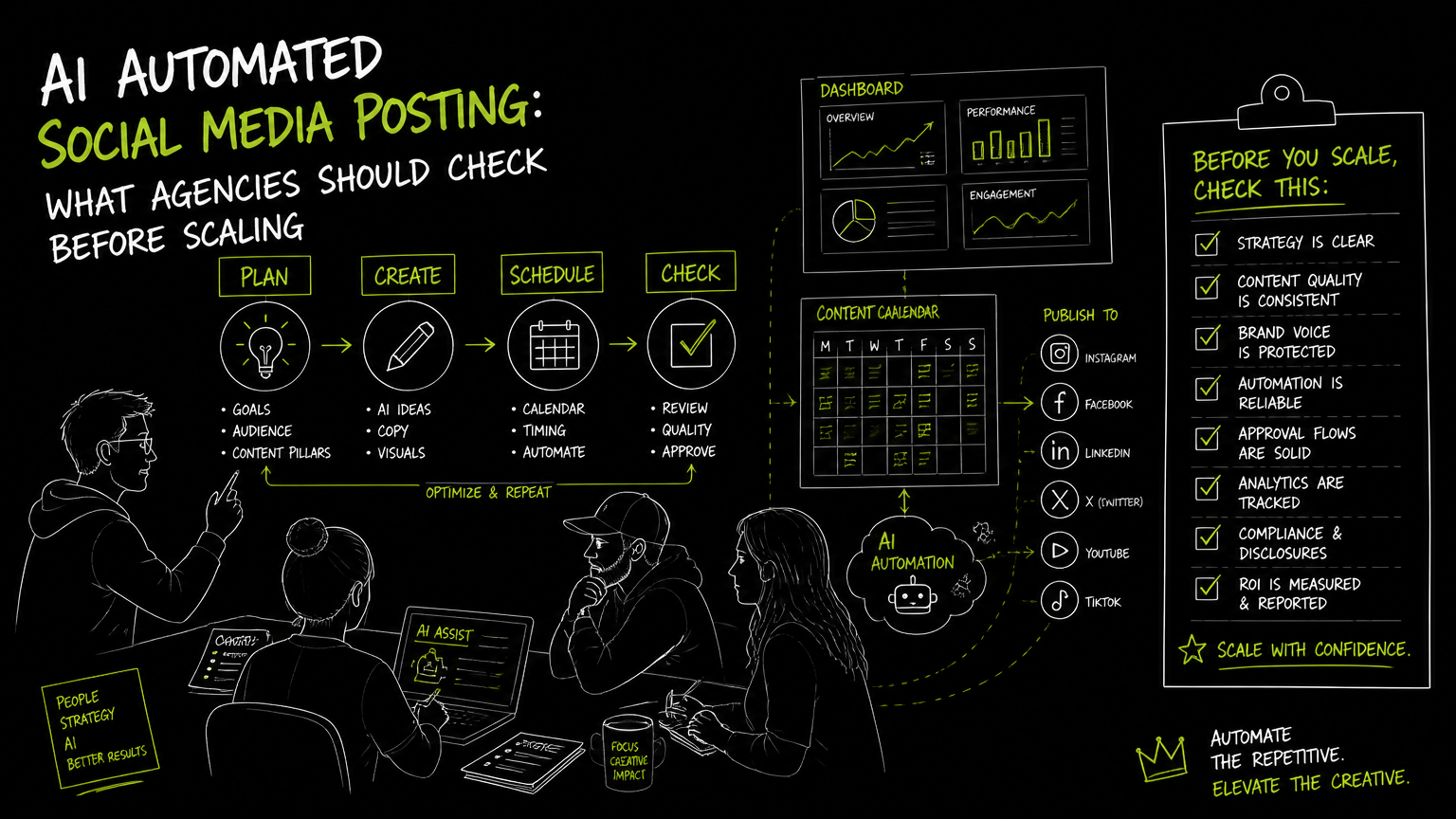
It usually starts on a Friday afternoon: three client approvals arrive late, two video files are still in the wrong format, and the account manager asks whether next week’s posts are “already automated.” That is the moment when social media ai stops being a shiny tool category and becomes an operations decision. The right approach is not “automate everything”; it is to protect approvals, publishing accuracy, platform fit, and client accountability while removing repetitive work.
This guide gives agencies a practical way to evaluate automated posting before they scale it across clients.
Quick Answer
Quick answer: Agencies should evaluate social media ai by checking workflow control, supported platforms, media upload limits, scheduling capacity, approval steps, publishing reliability, and reporting expectations. The best setup is usually a controlled content calendar with human review, clear client ownership, and automation only where it reduces repetitive production or posting work.
What Should Agencies Check Before Scaling Automated Posting?
Automated posting is only useful when the agency can trust the workflow under client pressure.
Before comparing tools, map the daily work your team already does: briefing, asset creation, caption drafting, approval, scheduling, publishing, and issue handling. Then evaluate automation against those steps instead of buying from a feature list.
| Need | What to check | Why it matters |
|---|---|---|
| Multi-client calendar | Can the team view scheduled content by client, platform, and date? | Agencies need visibility before posts go live, especially when several clients share campaign dates. |
| Supported networks | Which platforms can the tool publish to directly? | A tool that misses one client’s main channel creates manual workarounds. |
| Media handling | What file sizes, upload counts, and formats are practical for your workload? | Video-heavy clients can hit limits faster than text-first clients. |
| Approval workflow | Can account managers review captions, assets, and dates before publishing? | Automation without review increases the risk of client-facing mistakes. |
| Cross-posting control | Can you adapt the same campaign for Instagram, LinkedIn, TikTok, YouTube, X/Twitter, Threads, Facebook, or Pinterest? | The same message often needs different copy, format, or timing per platform. |
| AI assistance | Does AI help with captions, hashtags, visuals, transcription, or drafts, and where does human review happen? | AI should reduce blank-page work, not replace brand judgment. |
| Scheduling capacity | How many posts can be scheduled per month? | Agencies with multiple profiles need capacity that matches their publishing calendar. |
| API needs | Is API access available if your team publishes from another system? | Some agencies need automation from internal tools, client portals, or content pipelines. |
| Error handling | What happens when a post fails, an account disconnects, or media is rejected? | Failed posts are operational problems, not just software notifications. |
Decision rule: If the tool cannot match your agency’s approval process, it is not ready for client-scale automation, even if the AI features look impressive.
The hidden buying criterion is workflow fit under deadline pressure.
Where Does Social Media AI Actually Help in an Agency Workflow?
Social media ai is most useful when it removes repetitive setup work while keeping human review in the loop.
For agencies, the practical use cases are usually narrower than vendor landing pages suggest. AI can be useful in drafting caption options, preparing hashtag ideas when supported, helping with repetitive content variations, or converting source material into draft social posts. But your team still needs to check tone, claims, legal sensitivity, client preferences, and platform-specific context.
A workable agency workflow looks like this:
Client brief received The account manager confirms campaign goal, channel list, assets, and approval deadline.
Content draft created A strategist or creator prepares the post concept, copy, and media. AI may help create first-pass caption options or repurpose copy.
Platform adaptation The team adjusts copy and format by channel. A LinkedIn company page post should not automatically become a TikTok caption without review.
Internal review The account manager checks brand voice, campaign details, asset accuracy, and posting date.
Client approval Approved posts are locked for scheduling. Unapproved posts stay out of the publishing queue.
Scheduling and posting The scheduler publishes approved posts to the selected profiles.
Exception handling Someone owns failed posts, disconnected accounts, rejected media, and late client edits.
Tip: Treat AI-generated copy as a draft layer, not a publishing layer. The agency still owns the client relationship when something goes live.
A simple before/after example:
| Before automation | After controlled automation |
|---|---|
| Account manager copies the same caption into five platform tabs. | Account manager reviews one campaign set and adapts platform-specific versions in a calendar. |
| Video files are uploaded one by one on publishing day. | Media is uploaded during production and scheduled after approval. |
| Client changes arrive in Slack with no clear publishing impact. | Changes are checked against the scheduled calendar before posts go live. |
The goal is less manual posting, not less editorial control.
Which Features Matter Most for Agencies?
The most important features are the ones that prevent client mistakes at scale.
For a solo creator, a lightweight scheduler may be enough. For an agency, the risk profile changes. You are managing multiple brands, different approval habits, several publishing profiles, and sometimes large batches of media. That makes operational features more important than flashy AI promises.
1. Calendar and scheduled posting
A content calendar is the control room for automated social publishing. It should help the team see what is scheduled, when it will publish, and which client or profile it belongs to.
Look for a calendar that supports the way your agency reviews work. If posts are approved weekly, the calendar should make weekly review simple. If campaigns are launched by client, the calendar should make client-specific review simple.
2. Multi-platform publishing
Multi-platform publishing means creating or scheduling content across several social networks from one workspace.
Agencies should check whether the tool supports the actual platforms their clients use, not just “major networks” in general. Common client requirements may include Instagram, TikTok, Facebook, YouTube, X/Twitter, Threads, LinkedIn, and Pinterest.
3. Bulk upload and media workflow
Bulk upload matters when your team handles batches of videos, reels, carousels, images, or campaign assets.
The operational question is not only “Can we upload media?” It is “Can we upload enough media, in the right file sizes, early enough that publishing day is calm?”
4. AI captions, hashtags, and draft assistance
AI caption support can speed up first drafts, but it should not be treated as final approval.
For agencies, the useful check is whether AI assistance fits into the review workflow. If the tool generates captions or hashtags, your team still needs to confirm brand voice, platform context, and client-specific rules.
5. API access for publishing workflows
API access matters when an agency wants to connect publishing to an external system.
For example, a team may manage content assets in one internal workflow and use a publishing platform for final scheduling. In that case, API availability can be a buying criterion. If the agency does not have a technical workflow, API access may be unnecessary overhead.
Watch out: API access is not automatically valuable. It is useful only when your agency has a real system-to-system publishing workflow to support.
What Common Mistakes Break Automated Social Posting?
Most automated posting failures come from process gaps, not from automation itself.
Here are the mistakes I would check for before rolling automation across clients.
| Mistake | What it looks like | Practical fix |
|---|---|---|
| Automating before approvals are defined | Posts are scheduled while client feedback is still open. | Create a rule: only approved content enters the publishing queue. |
| Cross-posting without adaptation | The same copy is pushed to every platform. | Build a platform adaptation step before scheduling. |
| Ignoring media limits | Large video files fail late in the process. | Check file size and upload limits during tool evaluation. |
| Treating AI output as final copy | Captions go live with weak context or wrong tone. | Require human review for AI-assisted posts. |
| No owner for failed posts | A post fails and nobody notices until the client asks. | Assign daily publishing checks to a role, not a vague team. |
| Buying for peak features, not normal workflow | The agency pays for capabilities it rarely uses. | Evaluate against a typical client week, not a demo scenario. |
| Mixing client workspaces carelessly | Posts are scheduled to the wrong profile or brand. | Use naming conventions and calendar review by client. |
Important: The more profiles an agency manages, the more naming conventions matter. Clear client, platform, and campaign labels prevent avoidable publishing errors.
The highest-risk moment is the handoff from approved content to scheduled content.
How Should an Agency Evaluate Tools Before Buying?
The best evaluation process is a live workflow test using one real client calendar.
Do not start with a feature spreadsheet alone. Start with a representative week: one client, several platforms, a mix of images and videos, at least one edit request, and a real approval deadline. Run the workflow as if the tool were already in production.
Use this evaluation sequence:
Step 1: Define the agency workload
List the number of client profiles, platforms, post types, and monthly publishing volume you need to manage. Include videos, images, carousels, articles, and short-form posts if they are part of your service.
Do not average away the hard cases. A client with frequent video uploads may matter more than three clients with simple text-and-image posts.
Step 2: Map roles and approvals
Identify who drafts, who reviews, who approves, and who schedules. Typical roles include social media manager, account manager, designer, video editor, strategist, and client approver.
If the tool cannot reflect those responsibilities clearly, the team may revert to spreadsheets and messages.
Step 3: Test platform-specific posting
Check the exact platforms your clients require. For B2B agencies, LinkedIn personal profiles and company pages may matter. For consumer brands, Instagram, TikTok, YouTube, Facebook, or Pinterest may be more important.
Platform support should be verified at the feature level, not assumed from a logo.
Step 4: Upload real media
Use actual campaign files, not tiny demo assets. This exposes file size limits, upload friction, and media organization issues early.
Step 5: Schedule a controlled batch
Schedule a small batch across multiple profiles and review the calendar. The point is to see whether your team can spot mistakes before publishing.
Step 6: Check what happens when plans change
Client work changes. Move a post, revise a caption, replace media, or pause a campaign. A good workflow should make edits clear without creating uncertainty about what is live, scheduled, or still in draft.
Example: If a client asks to move a campaign from Monday to Wednesday, the team should be able to confirm every affected platform post, not manually hunt through separate queues.
The evaluation should prove calendar clarity, platform fit, and exception handling.
What Limits Should You Verify Before Choosing a Tool?
Limits are buying criteria because they decide whether automation works on a normal agency week.
Some limits are obvious, such as price or number of profiles. Others become visible only after onboarding, such as upload volume, scheduled post allowance, file size, AI minutes, and API availability.
Verify these items before signing off:
- Included profiles: How many social profiles are included?
- Scheduled posts: How many scheduled posts are allowed per month?
- Uploads: How many media uploads are included?
- File size: What is the maximum file size?
- AI usage: Are AI features limited by minutes, credits, or another usage model?
- API access: Is API publishing available on the plan you need?
- Platform support: Are the client’s required platforms supported for the relevant content types?
- Account types: Are business accounts, company pages, or multiple accounts supported where needed?
- Publishing flow: Does the tool support your calendar and scheduling process?
- Manual fallback: What does the team do if a platform connection or post fails?
For agencies, the practical question is: “Can this plan support our current workload plus the next few clients without changing the workflow every month?”
Avoid choosing a tool only because it has the most AI language on the page. A simpler scheduler with the right limits may outperform a more complex system that does not match your client operations.
When DOHOO May Fit
DOHOO may fit agencies or growing teams that manage regular content calendars, cross-posting, media uploads, and scheduled publishing across multiple social networks.
DOHOO is positioned as a social media automation platform for creating, scheduling, and publishing content across social platforms from one dashboard. Its confirmed publishing coverage includes TikTok, Instagram, Facebook, YouTube, X/Twitter, Threads, LinkedIn, and Pinterest.
For platform-specific workflows, DOHOO supports TikTok bulk scheduling, auto-publishing, multiple TikTok accounts, AI captions, and hashtags. It also supports Instagram photos, videos, reels, carousels, Instagram Business accounts, AI captions, hashtags, and bulk upload. LinkedIn support includes articles, images, videos, personal profiles, and company pages.
The public plans show clear operating limits:
| Plan | Monthly price | Uploads / month | Included profiles | Scheduled posts | AI transcription minutes | Max file size | API access |
|---|---|---|---|---|---|---|---|
| Blogger | $19.99/mo | 90 | 4 | 90 | 120 | 1 GB | No |
| Business | $39.99/mo | 250 | 15 | 250 | 300 | 2 GB | Yes |
| Agency | $79.99/mo | 550 | 30 | 550 | 600 | 4 GB | Yes |
The Agency plan includes 30 profiles, 550 uploads per month, 550 scheduled posts, 600 AI transcription minutes, a 4 GB maximum file size, and API access.
This makes DOHOO worth evaluating if your agency’s main bottleneck is publishing operations: repeated uploads, scheduled posts, multiple profiles, and cross-posting. It is not something to evaluate as a replacement for your strategy, client approval process, or brand governance.
Key Takeaways
Automated social posting should be evaluated as an agency workflow system, not as a standalone AI feature.
- Start with one real client calendar before comparing tools.
- Confirm supported platforms and content formats before rollout.
- Keep human review between AI-assisted drafts and scheduled publishing.
- Check upload limits, file size limits, scheduled post allowances, profile counts, and API access.
- Treat cross-posting as a controlled adaptation workflow, not a copy-paste shortcut.
- Assign ownership for failed posts, late edits, and disconnected accounts.
- Choose a tool that matches the agency’s normal week, not only the most polished demo.
The best automation setup is the one your team can trust when client approvals arrive late.
FAQ
What is AI automated social media posting?
AI automated social media posting is a workflow where software helps create, prepare, schedule, and publish social content with some AI-assisted tasks, such as caption drafting or related content preparation when supported. For agencies, it should still include human review before posts go live.
Is social media automation safe for client accounts?
Social media automation is safer when approvals, platform checks, and publishing ownership are clearly defined. The risk increases when teams schedule unapproved content, cross-post without adaptation, or fail to monitor publishing errors.
Should agencies use one tool for every client?
One tool can simplify operations if it supports the platforms, profiles, media types, and approval workflow your clients need. If a client requires a platform or workflow the tool does not support, forcing everything into one system can create manual workarounds.
Do agencies need API access for social publishing?
Agencies need API access only when publishing must connect to an external system, such as an internal content pipeline or client portal. If your team schedules directly from a calendar dashboard, API access may not be necessary.
What should agencies test during a trial?
Agencies should test a real content week with actual assets, multiple platforms, client edits, and scheduled posts. The goal is to confirm calendar clarity, media handling, approval control, and publishing reliability before scaling.
Final Takeaway
The right social media ai setup for an agency is not the one with the longest feature list; it is the one that protects approvals, handles real media volume, supports the right platforms, and keeps scheduled publishing visible.
If your agency is evaluating a platform for multi-profile scheduling, cross-posting, media upload pipelines, and API-supported publishing, DOHOO is worth adding to your shortlist and testing against one real client calendar.