 DOHOO
DOHOO
Agency
Free Social Media Scheduler: What Agencies Should Check Before Scaling
 Vitalii
14 min read
Vitalii
14 min read
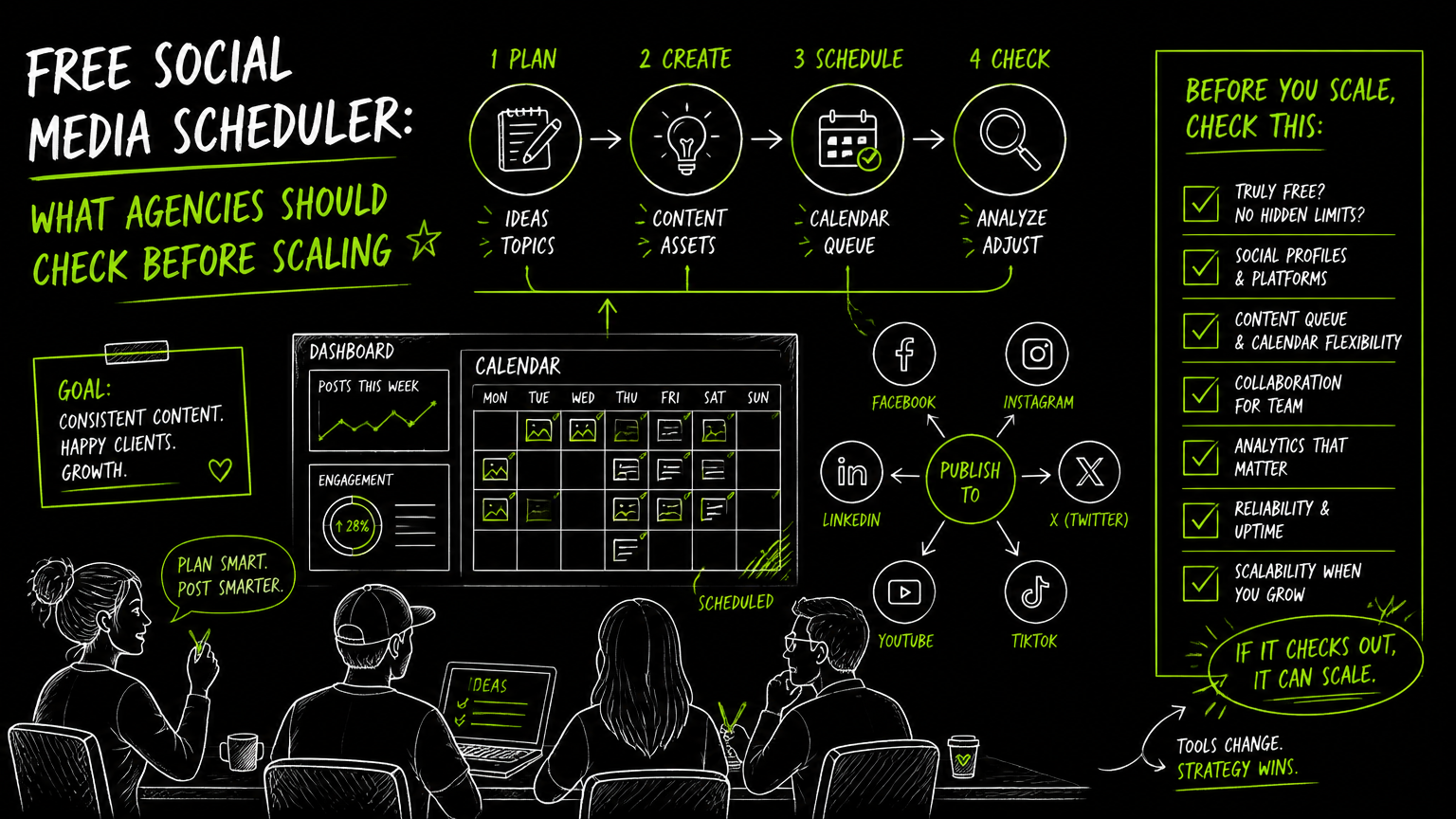
It usually starts with one messy handoff: a client approves next week’s Instagram Reel, the account manager drops a caption in a chat thread, and the freelancer asks which Facebook Page should get the adapted version. A free social media scheduler can help, but only if it fits the way your agency actually plans, reviews, uploads, and publishes content.
The real question is not “Can it schedule posts?” It is “Can it survive your workflow once five clients become fifteen?”
This guide gives you a practical way to evaluate free scheduling tools before they create operational debt.
Quick Answer
Quick answer: A free social media scheduler is best for testing workflows, managing a small number of profiles, or proving a content process before paying. Agencies should check profile limits, scheduled post caps, supported platforms, approval workflows, media upload rules, calendar visibility, and upgrade pricing before relying on any free plan at scale.
Free Social Media Scheduler Evaluation Checklist for Agencies
Agencies should evaluate scheduling tools by workflow fit first, then price.
Free plans are useful for discovery, but agency work adds pressure that solo creators rarely face: multiple brands, multiple approvers, different content formats, and recurring publishing deadlines. Use this checklist before you move real client work into any tool.
| Need | What to check | Why it matters |
|---|---|---|
| Multi-client organization | Can you separate brands, profiles, calendars, or workspaces clearly? | Mixing client assets or queues is one of the fastest ways to create publishing mistakes. |
| Supported platforms | Check support for Instagram, Facebook, TikTok, YouTube, LinkedIn, Pinterest, X/Twitter, Threads, or whichever networks your clients use. | A scheduler that misses one core channel forces manual work outside the calendar. |
| Scheduled post limits | Look for monthly or total queue caps. | A free plan may work for one client but break when you add weekly posts across several channels. |
| Profile limits | Count every Page, profile, account, and company page. | Agencies often underestimate profile count because one client can require several connected destinations. |
| Media upload rules | Verify file size, video support, image handling, and bulk upload behavior. | The calendar is only useful if your actual creative assets can move through it. |
| Approval workflow | Check whether drafts, approvals, comments, or status labels are available. | Without a clear approval step, teams fall back to chat threads and spreadsheets. |
| Calendar visibility | Confirm monthly, weekly, and post-level views if your team plans campaigns visually. | Account managers need to spot gaps, collisions, and campaign clusters quickly. |
| Publishing behavior | Check whether posts auto-publish or require manual reminders for each platform and format. | Manual publishing is manageable for a small account, but risky across client queues. |
| Upgrade path | Review paid plan pricing, limits, and included profiles before committing. | The cheapest tool today can become awkward if the next plan still does not match agency volume. |
| API access | If you publish from external systems, verify whether API publishing is available. | Some agencies eventually need scheduling connected to internal content operations. |
Decision rule: If you cannot map one full client workflow from intake to approval to publishing inside the tool, do not scale it across the agency yet.
A scheduling tool should reduce coordination, not just move the same confusion into a nicer calendar.
What Should Agencies Check Before Using a Free Plan?
The first thing to check is whether the free plan matches your smallest repeatable client package.
Do not start with your largest client. Start with a normal retained account: the kind that needs regular content, recurring approvals, and a few active social profiles. If the tool cannot support that baseline, it will not support agency growth.
1. Count profiles before you count posts
A “profile” is a connected publishing destination, such as an Instagram account, Facebook Page, LinkedIn company page, YouTube channel, TikTok account, Pinterest account, Threads profile, or X/Twitter account.
For agencies, profile count usually becomes a constraint before the team expects it. One client might need Instagram, Facebook, LinkedIn, TikTok, and YouTube. Add three clients, and your profile count grows faster than your content calendar.
Profile limits matter because they define whether the tool can hold your client portfolio without workarounds.
2. Compare scheduled post limits to your actual publishing rhythm
A “scheduled post” is a post placed into a future publishing queue or calendar.
Agencies should calculate scheduled post volume by client and by platform. A simple weekly package can become a large queue when each content idea is adapted for multiple networks.
For example:
| Client package | Planning assumption | Operational risk |
|---|---|---|
| Light presence | A few posts per week on selected channels | Usually manageable on limited plans. |
| Multi-platform retainer | Regular posts across Instagram, Facebook, LinkedIn, and TikTok | Queue limits may appear quickly. |
| Campaign launch | A concentrated batch of posts across several platforms | Calendar congestion and approval delays become more likely. |
The point is not to forecast perfectly. The point is to avoid discovering a limit during launch week.
3. Verify platform and format support
A scheduler may support a platform but not every format your team uses.
For Instagram, agencies may need photos, videos, Reels, or carousels. For LinkedIn, they may need personal profile posts, company page posts, images, videos, or articles. For TikTok, they may need multiple accounts, bulk scheduling, or auto-publishing.
Platform support is not the same as format support. Always test the exact post types your clients buy from you.
4. Look for the handoff points
The tool should make the handoff between strategist, copywriter, designer, account manager, approver, and publisher visible.
A weak handoff looks like this:
- Caption in a document.
- Creative asset in a drive folder.
- Approval in email.
- Publishing date in a spreadsheet.
- Final confirmation in Slack or chat.
A stronger handoff centralizes the calendar, asset, caption, status, and publishing destination in one workflow.
Watch out: A free calendar that looks clean in a demo may still fail if approvals happen outside the scheduler and no one knows which version is final.
How Do You Test a Social Media Scheduling Workflow?
Test one complete client cycle before migrating every account.
A practical evaluation process should use real assets, real approvers, and real deadlines. Fake sample posts rarely expose the messy parts of agency work.
Step 1: Pick one representative client
Choose a client with enough complexity to be useful but not so much risk that a failed test creates panic.
A good test client usually has:
- More than one social profile.
- At least two content formats.
- A recurring publishing schedule.
- One internal reviewer and one client approver.
- A mix of evergreen and campaign posts.
Step 2: Build a two-week calendar
Create a short calendar that includes normal work: captions, images, videos, links, hashtags, publishing dates, and platform variations.
This gives you enough volume to see whether the scheduler supports your process without turning the test into a full migration project.
Step 3: Run the approval path exactly as you would in production
If your account manager usually reviews captions before the client sees them, keep that step.
If your client usually requests edits, include that too.
The goal is to test the real approval path, not the idealized one.
Step 4: Schedule and publish across the actual platforms
Use the platforms that matter to your client, such as Instagram, Facebook, LinkedIn, TikTok, YouTube, Pinterest, X/Twitter, or Threads.
Pay attention to what happens when you adapt one idea into several posts. Does the tool make cross-posting manageable, or does every channel feel like starting over?
Step 5: Document every workaround
A workaround is not automatically a dealbreaker. Some are harmless.
But repeated workarounds are signals. If your team needs a spreadsheet for status, a chat thread for approvals, and a separate reminder for publishing, the scheduler is only solving part of the workflow.
Tip: Keep a short “friction log” during the test. Write down every extra tab, duplicate upload, unclear status, or manual reminder. That list is more useful than a generic feature comparison.
Which Free Scheduling Limits Matter Most?
The most important limits are the ones that create manual work at the point of publishing.
Not every limitation matters equally. A small team can live without advanced reporting if it is only trying to keep posts organized. But a publishing limit that forces last-minute manual work can damage the workflow immediately.
Limits to verify before choosing a tool
| Limit type | What to verify | Practical agency impact |
|---|---|---|
| Number of connected profiles | How many accounts, Pages, or channels are included? | Determines how many clients can fit before upgrading. |
| Number of scheduled posts | How many posts can be queued or scheduled? | Affects campaign planning and recurring retainers. |
| Upload volume | Are there monthly upload caps? | Matters for agencies that handle video, carousels, or batch production. |
| File size | What is the maximum media file size? | Video workflows can fail if files are too large. |
| Platform-specific publishing | Which formats can be scheduled or auto-published? | Prevents surprises on Reels, videos, carousels, or platform-specific content. |
| User roles and approvals | Can teammates and approvers collaborate cleanly? | Reduces accidental publishing and version confusion. |
| API access | Is it available, and on which plan? | Relevant if your agency publishes from external systems or internal tools. |
| Pricing step-up | What changes when you outgrow free? | Prevents choosing a tool that becomes expensive or still too limited later. |
The best free plan is the one with the fewest hidden workflow surprises.
When a free plan is enough
A free plan can be enough when:
- You manage a small number of profiles.
- Publishing volume is low.
- One person owns the calendar.
- Client approvals happen outside the tool by design.
- You are testing a new service line before committing budget.
When a free plan becomes risky
A free plan becomes risky when:
- Multiple people schedule posts.
- Multiple clients share one operational process.
- Campaigns require batch uploads.
- Publishing spans several social networks.
- Approvals are easy to lose in messages or documents.
- Manual posting reminders become part of the workflow.
Quick takeaway: Free is useful for validation. It is risky as an operating model if the agency depends on workarounds to meet client deadlines.
What Common Scheduling Mistakes Should Agencies Avoid?
Most scheduling mistakes come from unclear ownership, not from the calendar itself.
A tool cannot fix a workflow where no one knows who approves, who schedules, who checks the final post, and who handles platform exceptions. These are the mistakes to prevent early.
Mistake 1: Treating one post as one task
A single content idea can become several platform-specific posts.
A client announcement might need:
- A LinkedIn company page version.
- An Instagram carousel.
- A TikTok video.
- A Facebook Page post.
- A YouTube Short.
- A Pinterest asset.
If the agency treats that as one task, details get missed.
Fix: Create one campaign item, then break it into platform-specific scheduled posts with their own captions, formats, and publishing destinations.
Mistake 2: Scheduling before approval is final
This is the classic agency error: the post is scheduled, the client asks for “one small edit,” and now the team is unsure whether the queue was updated.
Fix: Use status labels or a simple rule: nothing enters the publishing queue until approval is final. If your tool does not support approval states, keep a separate approval checklist and assign one owner to move posts into the queue.
Mistake 3: Assuming cross-posting means copy-pasting
Cross-posting means publishing related content across multiple social networks. It does not mean every caption, asset, and format should be identical.
A LinkedIn post may need a different opening than a TikTok caption. An Instagram carousel may not translate cleanly into a Pinterest post. A YouTube description may need different handling than a short social caption.
Fix: Build adaptations into the workflow. Start from one campaign message, then create platform-specific versions.
Mistake 4: Ignoring upload and file-size rules until the last step
Media problems often appear late because teams review copy first and upload files later.
Fix: Upload or test assets before final approval. This is especially important for video-heavy workflows, bulk uploads, and campaigns with many creative variations.
Mistake 5: Choosing based only on the cheapest plan
The cheapest social media scheduler is not always the lowest-cost workflow.
If a low-cost tool requires manual reminders, duplicated uploads, or disconnected approvals, the hidden cost shows up in account management time.
Fix: Evaluate total workflow friction, not just subscription price.
Example: Before: one account manager keeps publish dates in a spreadsheet while a designer updates assets in a folder and the client approves in email. After: each post has a calendar date, destination profile, creative asset, caption, and approval status before scheduling. The improvement is not “automation”; it is fewer places to check.
How Should an Agency Compare Free and Paid Scheduling Tools?
Compare tools against your next six months of workflow, not only today’s client roster.
You do not need the most advanced platform from day one. You do need a path that does not force another migration as soon as the agency adds profiles, uploads, or scheduled posts.
Build a simple scoring model
Use a 1–3 score for each criterion:
- 1 = weak fit
- 2 = usable with workarounds
- 3 = strong fit
| Criterion | Score | Notes |
|---|---|---|
| Supports required platforms | ||
| Handles required formats | ||
| Fits profile count | ||
| Fits scheduled post volume | ||
| Handles media uploads | ||
| Makes approvals visible | ||
| Provides useful calendar views | ||
| Has a clear upgrade path | ||
| Supports API publishing if needed |
Then add one written note: “What would break first?”
That question forces a practical answer. Maybe it is profile count. Maybe it is video upload size. Maybe it is client approval. Whatever breaks first is your real buying criterion.
Separate “nice to have” from “workflow-critical”
For a very small team, some features are overrated. If one strategist writes, approves, and schedules everything, advanced internal collaboration may not matter yet.
For an agency, the workflow-critical items are usually:
- Clear client separation.
- Reliable calendar planning.
- Multi-platform publishing.
- Media handling.
- Approval visibility.
- Enough profiles and scheduled posts.
- A pricing path that matches growth.
The strongest tool is the one that keeps the fewest critical steps outside the system.
When DOHOO May Fit
DOHOO may fit agencies or growing teams that need multi-platform scheduling, media upload workflows, and enough plan capacity for multiple client profiles.
DOHOO is a social media automation platform positioned around creating, scheduling, and publishing content across social platforms from one dashboard. It supports publishing across TikTok, Instagram, Facebook, YouTube, X/Twitter, Threads, LinkedIn, and Pinterest.
For agencies comparing paid options after testing free tools, the public plans provide concrete capacity points:
| Plan | Monthly price | Included profiles | Uploads per month | Scheduled posts | Max file size | API access |
|---|---|---|---|---|---|---|
| Blogger | $19.99/mo | 4 | 90 | 90 | 1 GB | No |
| Business | $39.99/mo | 15 | 250 | 250 | 2 GB | Yes |
| Agency | $79.99/mo | 30 | 550 | 550 | 4 GB | Yes |
DOHOO’s Agency plan includes 30 profiles, 550 uploads per month, 550 scheduled posts, a 4 GB maximum file size, and API access.
That makes it worth evaluating if your agency is moving beyond a lightweight planner into regular content calendars, cross-posting across multiple networks, media upload and publishing pipelines, or API publishing from external systems.
This section is not a substitute for a hands-on test. Use the same checklist above and validate your exact platforms, formats, approval process, and publishing volume before switching client work.
Key Takeaways
A scheduler should be judged by how well it supports the full agency workflow, not by how attractive the calendar looks.
- Start with one representative client before migrating every account.
- Count profiles, scheduled posts, uploads, and file-size needs before choosing a plan.
- Verify platform-specific formats, not just platform names.
- Treat approvals as a core workflow requirement, not an afterthought.
- Document workarounds during the trial or free-plan test.
- Compare upgrade paths before the free plan becomes operationally painful.
- For agencies, the best tool is usually the one that reduces handoff risk across roles, clients, and platforms.
FAQ
What is the best free scheduler for social media agencies?
The best option is the one that supports your actual client workflow: required platforms, post volume, profile count, media formats, and approvals. Agencies should avoid choosing only by the free label because limits can appear quickly once multiple clients and channels are involved.
Can agencies rely on free social media scheduling tools long term?
Some agencies can use free tools long term for light workflows, especially with a small number of profiles and one person managing the calendar. Free plans become harder to rely on when the agency needs many profiles, bulk content planning, client approvals, or frequent multi-platform publishing.
What should I test before moving client accounts into a scheduler?
Test one full publishing cycle with real posts, assets, approvers, and deadlines. Check whether the tool handles your platforms, formats, scheduled post volume, upload needs, and approval handoffs without forcing the team back into spreadsheets and chat threads.
Is API access important for a social media scheduler?
API access matters if your agency wants to publish from external systems or connect scheduling to internal content operations. If your workflow is fully manual and calendar-based, API access may not be necessary at the start.
How do I know when to upgrade from a free plan?
Upgrade when the free plan creates recurring manual work, blocks required profiles, limits scheduled posts, or makes client delivery harder to manage. The signal is not just “we hit a cap”; it is “the team is building workarounds to keep publishing on time.”
Final Takeaway
A free social media scheduler is a smart starting point for agencies, but it should be treated as a workflow test, not a permanent operating model by default. Use it to prove your calendar, approvals, media handling, and publishing process before client volume makes the decision harder.
If your agency is ready to evaluate a paid scheduling workflow with multi-platform publishing, defined plan limits, and an Agency plan built for more profiles and scheduled posts, consider testing DOHOO against the checklist in this guide.